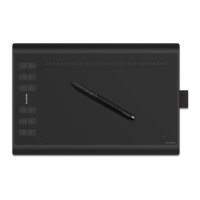
NEW 1060PLUS Graphics Tablet
2
/ 15 www.huion.com
Contents
1. Product Overview
............................................................................................................................
3
1.1 Tablet Introduction
................................................................................................................
3
1.2 Product and Accessories
.......................................................................................................
3
1.3 Tablet Connection
.................................................................................................................
5
1.4 Driver Installation
..................................................................................................................
5
1.5 Pen Nib Replacement
............................................................................................................
6
1.6 Charging the Pen
...................................................................................................................
6
2. Product Basic Operation
.................................................................................................................
7
2.1 Using The Pen
........................................................................................................................
7
3. Function Setting
..............................................................................................................................
9
3.1 Device Connection Prompt
...................................................................................................
9
3.2 Working Area Setting
............................................................................................................
9
3.3 Press Keys Function Setting
................................................................................................
11
3.4 Pen Buttons Function Setting
.............................................................................................
11
3.5 Pressure Sensitivity Setting
.................................................................................................
12
3.6 Pen Pressure Testing
...........................................................................................................
12
3.7 Enable the Windows Ink feature
........................................................................................
13
3.8 Data Export and Import
......................................................................................................
13
4. Specifications
.................................................................................................................................
14
5. Trouble Shooting
...........................................................................................................................
15
5.1 Possible Breakdowns Related to TABLET
............................................................................
15
5.2 Possible Breakdowns Related to SYSTEM
...........................................................................
15
6. After-service Contact
....................................................................................................................
15









 To Next Page