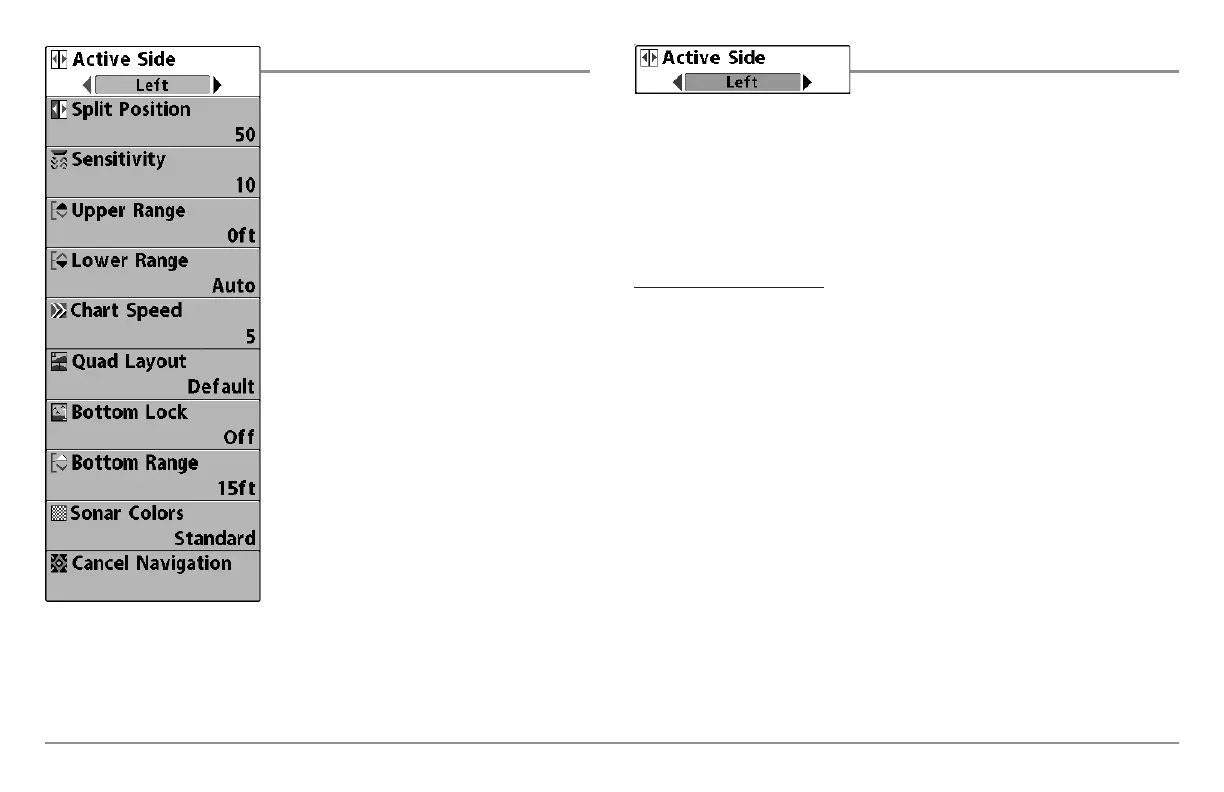
Sonar X-Press™ Menu
The Sonar X-Press™ Menu provides access
to the settings most frequently used. Press
the MENU key once while in any of the
Sonar Views to access the Sonar X-Press™
Menu.
NOTE: Menu choices will vary depending on
system settings such as whether the unit is set
for Advanced User mode.
NOTE: Quad Layout only appears in Side Beam
View with the optional-purchase QuadraBeam
PLUS™ transducer.
Active Side
Active Side allows you to select which side
of a Combo View will be active; key presses will only affect the active side of
the screen. When a menu is displayed, the non-active side of the screen will
be grayed out; at any other time, a green arrow will point to the active side.
Combo Views usually display sonar on the left, with charts or Bird’s Eye
usually on the right. The Active Side menu choice is only available when a
Combo View is active.
To select the Active Side:
1. Highlight Active Side on the Sonar X-Press™ Menu.
2. Use the RIGHT 4-WAY Cursor Control key to change which side is
active. (Left, Right, Default = Left, or Sonar).
Sonar X-Press™ Menu
65





 To Next Page