2
The Home Screen
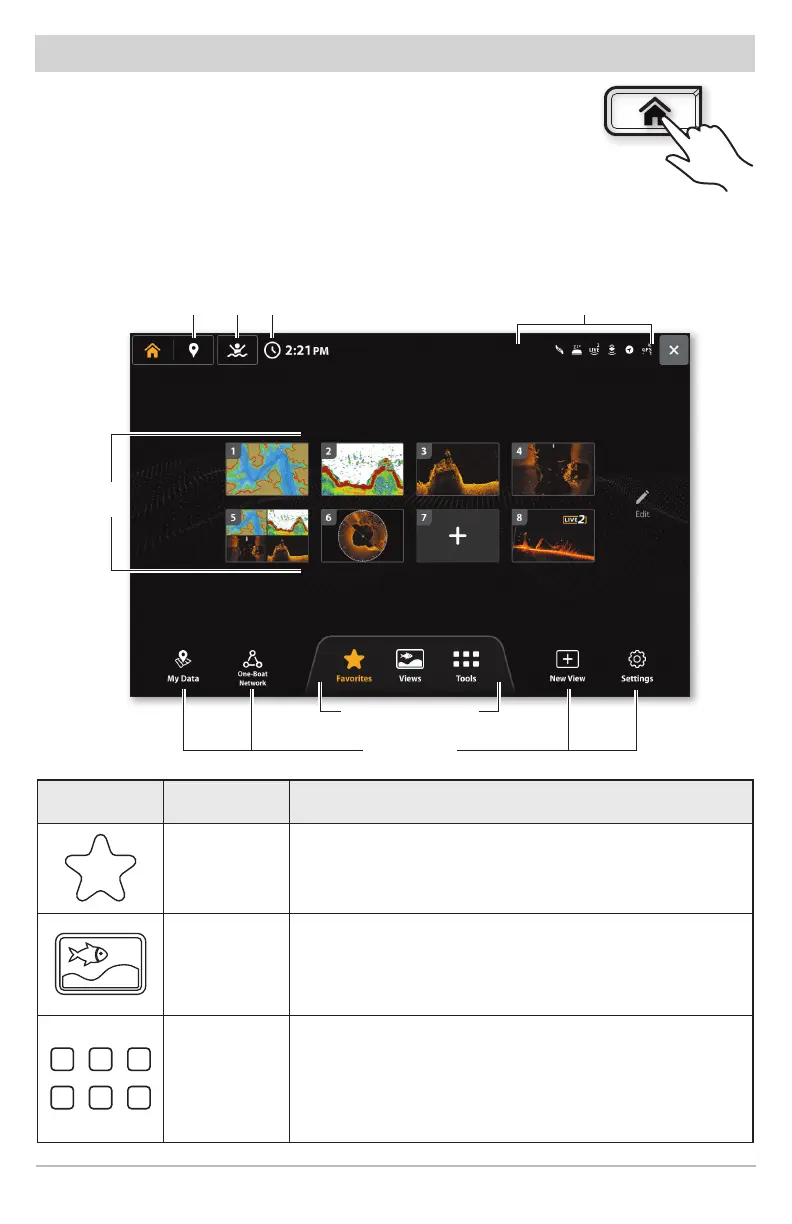
The Home screen is the main control center for your fish finder. Use
the Home screen to access views, favorites, settings, navigation
data, One-Boat Network connections, and other tools.
Press the HOME key to open the Home screen from any view.
• Tools and views available on the Home screen are determined
by the equipment attached to the Humminbird network.
status bar
Home Screen
timeMOBmark waypoint
primary tools
home screen presets
favorite
views
Icon Name Function
Favorites
Select Favorites to quickly access your favorite
saved views.
Views
Select Views to access the complete set of views
available on your fish finder. You can edit views,
create your own views, and save your favorite views.
Tools
Tools allow you to manage the fish finder network
operations and saved data. When you connect an
accessory to the fish finder, a related tool may
also be displayed.











 To Next Page