9
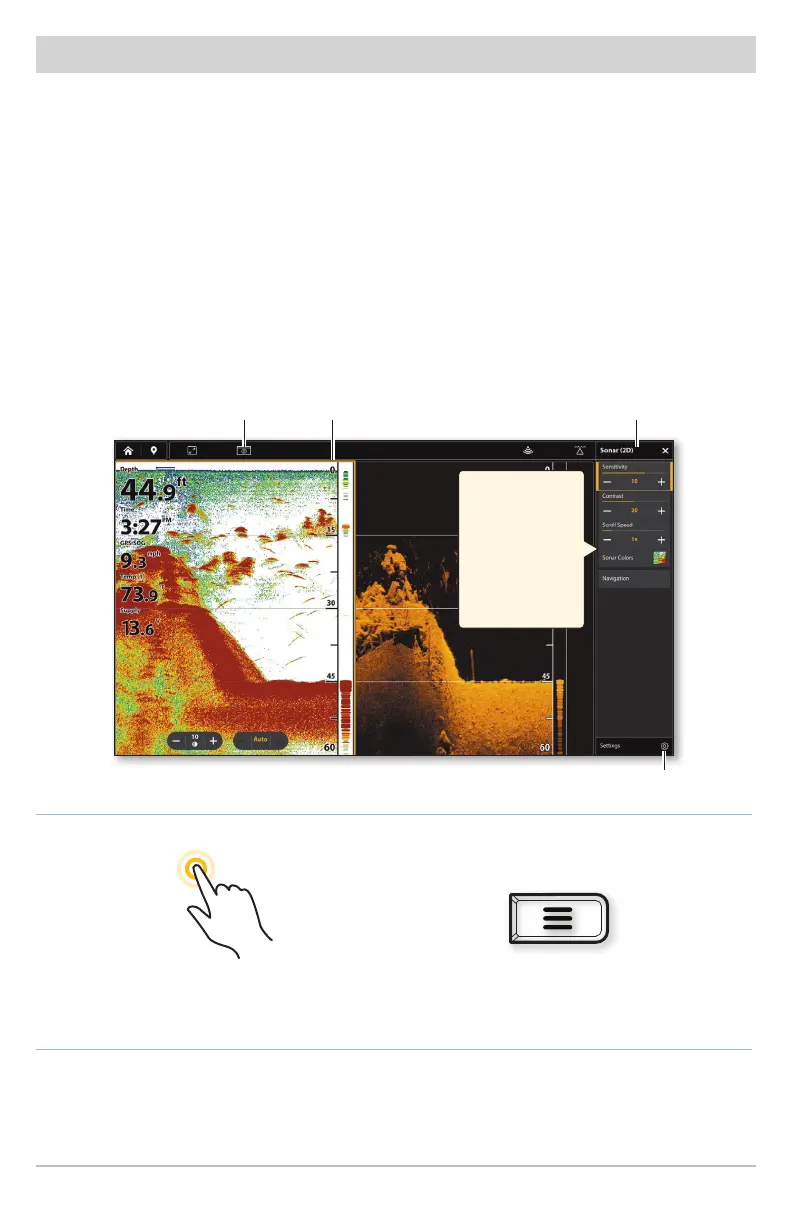
Edit the On-Screen View (X-Press Menu)
The X-Press Menu displays menu options for the on-screen view and the selected
pane.
1. Single-Pane View: Tap the Menu icon in the Top bar, or press the MENU key.
Multi-Pane View: Tap a pane. Tap the Menu icon in the Top bar, or press the
MENU key.
2. Select an option in the X-Press menu to change the appearance of the view.
Select Settings > Overlays to display or hide information on the view.
Select View Options > Data Overlays to display data readouts on the view.
Tap to Select a Pane
and the Menu
Press the MENU key
OR
View
Options
selected pane
outlined in yellow
X-Press
Menu
Using the
X-Press Menu
Swipe with one
finger up/down
or move the
CURSOR pad to
scroll through
the menu list.
settings









 To Next Page