34
OPERATOR MANUAL HCS-5 020310 5.7.x 03
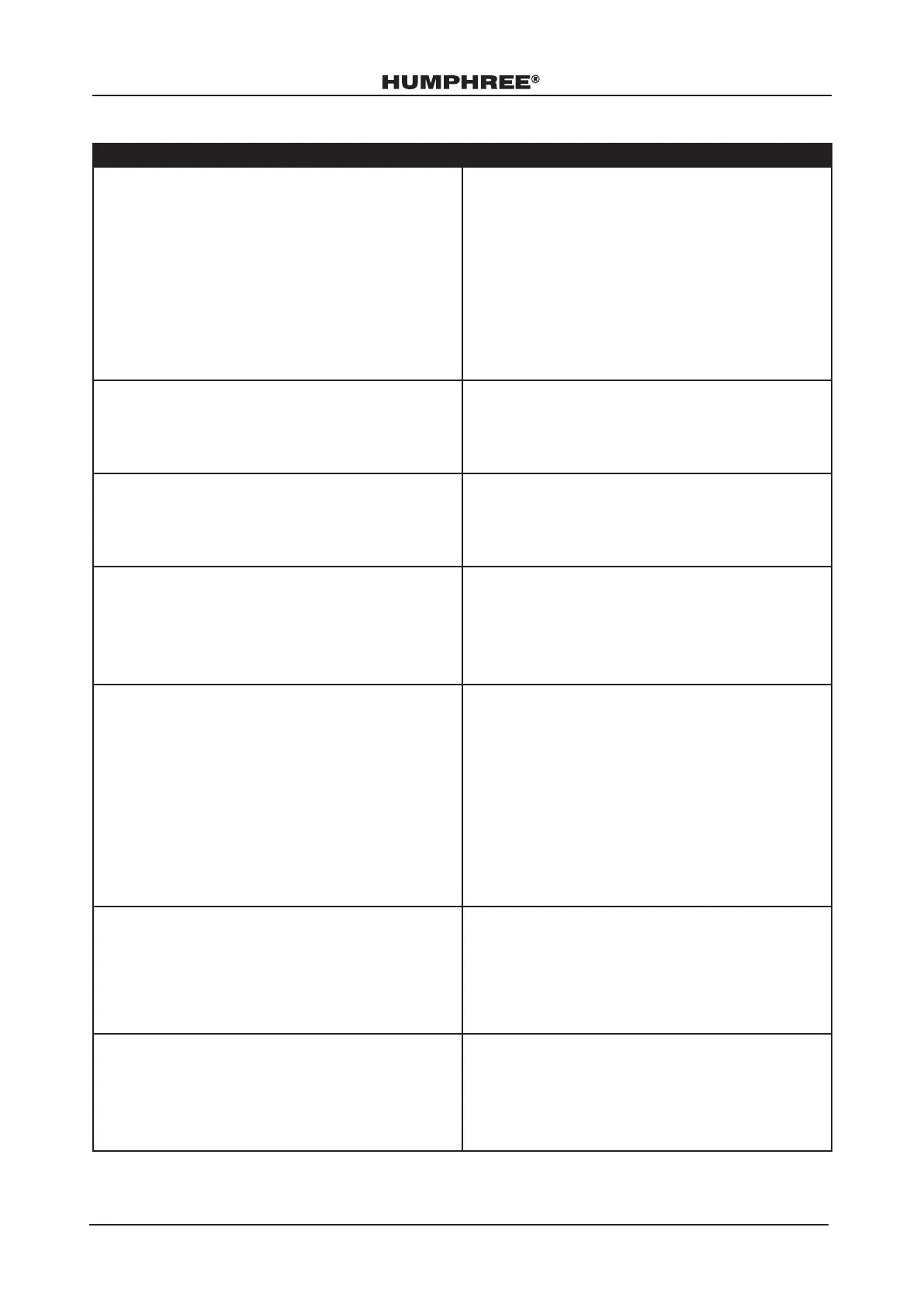
Other Errors
Error Solution
Text “Waiting for GPS x” in the information bar of
the main screen.
1. Make sure the GPS is not covered by any metallic
structures or metallic parts.
2. Make sure the GPS is not mounted on structures
with vibrations.
3. Check that the wind screen does not have a
metallic coating which can disturb the signal.
4. Move the GPS so that it has good GPS satellite
reception.
5. Check GPS source signal if not using a Humphree
GPS antenna.
GPS speed is not shown in main screen. 1. Check GPS or NMEA2000 connection to
Control Panel.
● See Setup Manual.
● If EXTBUS is used, see EXTBUS Manual.
Missing unit under System Units (Servo unit or control
unit):
For systems with several RCUs. make sure the power
on all units is on.
1. Check all system connectors and cables.
2. Make sure all the units are connected correctly.
If the control panel does not start even though the
system power is on.
1. Check all the connectors and cables.
2. Check the power supplies of all RCU units. The
control panel needs minimum 6 volts to start up
and display information. Use connection diagram
to establish power supply to all the units in the
system.
If the batteries has been drained: 1. Charge the batteries.
2. Check the capacity of the batteries to hold
120mA per control panel equals to 21A per week
for the time the system will be in standby mode.
3. Add a charging device or increase the battery
capacity.
4. An alternative that disable the cleaning function,
is to turn off the main switch. In that case, it
is important to have the interceptor blades
completely retracted minimising the marine
growth on the blades.
The Humphree system does not turn on when the
engine ignition switch is turned on (Only if remote
key switch is installed):
1. Press the power key on the Humphree control
panel, if the system starts then the problem is in
the remote key switch cable.
2. If the Humphree system does not start check the
system power and cables.
3. Check connection and wiring diagram for details.
The Trim or List angle can not be reset to 0°. 1. Check the orientation of RCU. See Installation
Manual and Setup Manual - RCU control unit
orientation.
2. Match the software orientation of the RCU so it
corresponds to the specic RCU installation in
the vessel.



 To Next Page