10
Installation | Manual Solenoid Test
Manual Solenoid Test
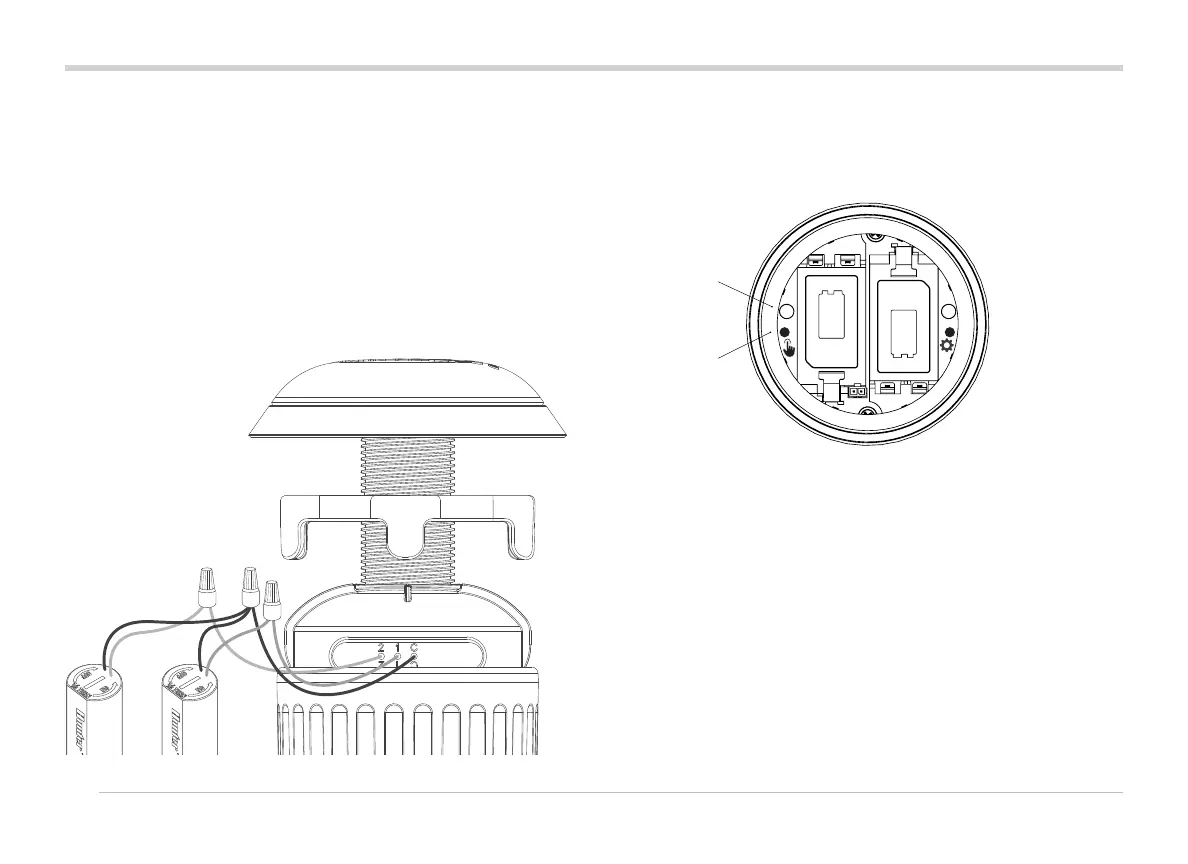
Test connected solenoid operation with the local Manual start
button in the battery compartment.
Press and hold the Manual start button (le) to start the rst
station (blue LED will light and solenoid will click if attached).
Press again to advance to the next station (if it's a multi-station
controller).
On multi-station WVLs, the blue light will blink rapidly to show
which station output is active.
Aer the last station starts, press the button one more time to
stop all test irrigation. The test function will stop aer 1 minute
if it does not receive further commands.
Solenoids (P/N 458200) in the valve box. The WVL outputs will
operate a DC-Latching Solenoid at up to 30 m wiring distance.
Observe wire colour-coding for these solenoids: black to black,
red to red. Use the black as a common wire for multi-station
WVLs to combine all black wires into a single splice.
This system will not operate with AC Solenoids.
Use irrigation-grade, waterproof connectors for wire splices.
+ –
+ –
LED
MANUAL
START BUT TON



 To Next Page