Notes on Programming
© 2007 Hunter Douglas Inc. ® Registered trademark of Hunter Douglas Inc. ™Trademark of Hunter Douglas Inc.
Patented in the U.S. and foreign countries. Other U.S. and foreign patents pending. 5110540027 8/07
ENTERING PROGRAMMING MODE
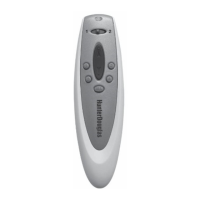
To activate the programming mode, use a paper clip to press
and quickly release the PROGRAM button located on the back
of the remote control. The programming mode is indicated
by the blinking green indicator light and will stay active for
approximately 30 seconds before timing out.
WINDOW COVERING OPERATION
Window coverings may not be operated while in the programming
mode. Do not operate window coverings when the indicator light
is blinking green.
EXITING PROGRAMMING MODE
To exit the programming mode before it times out, press and
quickly release the PROGRAM button a second time. The indicator
light will stop blinking green. The remote may now be used to
operate your window covering(s).
Refer to the Product Owner’s Guide for further details about
Platinum
™
Technology.


 To Previous Page