Ref: REFLEX/SCANFLEX MANUAL
EDITION 1: JULY ’97 18
Keypad Definitions
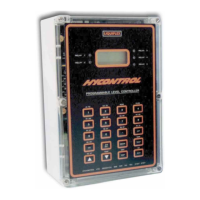
The keypad consists of 20 keys which are used to programme the Controller. Some of these
keys also have secondary functions enabling the operator to view the results being obtained
by the instrument during its normal 'RUN' cycle.
Primary Key Functions
0 - 9 Numerical Values
w Decimal Point
— Negative value (also used to slow down simulation)
CE Clear Entry (also used to leave test functions Pr.75 to Pr.78.)
# In normal 'RUN' mode it displays unit status and in 'PROG'
mode it advances point number. (also speeds up simulation Pr.78)
MODE Alternates between 'RUN' and 'PROG' mode.
TEST In 'RUN' it displays gain and distance or shows LOE status.
'▲' Increase parameter number (also control of simulation direction).
'▼' Decrease parameter number (also control of simulation direction)
DSP Moves the cursor on the display between Pr. No. and its value.
(Changes can be made only to the data underlined by the cursor.)
ENT Enter a new value or initiate a system test under Pr.75 to Pr.78
Active Secondary Key Functions
During normal 'RUN' mode it is possible for an operator to obtain the data defined as
secondary function without interrupting normal operation, by pressing the appropriate
key, i.e.
Key 1 Relay 1. Hours energised and number of starts.
Key 2 Relay 2. Hours energised and number of starts.
Key 3 Relay 3. Hours energised and number of starts.
Key 4 Relay 4. Hours energised and number of starts.
Key 5 Relay 5. Hours energised and number of starts.
Test In 'PROG' it scrolls through parameter list and control
simulation.
DSP Displays point, mA output and temperature
To cancel secondary display press "CE"


 To Next Page