21
User GuideHYDRAFACIAL
Syndeo
™
1900104-B
en
Manifold Cleaning
Perform after every 50 treatments or every two weeks (whichever comes rst).
1. On the screen, select Menu. Then, select Handpiece Rinse from the System Rinses.
2. Remove solution bottles from the manifold.
3. Disconnect the handpiece tubing from the Syndeo system
4. Place a towel under the serum straws to capture liquid.
5. Select Continue To Air Clean on the screen.
6. Insert the compressed air dispenser into the handpiece coupling. Administer 2 long sprays. Select Continue on the screen.
Repeat for each Slot.
7. Reconnect the handpiece tubing.
8. Insert Device Rinse bottle into Slot
1. Select Start Rinse.
9. When rinse is complete, disconnect Device Rinse bottle from Slot
1
and connect to Slot
2. Select Continue.
10. When rinse is complete, reconnect all solution bottles into the Slots.
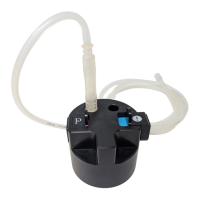
11. Empty and rinse the #Gunkie with water.
Touchscreen Clean
Warning: The surface of the touchscreen may be cleaned as needed to remove any residue or dust.
Apply a window or glass cleaner on a non-scratching microber cloth and wipe the touchscreen. Do not spray cleaner directly
on the screen.
Note: Do not use any type of alcohol or strong solvent, as well as thinner, benzene, abrasive cleaners, or compressed air,
as it may damage the touchscreen surface.


 To Next Page