Installation Manual 5.1.2
27
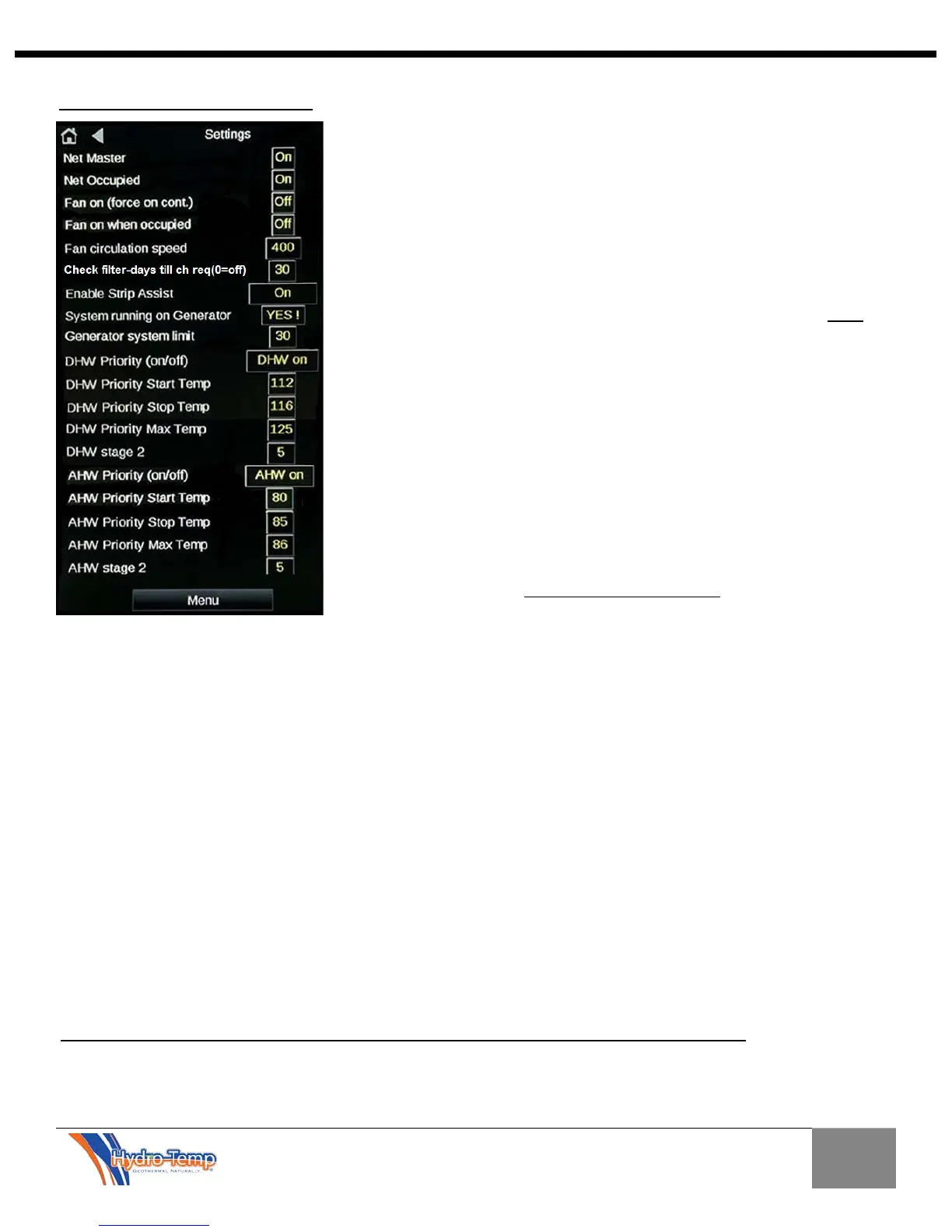
The customer setting screen provides the following settings:
Net Master: Must be “on” for the system to run. This provides the
customer a “software method” of shutting down the system.
Net Occupied: Forces the system to be occupied all the time. If this is
“ON” and the jumper in the electrical box is on, the system will remain at
occupied set points all the time. This is the recommended setup for all v-
star systems.
Fan Circulation selection and Fan Circulation Speed setting: These
settings are used for fan circulation mode.
Check Filter - days till ch req: This setting sets the frequency in days
that the “CK Filter” indicator will show on the home screen. 30 days is the
default. Set this to 0 to disable the check filter indicator.
Enable Strip Assist: With this setting turned “on”, the strip heaters will
run to supplement the system in the heating mode as needed. If this
setting is turned to “Eheat only” the strip heater will only run if a system
fault is detected during a heating call or if the unit is set to the emergency
heat mode (E.Heat).
System running on Generator: When this setting is set to “Yes”, another
set point will appear labeled "Generator system limit”. The default setting
for limiting the system is “30%”. This means that when this setting is set to
“YES”, the system will be limited to 30%. It is important to note this setting
needs to be manually selected when the system is being powered from a
generator. If this set
ting is selected as “Yes”, the system will never exceed
the limit set point and the strip heat will be disabled. If the generator being
used is large enough to handle the system at 100% the "Generator
system limit" can be increased accordingly.
DHW Priority (on/off): This setting turns on / off the domestic hot water option. When turned off other
settings pertaining to the DHW will disappear. When turned back on navigation away from this screen then
back will force the settings back on the screen.
DHW Settings if DHW Priority is set to on:
DHW Priority Start Temp—This is the temp the system will turn on and start making hot water
DHW Priority Stop Temp—This is the temp the system will heat up to and turn off.
DHW Priority Max Temp—This temp setting is the max the system will heat the water when desuperheating
and providing free hot water. Desuperheating takes place
when the system is heating hot water while heating
or cooling the space.
DHW stage 2 temp—This setting stages the system up to maximum compressor speed if the hot water tank
temperature drops this much below the DHW start temp. For example in the screen shot above if the tank
temp drops below 112 the system will start in Priority hot water generation mode with the compressor in stage
1 (factory preset speed). If the tank temperature continues to drop below 107 (priority start temp – DHW
stage 2 temp) the system will ramp the compressor up to stage 2 (factory preset speed).
DHW water sampling – This setting when turned on will occasionally start the DHW pump to circulate water
to sample the temperature if the tank temperature sensor is placed on the DHW water in line. Another setting
will allow one to set the frequency (in seconds) the pump will run and the time (in seconds) the pump will run
before a temperature sample will be read from the sensor. The sensor will only be read during that time.
After the temperature is read the pump will turn off if no hot water is needed. Use this setting with caution.
It’s always best to leave this setting off and mount the tank temperature sensor on the tank.
If an optional AHW (Auxiliary Hot Water) source is needed additional AHW settings will appear below the
DHW settings. These will include AHW Priority on/off, AHW Priority start, AHW Priority stop, and AHW


 To Next Page