Installation Manual 5.1.2
28
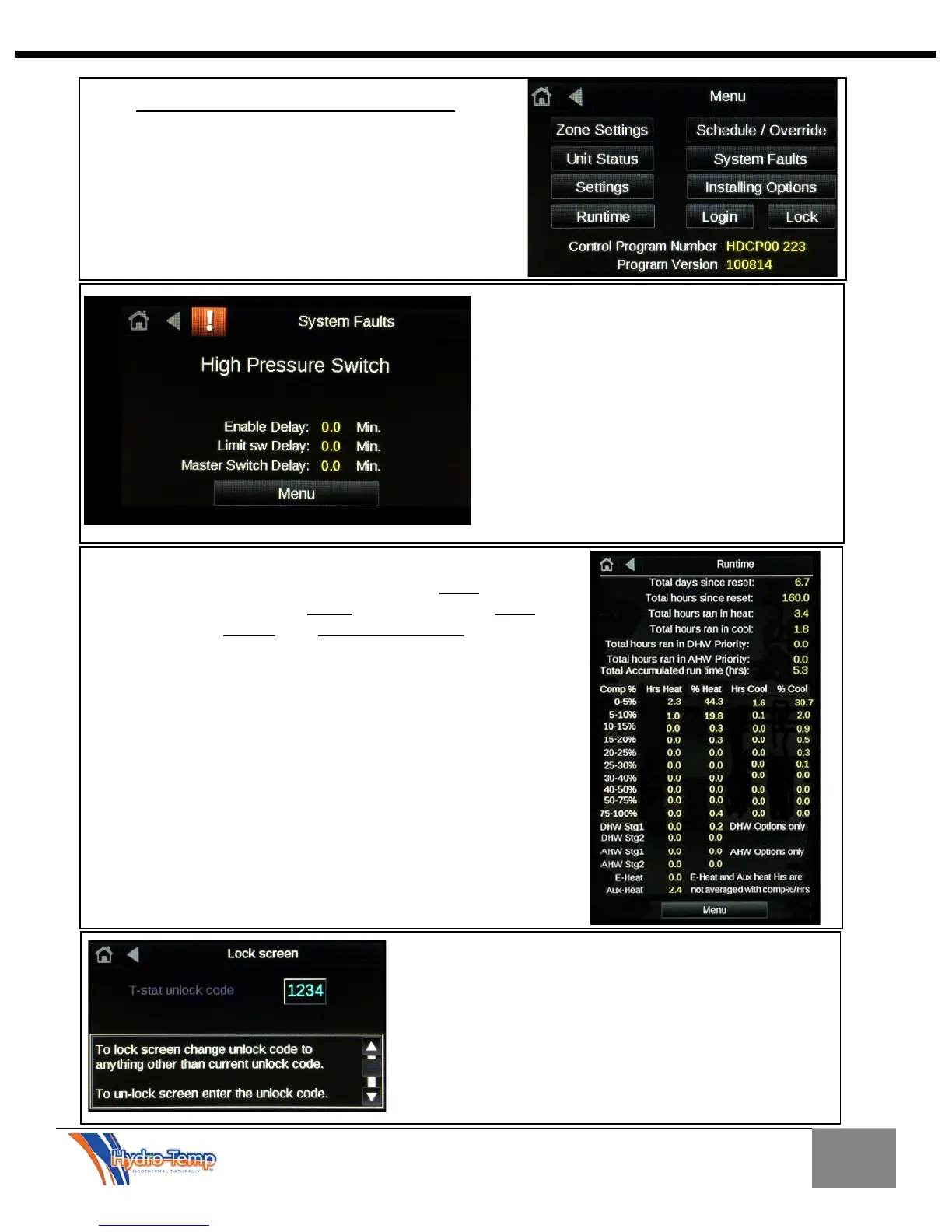
A few other buttons are available to the end user /
homeowner. System Faults, Runtime, and Lock. The
Installing Options page is password protected and is
only used during the initial equipment installation and
commissioning.
Other Items on the Menu Page
The thermostat lock screen will display the code
needed to unlock the screen. If the code is anything
other than 1234 (adjustable in factory settings) the
screen will lock and go to the home screen. No
adjustments will be allowed. Only the unlock button will
show on the home screen. To unlock press the unlock
button and enter the unlock code (1234). A help screen
is provide at the bottom to explain how the lock screen
The Runtime Screen shows the accumulated system run
time. This is divided up into total hours run in heat, total hours
run in cool, total hours run in DHW, total hours run in AHW,
total hours run in E-heat, and total accumulated run time.
In the Runtime Screen we divide this up even more to show
the compressor runtime in increments of percentage the
compressor has run in heat and cool.
With this you can determine how hard your system is having to
work to keep you comfortable.
Hydro-Temps ultimate goal is to have the unit operate for long
periods of time at the lowest compressor percentage possible
to provide the exact amount of heating / cooling needed for the
home or building. This will allow the unit to create a more
comfortable environment while operating at the highest
possible efficiency.
The Fault screen will display the current
system status in plain text and the status of
any time delays that are active. If no faults are
detected the screen will simply read “No
Faults”. Other possible faults may be Low or
High pressure switch, Freeze fault, Sensor
Failure, Master off, Temp diff fault, Low or high
limit lock out, or V-star drive Fault.
The Timers will normally read 0.0 minutes
unless a delay is active. If the air filter
indicator is active red text labeled “Clean or
replace filter” and a reset button will appear.


 To Next Page