Installation Manual 5.1.2
29
Occupied/Unoccupied (Occupied or Setback)
The best mode of operation for VStar units is normally when maintaining a constant space temperature
24/7. The unit will run only enough to keep the space at the predetermined occupied set-point
temperature. A consistent set-point will enable the unit to run in its lowest (most efficient) speed and at
the same time maintain a constant temperature and a low summertime humidity level.
This means the unit will run to satisfy only the “occupied” temperature settings.
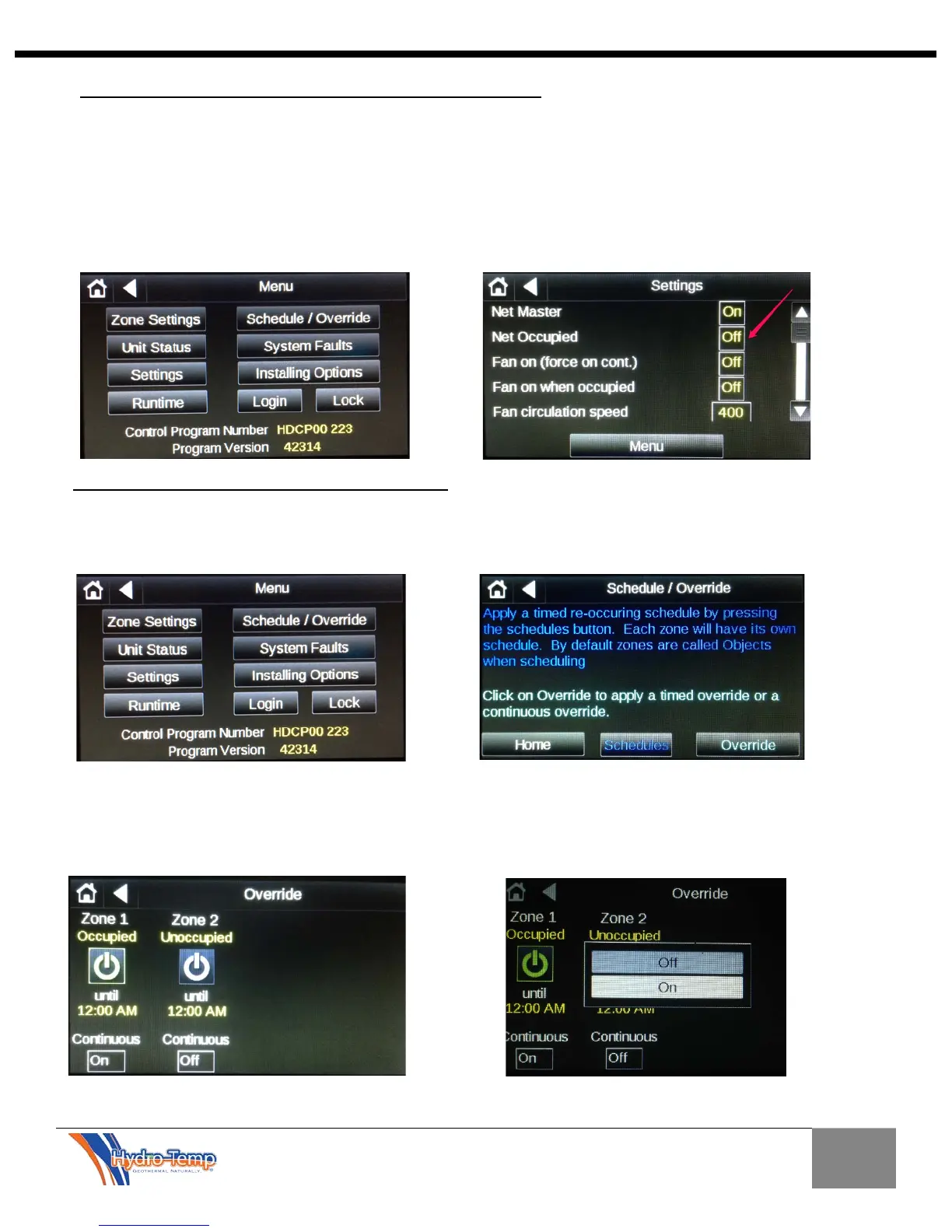
Should it be necessary to have the ability to schedule occupied and unoccupied times navigate to the
“Menu” screen, then select the “Settings” button. In the Settings screen toggle the “Net Occupied” to off.
To set a schedule or override, navigate to the menu screen by pushing the “Menu” button on the home
screen. Then on the Menu page select Schedule/Override
We will first discuss the override option. This is the easiest way to set the unit for an occupied mode.
There are two options here. One is the continuous mode and the other is timed mode. If the “Continuous”
button is selected, a pop-up will appear that provides the option for “on/off”. If “On” is selected the zone
will be occupied 24/7 much like having the “Occupied Sensor” jumper in place in the electrical box.
Setting Occupied/Unoccupied Times


 To Next Page