Installation Manual 5.1.2
31
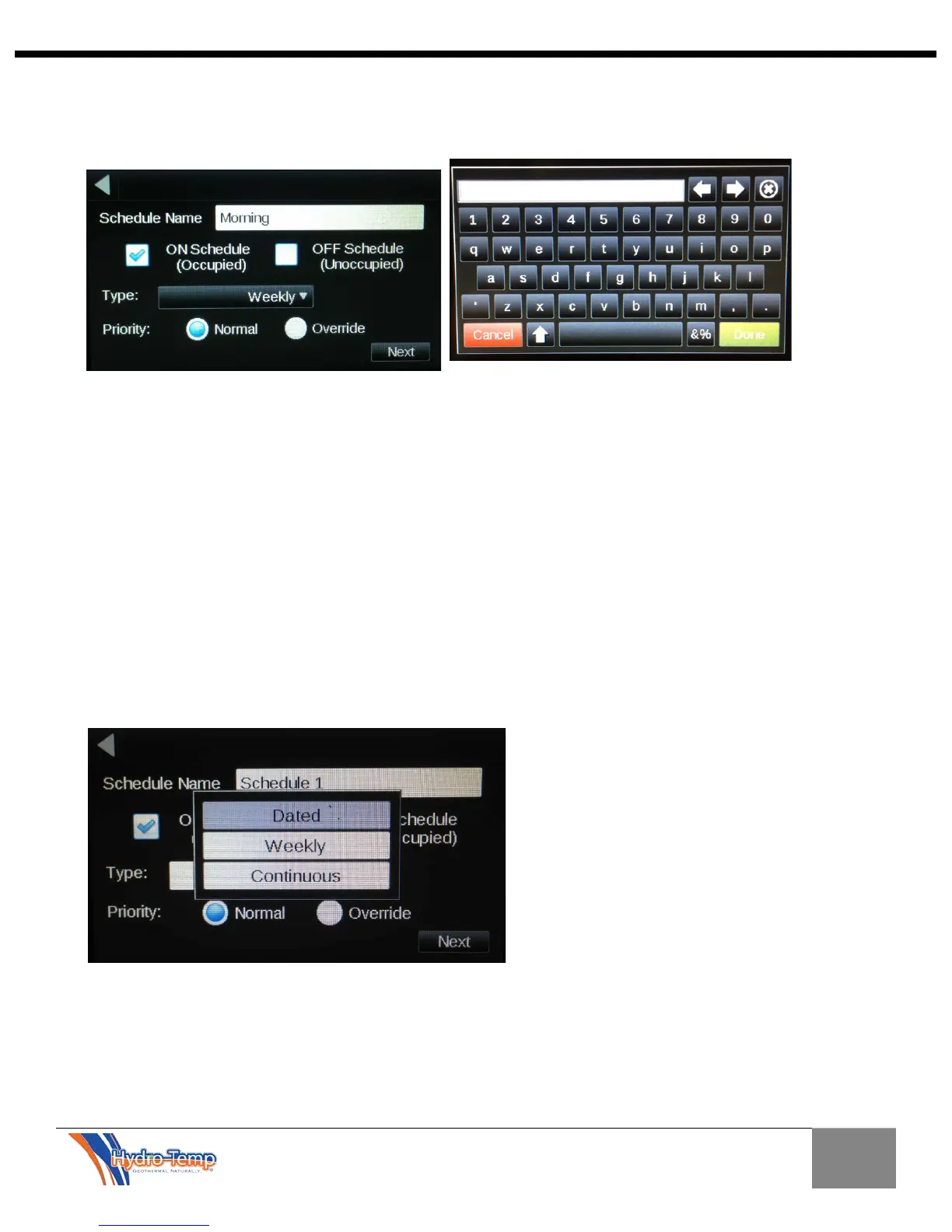
It is a good idea to provide a name for the schedule you are setting up. In this example the schedule was
name “Morning”. This was accomplished by pressing on the name area, typing in the desired name and
pressing “Done”.
The next step is to choose an “On Schedule” or an “OFF Schedule”. Most of the time an On Schedule is
chosen, however if the desired schedule was to place the unit into an unoccupied mode, overriding a
previous schedule the “OFF Schedule” can be chosen.
Continuing the scheduling process, the type of schedule needs to be chosen. The most common
schedule would be a weekly schedule. The dated schedule would be used for specific dates. This is
usually used once a general schedule has been set-up and an exception such as a holiday or a special
event occurs. The continuous schedule is the least common schedule type. The continuous schedule
puts the unit into a 24/7 occupied mode for a specified date range.
In this example the “Weekly” type will be discussed. To select the schedule type, depress the “Type”
button and choose weekly. Then press “Next”.


 To Next Page