30
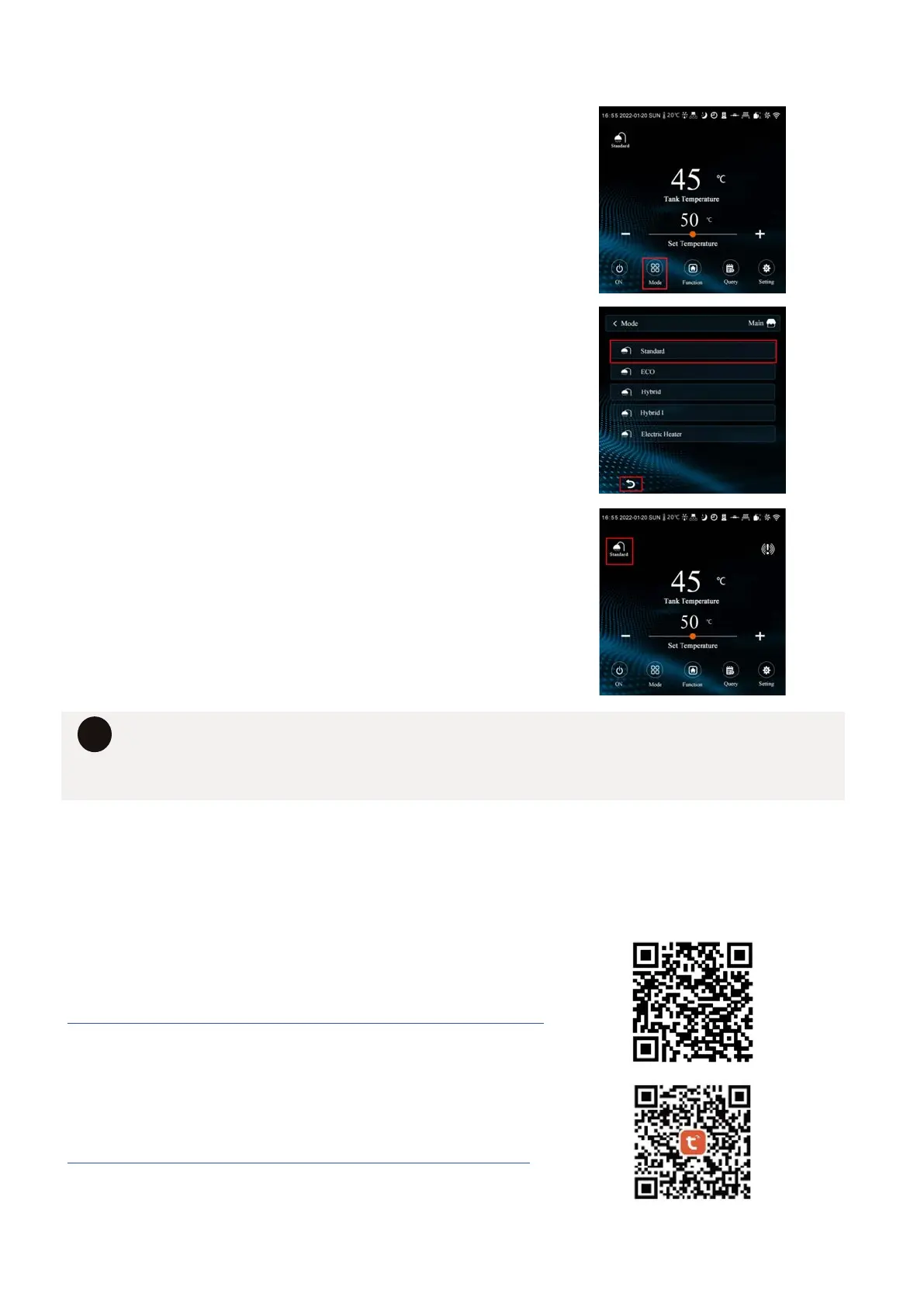
12.6 SELECTING A HEATING MODE
1. ACTIVATE MODE SELECT SCREEN.
Press mode icon to bring up the list of
available modes.
2. SELECT MODE.
Click the mode you wish to select. Then click
the BACK arrow to return to main screen.
3. MODE DISPLAY.
The selected mode will appear
underneath the SHOWER symbol and the SET
TEMPERATURE will update according to the
mode pre-sets.
• Any timers you set on the system will operate across all modes.
• The control parameters are designed to ensure that at least 45% of the stored
water reaches 60°C daily to ensure compliance with legionella disinfection.
i
12.7 WI-FI CONFIGURATION
Homes are getting smarter, and so should your hot water system. Our heat pumps are Wifi
enabled via the Tuya smart-home app. So you can control and monitor hot water from your
phone or tablet.
DOWNLOAD THE WI-FI SETUP MANUAL
https://www.hydrothermhotwatersystems.com.au/downloads/
DOWNLOAD THE TYUA SMART APP
https://www.tuya.com/product/app-management/all-in-one-


 To Next Page