EasyManua.ls Logo

Hypontech HHT-5000 Series - 7.3 DISPLAY AND CONTROL LOGICS

Hypontech HHT-5000 Series
35 pages
Print Icon
To Next Page IconTo Next Page
To Previous Page IconTo Previous Page
Loading...
21 HHT-5000/6000/8000/10000/12000 USER MANUAL
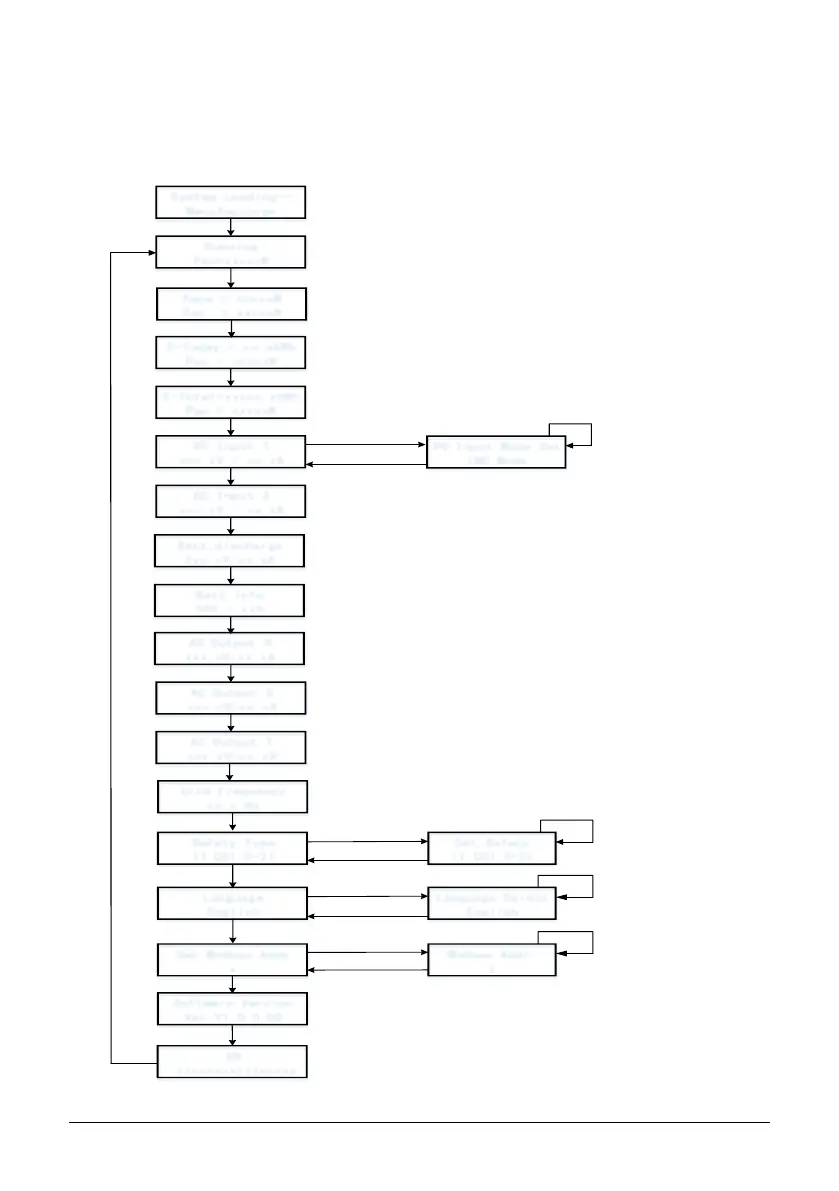
7.3 Display and Control Logics
When inverter starts up and operates, there is a control button beside LCD Display of the
inverter. Please follow the logics listed below.
System Loading
Manufacturer
Running
Pac=xxxxxW
E-Today = xx.xkWh
Pac = xxxxxW
E-Total=xxxxx.xkWh
Pac = xxxxxW
DC Input 1
xxx.xV / xx.xA
DC Input 2
xxx.xV / xx.xA
Grid Frequency
xx.x Hz
Software Version
Ver:V1.0.0.00
Safety Type
IT CEI 0-21
Set Safety
IT CEI 0-21
Language
English
Language Select
English
Set Modbus Addr
x
Modbus Addr:
x
wait system
loading
short press
short press
short press
short press
short press
short press
short press
short press
short press
short press
short press
long press 2s
long press 2s
long press 2s
short press to
switch safety
long press 2s/timeout
short press/
timeout
SN
xxxxxxxxxxxxxxxx
short press
AC Output T
xxx.xV/xx.xA
short press
Batt:discharge
Xxx.xV/xx.xA
Batt Info
SOC = xx%
AC Output S
xxx.xV/xx.xA
short press
short press
PV Input Mode Set
IND Mode
long press 2s
short press to switch
input mode
long press 2s/timeout
AC Output R
xxx.xV/xx.xA
short press to
switch language
short press to increase
address,long press to
discrease address
timeout
short press
Peps = xxxxxW
Pac = xxxxxW

Related product manuals