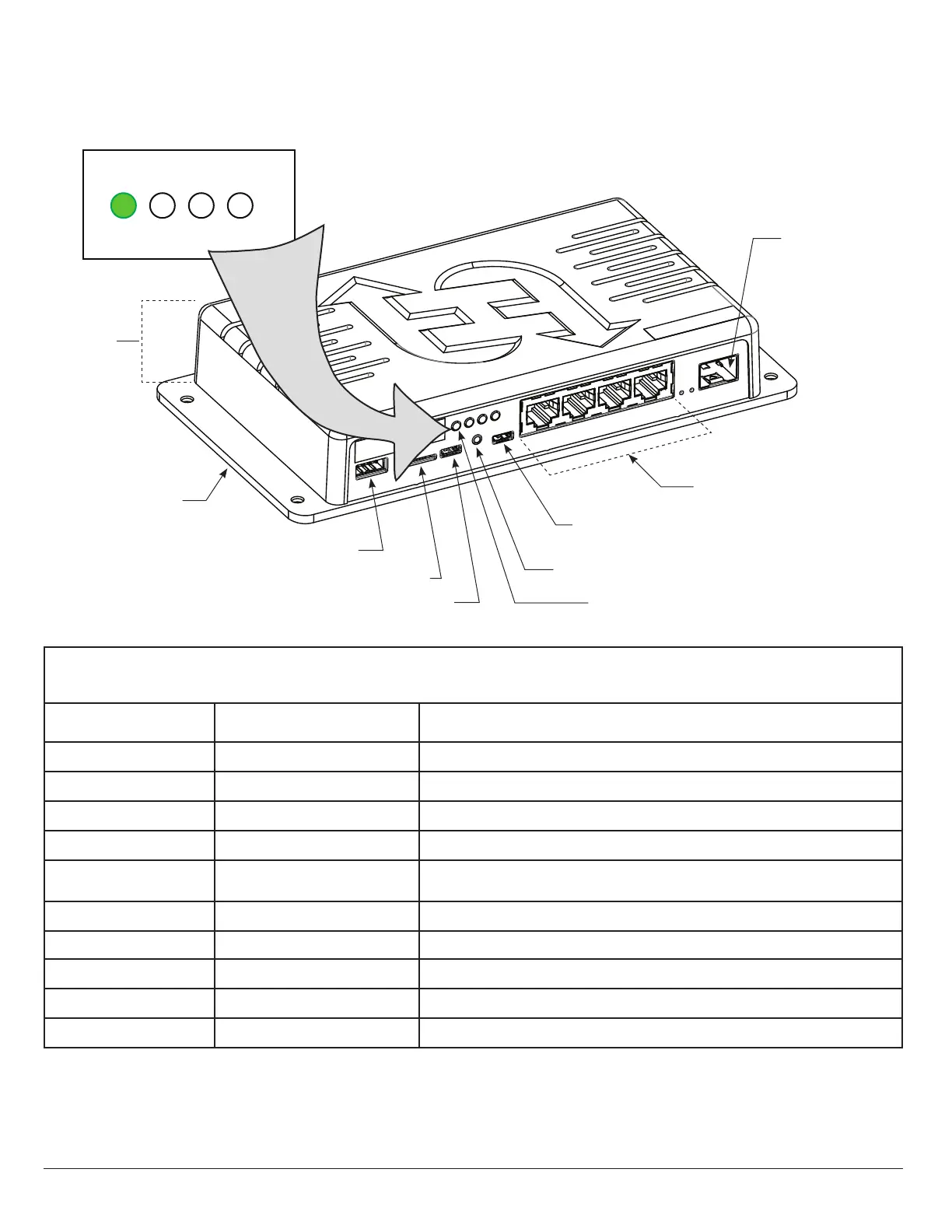
HyNet Components
LED Indicators
Drawing is not to scale
Height
1¼ inches
SFP Module
(100/1000/2500)
Managed Switch
RJ-45 Integration Hub
4-Port Copper Gigabit
(100/1000/2500)
Micro USB
Reset Button
RS-485
USB OTG
Micro SD Card Slot
Mounting Plate
4 x 7½ inches
LED (position 1)
Table 1: HyNet LED Indicators
LED Position LED Color Indicates
1 RED ashing No communication from gate operator to HyNet.
1 Green steady Communication is established between gate operator and HyNet.
2 RED steady Gate operator network communication is not congured or established.
2 RED ashing HyNet is attempting to connect to network (web interface).
2 GREEN ashing
Network (web interface) is established and working. (May not be wholly
congured, yet. Verify conguration with your IT administrator.)
3 RED steady Hardware fault.
3 RED ashing Charge is low on coin battery. Replace coin battery.
3 GREEN steady Hardware functioning and coin battery charged.
4 Red steady or no LED lit HyNet internal switch is not functioning.
4 GREEN steady HyNet internal switch is functioning.
4321
www.SecureOpeners.com | (800) 878-7829 | Sales@SecureOpeners.com











 To Next Page