Fork Replacement 4000 SRM 736
Theforkscanbeconnectedtothecarriagebyoneof
two types of hooks and lock pins. See Figure 6. These
lock pins are installed through the top fork hooks and
fit into slots in the top carriage bar. Separate the
forks as much as possible for maximum support of
theload.Hookforkswillslidealongthecarriagebars
to adjust for the load to be lifted. Raise the lock pin in
each fork to slide the fork on the carriage bar. Make
sure the lock pin is engaged in the carriage bar to
lock the fork in position after the width adjustment
is made.
A fork can be removed from the carriage for replace-
ment of the fork or other maintenance.
REMOVE
WARNING
Do not try to move a fork without a lifting de-
vice. Each fork for these lift trucks can weigh
66 to 183 kg (145 to 403 lb).
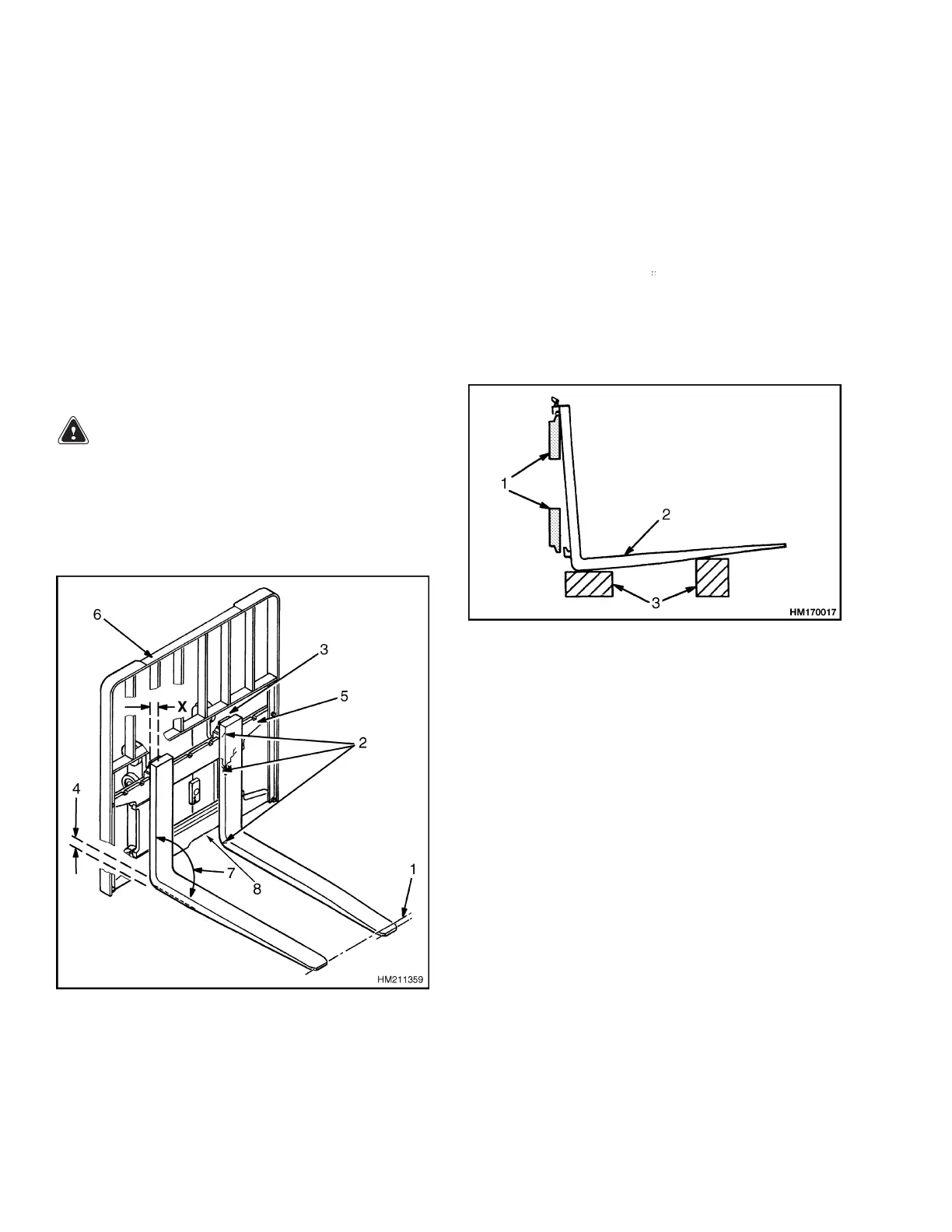
1. Slide fork to fork removal notch on carriage. See
Figure 7.
Figure 7. Forks Check
Legend for Figure 7
1. TIP ALIGNMENT (
MUST BE WITHIN 3% OF
FORK LENGTH)
2. CRACKS
3. LATCH DAMAGE
4. HEEL OF FORK (MUST BE 90% OF DIMENSION
"X")
5. CARRIAGE
6. LOAD BACKREST EXTENSION
7. MAXIMUM ANGLE 93
8. FORK REMOVAL NO
TCH
2. Lower fork onto b
locks so that bottom hook of
fork moves thro
ugh fork removal notch. See Fig-
ure 8.
1. CARRIAGE FORKS
2. HOOK FORK
3. BLOCKS
Figure 8. Hook Fork Removal
3. Lower carriage further so that top hook of fork is
disengaged from the top carriage bar.
4. Move carriage away from fork, or use a lifting
device to move fork away from carriage.
INSTALL
1. Move fork and carriage so that top hook on fork
can engage the upper carriage bar.
2. Raise carriage to move lower hook through the
fork removal notch.
3. Slide fork on the carriage so that both upper and
lower hooks engage the carriage.
4. Engage lock pin with a notch in the upper car-
riage bar.
8


 To Next Page