4000 SRM 340 Forks Replacement
Forks Replacement
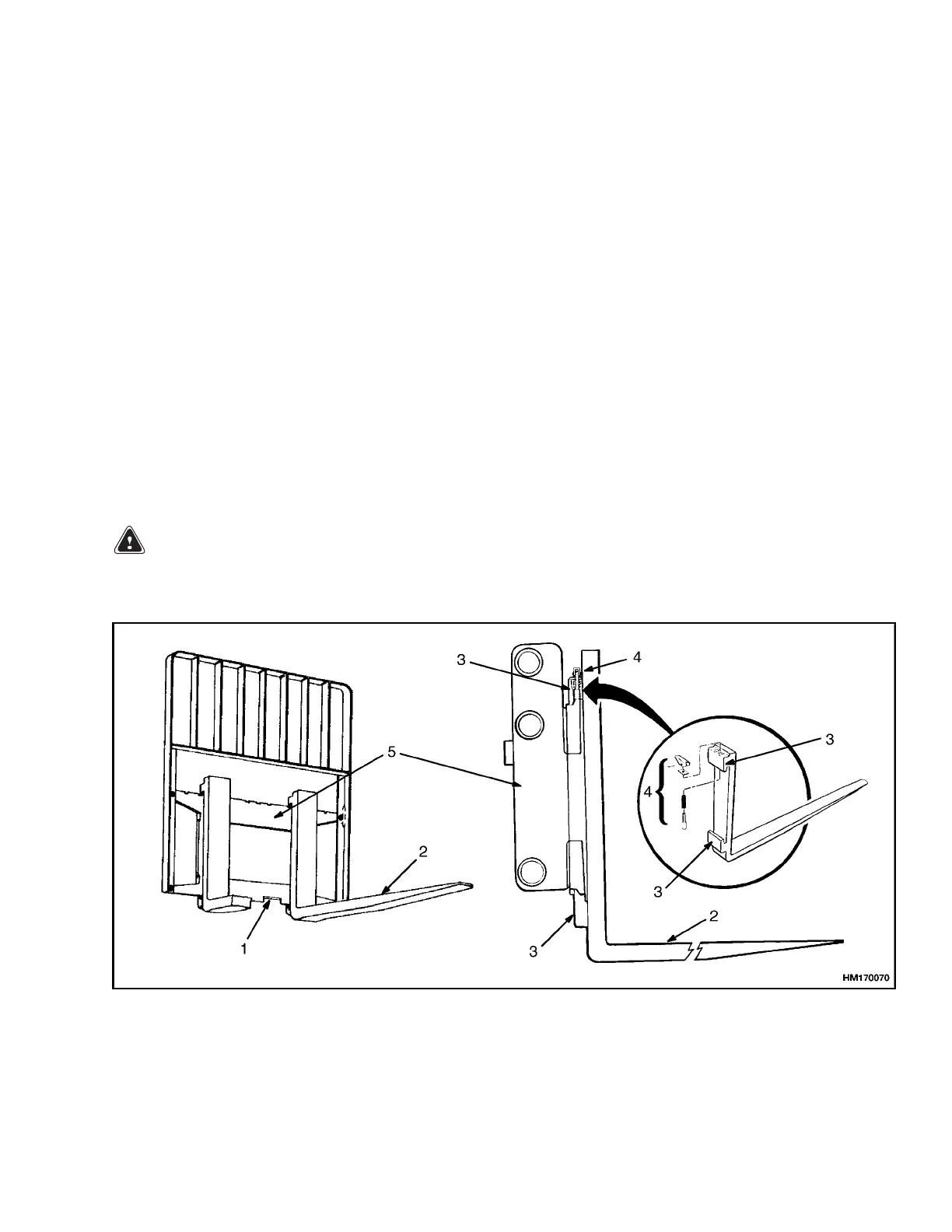
The identification of a fork describes how the fork is
connected to the carriage. The series of lift trucks
that use this mast normally have hook forks. See
Figure 6. Pin forks are available on the larger capac-
ity lift trucks in this series as an option. Pin forks
are fastened to the carriage with large fork pins. See
Figure 8.
Hook forks are connected to the carriage by hooks
and lock pins. These lock pins are installed through
the top fork hooks and fit into slots in the top carriage
bar. Separate the forks as much as possible for maxi-
mum support of the load. Hook forks will slide along
thecarriagebarstoadjustfortheloadtobelifted.
Raisethelockpinineachforktoslidetheforkon
thecarriagebar. Makesurethelockpinisengaged
in the carriage bar to lock the fork in position after
the width adjustment is made.
REMOVE AND INSTALL
WARNING
Do not try
to move a fork without a lifting de-
vice. Eac
h fork for these lift trucks can weigh
[66 to 183 kg (145 to 402 lb) for a hook fork] and
[128 to 226 kg (281 to 498 lb) for a pin fork].
A fork can be removed from the carriage for replace-
ment of the fork or other maintenance.
Hook Fork
Remove
Slide a hook fork to the fork removal notch on the car-
riage. See Figure 6. Lower fork on to blocks so bot-
tom hook of fork moves through fork removal notch.
See Figure 7. Lower carriage further so top hook of
fork is disengaged from top carriage bar. Move car-
riage away from fork, or use lifting device to move
fork away from carriage.
Install
Move fork and carriage so top hook on fork can
engage upper carriage bar. Raise carriage to move
lower hook through fork removal notch. Slide fork
on carriage so both upper and lower hooks engage
carriage. Engage lock pin with a notch in the upper
carriage bar.
1. FORK REMOVAL NOTCH
2. FORK
3. HOOK
4. LOCKING PIN ASSEMBLY
5. CARRIAGE
Figure 6. Hook Fork
7



 To Next Page