4
Attaching the Accessories
1. Open the accessory connector cover.
2. Plug the accessory into the accessory connector.
3. Tighten the screw on the accessory plug.
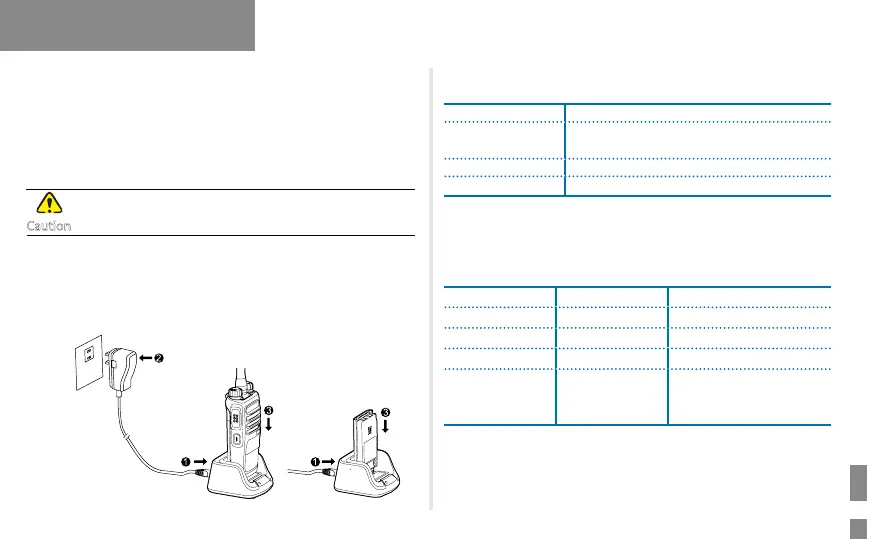
Charging the Battery
Use the charger specified by the Company to charge the
battery.
Be sure to charge the battery fully before initial use, since reduction of
state of charge (SoC) may lead to low battery alarm. You can charge
the standalone battery or the radio with the battery attached. It is
recommended that your radio remain powered off during charging.
The LED indicator on the charger shows the charging status. For details,
see the following table.
LED Indicator Charging Status
Glows green
The battery is inserted incorrectly or fully
charged.
Glows red The battery is charging.
Glows orange The battery is charged to 85% or above.
Checking the Battery Power
You can check the current battery power by holding down the Battery
Power Indicator key programmed by your dealer, and release the key to
exit. The following table lists battery power indications:
LED Indicator Alert Tone Battery Power
Glows green Three beeps High
Glows orange Two beeps Medium
Glows red One beep Low
Flashes red Low battery tone
Under the low battery
threshold. Please recharge
or replace the battery.
Caution
Before Use



 To Next Page