5
Basic Operations
If you want to… Do this…
Turn on the radio
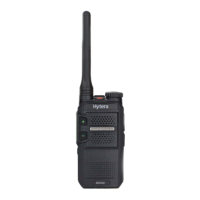
Rotate the On-Off/Volume Control knob
clockwise.
Turn off the radio
Rotate the On-Off/Volume Control knob
counterclockwise.
Increase/Decrease
the volume
Rotate the On-Off/Volume Control knob
clockwise/counterclockwise after turning
on the radio.
Select a channel Rotate the Channel Selector knob.
Call Services
Call on Digital Channel
On the digital channel, you can initiate or respond to a group call or
private call. A group call is a call from an individual user to a group of
users. A private call is a call from an individual user to another individual
user.
Initiating a Call
1. Select the required channel.
2. Hold the radio vertically 2.5 to 5 cm from your mouth.
3. Hold down the PTT key and speak when the radio is in standby mode.
Receiving and Responding to a Call
When receiving a call, you can listen to it without any operation. You can
hold down the PTT key to respond within the preset time period.
Call on Analog Channel (Without Signaling)
A call on analog channel is from an individual user to all users on the
channel. The operations are the same as the call on digital channel.



 To Next Page