3
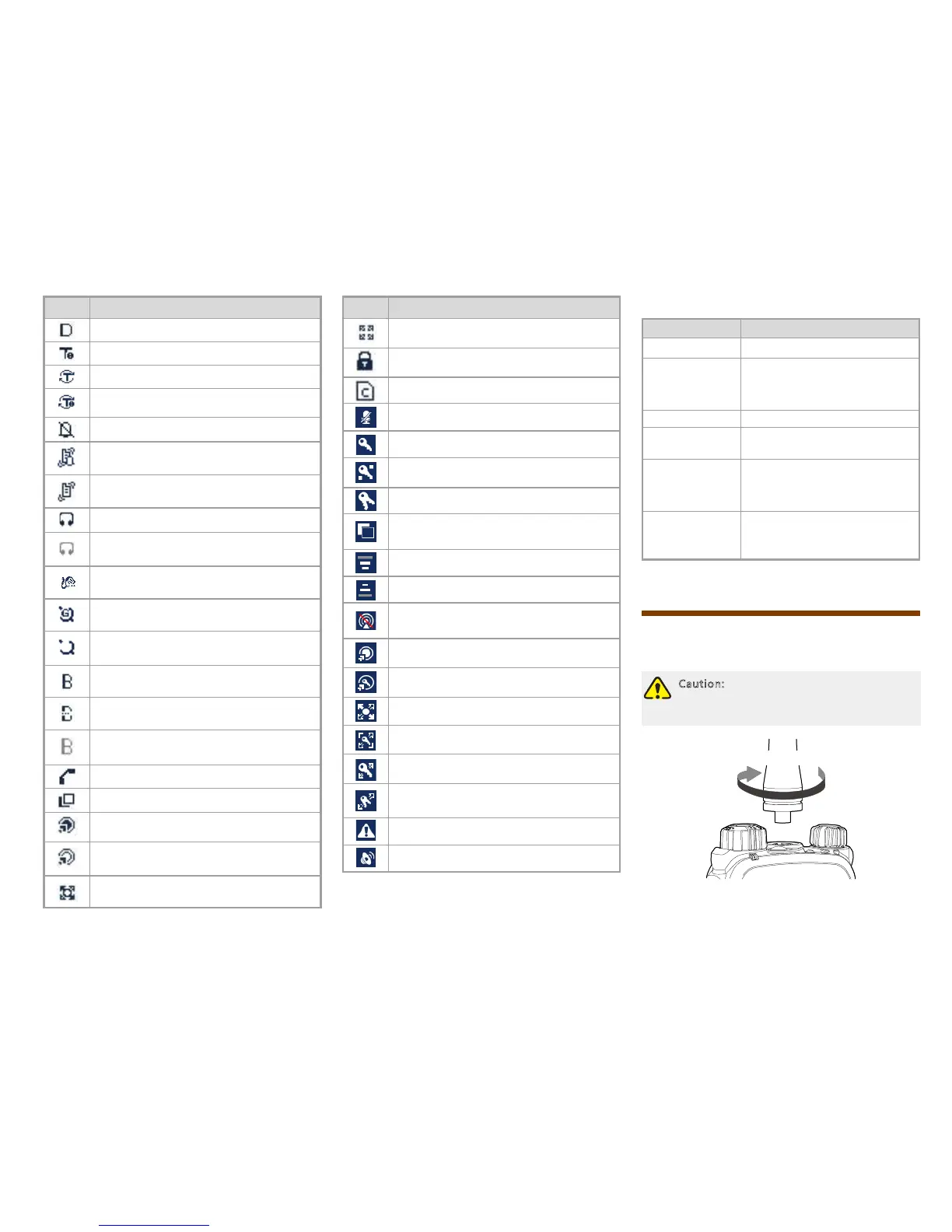
Icon Terminal Status
The terminal is operating in DMO.
The terminal is operating in fallback mode.
The scan feature is enabled in TMO.
The scan feature is enabled in fallback
mode.
The terminal is operating in silent mode.
The terminal is operating in normal (ring
and vibration) mode.
The terminal is operating in vibration
mode.
An audio accessory is connected.
An audio accessory is connected but not
available for use.
A palm microphone with keypad is
connected.
The GPS feature is active, and valid GPS
or GLONASS data is received.
The GPS feature is active, but no valid
GPS or GLONASS data is received.
A wireless accessory is connected and
available for use.
The BT feature is enabled but no wireless
accessory is connected.
A wireless accessory is connected but not
available for use.
A call is in progress.
The terminal is selecting a group.
A gateway device is available and
connected in DMO.
A gateway device is available but not
connected in DMO.
A repeater is available and connected in
DMO.
Icon Terminal Status
A repeater is available but not connected
in DMO.
The keypad is locked.
The SIM card E2EE is in use.
The microphone is disabled.
AIE (Air Interface Encryption) is in use.
E2EE (End-to-End Encryption) is in use.
Both AIE and E2EE are in use.
The ongoing call enjoys a pre-emptive
priority.
The ongoing call enjoys a higher priority.
The ongoing call enjoys a lower priority.
The terminal is prohibited from
transmitting.
A call via gateway is in progress.
An E2EE call via gateway is in progress.
A call via repeater is in progress.
An E2EE call via repeater is in progress.
An AIE call via repeater is in progress.
The AIE and E2EE call via repeater is in
progress.
An Emergency call is in progress.
A broadcast call is in progress.
LED Indicator
LED Indication Terminal Status
Glows red Transmitting
Flashes red
slowly
Low battery voltage
Please replace or recharge the
battery
Glows green Receiving
Flashes green
slowly
Channel idle in DMO
Glows orange
Channel busy in DMO
The terminal is prohibited from
transmitting.
Flashes orange
slowly
The BS with which the terminal
is registered is out of service in
TMO.
Before Use
Attaching the Antenna
Caution: Do not hold the terminal by its
antenna, otherwise the performance and
lifespan of the antenna will be reduced.
Rotate Clockwise



 To Next Page