10
2.4.1 LCD Icons
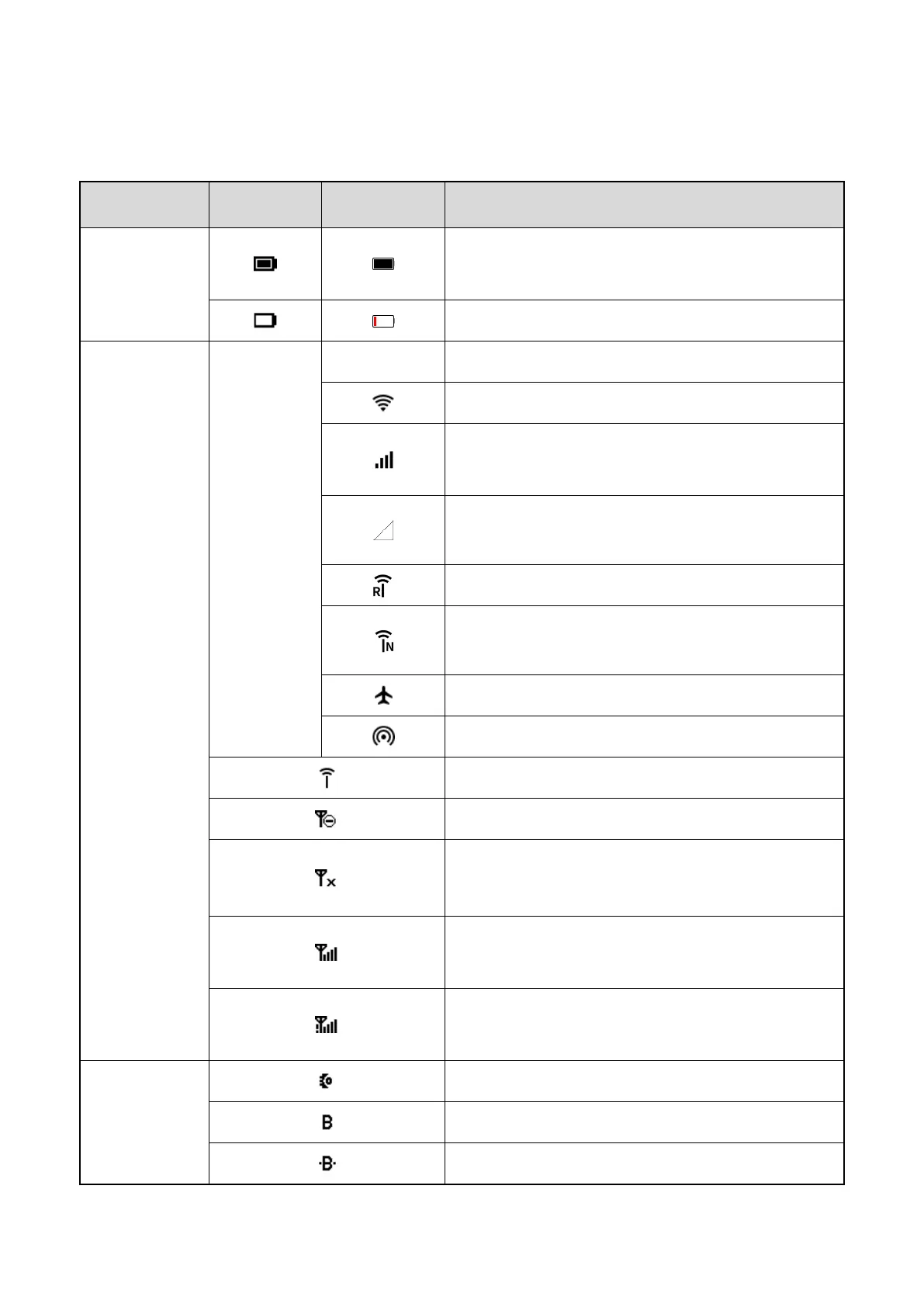
Type Top Screen Main Screen Radio Status
Battery power
The fuller the battery bar is, the stronger the battery
power remains.
The battery power is low.
Network and
signal
/
E/G/3G/4G
The EDGE/2G/3G/4G cellular network is enabled.
The radio is connected to the WLAN network.
The number of bars indicates the signal strength of
the broadband network.
The radio has not registered with the broadband
network.
The radio has registered with the RoIP network.
The radio has registered with the narrowband
network.
The radio operates in Airplane mode.
The WLAN hotspot is enabled.
The RoIP network is enabled.
The narrowband network is disabled.
In TMO, the radio detects no signal.
In DMO, the radio is standby.
The number of bars indicates the signal strength of
the narrowband network.
In TMO Fallback mode, the number of bars indicates
the signal strength of the narrowband network.
Accessory
An accessory is connected.
The BT feature is enabled.
A BT device is connected.


 To Next Page