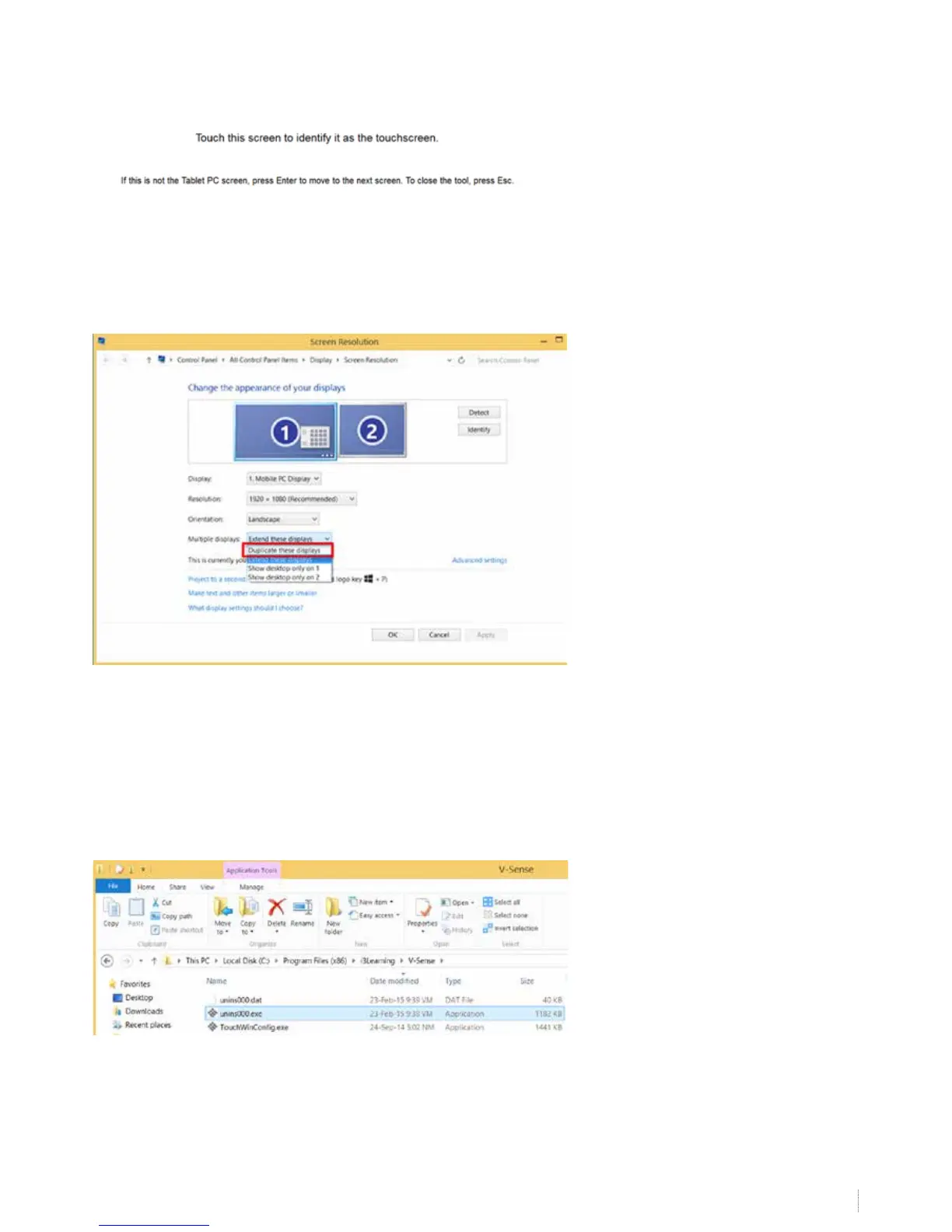
Follow the on-screen instructions. Tap on the board when the below instructions are shown on the board or press “enter”
when you read the instructions on your computer screen only. With this step you identify the board as the touch screen to
be used in windows. Finish with “escape”.
Touch the board and check if it recognizes touch, regardless to it’s accuracy. Then check the accuracy of the touch. If not
accurate, calibrate using the V-sense driver calibration. If still not accurate after calibration, go to screen resolution and
choose “duplicate” again to duplicate your computer screen on the board.
Calibrate again with the V-sense drivers and test the result. If the i3BOARD is still not calibrated fully accurately, the problem
might be related to your computer graphical card or its drivers that needs to be upgraded.
10. What to do if windows calibration does not start
Sometimes the Windows calibration cannot run because the board is already calibrated with the V-sense driver. Remove the
V-sense drivers using the uninstaller (unins000.exe) in the folder “program les\i3 learning”.


 To Next Page