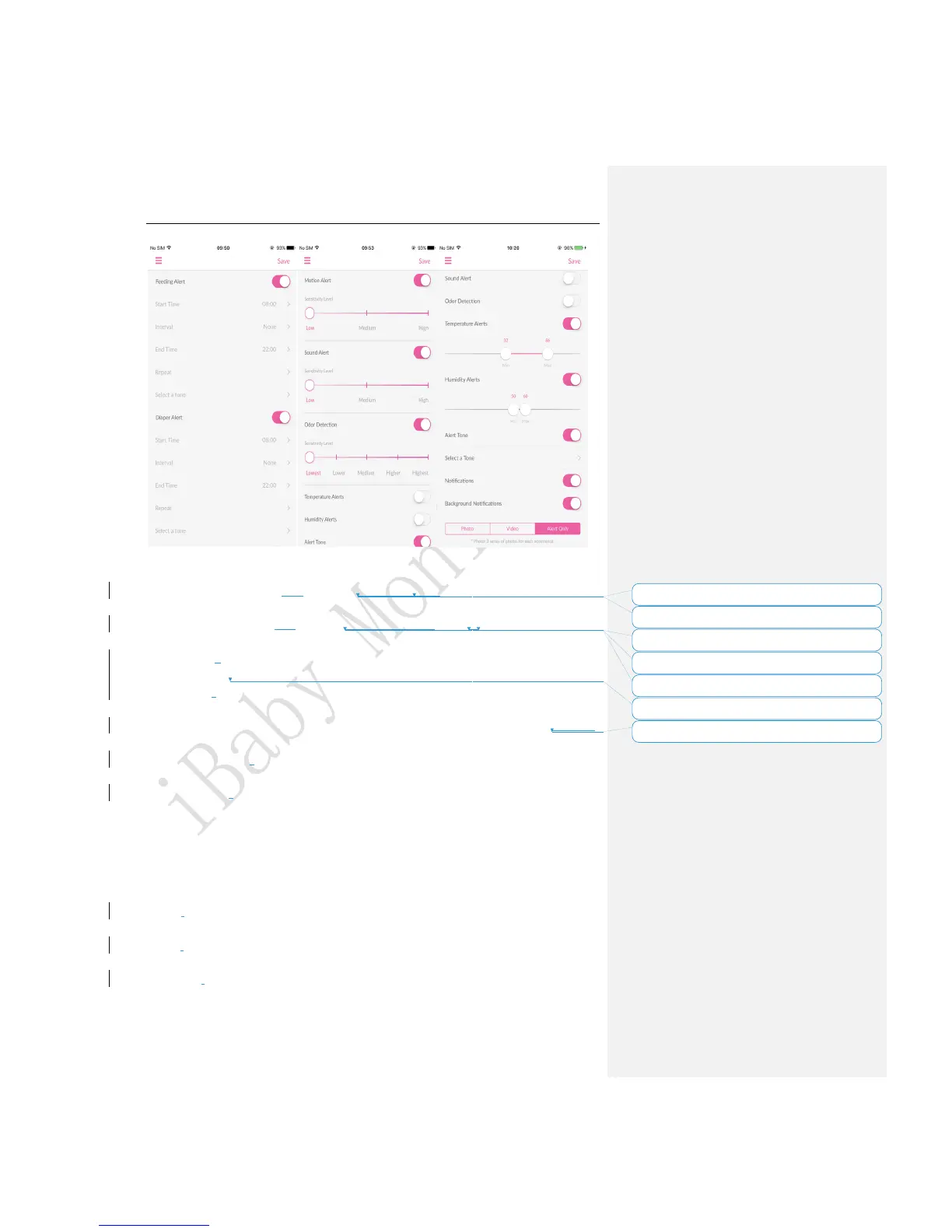
Figure 8
Feeding Alert: You can set this to remind yourself to feed for your child. It will remind you
when times up.
Diaper Alert: You can set this to remind youto change the diaper of your child. It will remind
you when times up.
Motion Alert: The device will trigger an alert when motion detected. The higher the
sensitivity level, the more accurate the monitor will be.
Sound Alert: The device will trigger an alert when there is a sound from the room. The
higher the sensitivity, the more accurate the monitor will be.
Odor Detection: The device will trigger an alert when the air quality in the room changes.
The higher the sensitivity level, the more accurate the monitor will be.
Temperature Alerts: The device will trigger an alert when the temperature around the
device is below the minimum value (eg.32℉) or above the maximum value (eg.86℉).
Humidity Alerts: The device will trigger an alert when the humidity around the device is
below the minimum value (eg.50%) or above the maximum value (eg.60%).
Alert Tone:Select a tone for the alerts.
Notifications:If this setting is on, you will get notifications when the app is running.
Background Notifications:If this setting is on, you will get notifications when the app is
closed or running in the background.
Alerts display types:
Photo: When there is an alert the device will capture 3 photos and save them in the Media
Gallery.
Video: When there is an alert, the device will capture a 15 second video and save it in the
Media Gallery.
Alert Only: There is only notification without any media file saved.



 To Next Page