EasyManua.ls Logo

IBM 5155 - Page 385

IBM 5155
450 pages
Print Icon
To Next Page IconTo Next Page
To Previous Page IconTo Previous Page
Loading...
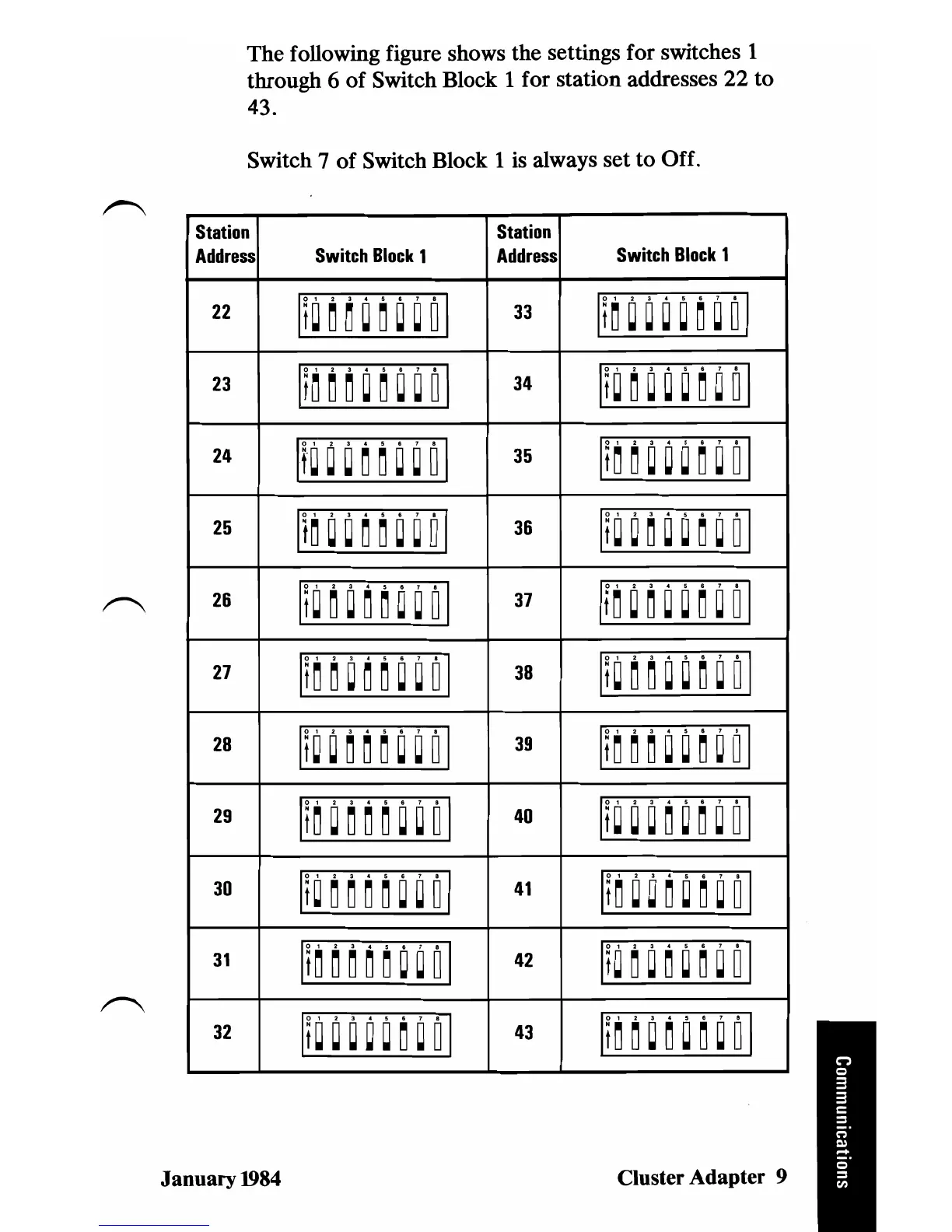
The
following figure shows the settings for switches 1
through 6
of
Switch Block 1 for station addresses
22
to
43.
Switch 7
of
Switch Block 1 is always
set
to
Off.
Station
Address
Switch
Block
1
22
It~~~~~~~ol
23
It~
~ ~
~
~
~
~
0I
24
If~
~
~
~
~ ~
~
0I
25
It~
~
~
~
~ ~
~
0I
26
It~
~
~
~
~ ~ ~
ol
27
It~~~~~~~ol
28
It
~ ~ ~
~
~
~ ~
0I
29
It
~ ~ ~
~
~
~ ~
01
30
It
~
~
~
~
~
~ ~
01
31
It
~ ~ ~
~
~ ~ ~
0I
32
II~
~ ~
~
~
~
~
0I
January
1984
Station
Address
33
34
35
36
37
38
39
40
41
42
43
Switch
Block
1
It~
~ ~ ~ ~ ~
~
0I
U~~~~~~~ol
It
~ ~
~
~ ~ ~
~
0I
It~
~ ~ ~
~
~ ~
0I
It~
~ ~ ~
~ ~
~
0I
It~
~ ~ ~ ~ ~ ~
0I
It~
~ ~ ~
~
~ ~
0I
II
~ ~ ~ ~ ~ ~
~
0I
It
~
~ ~
~
~
~ ~
0I
It
~ ~
~ ~
~ ~
~
0I
It
~ ~ ~ ~ ~
~
~
0I
Cluster Adapter 9

Table of Contents

Related product manuals