15
Instruction Manual C100-AE
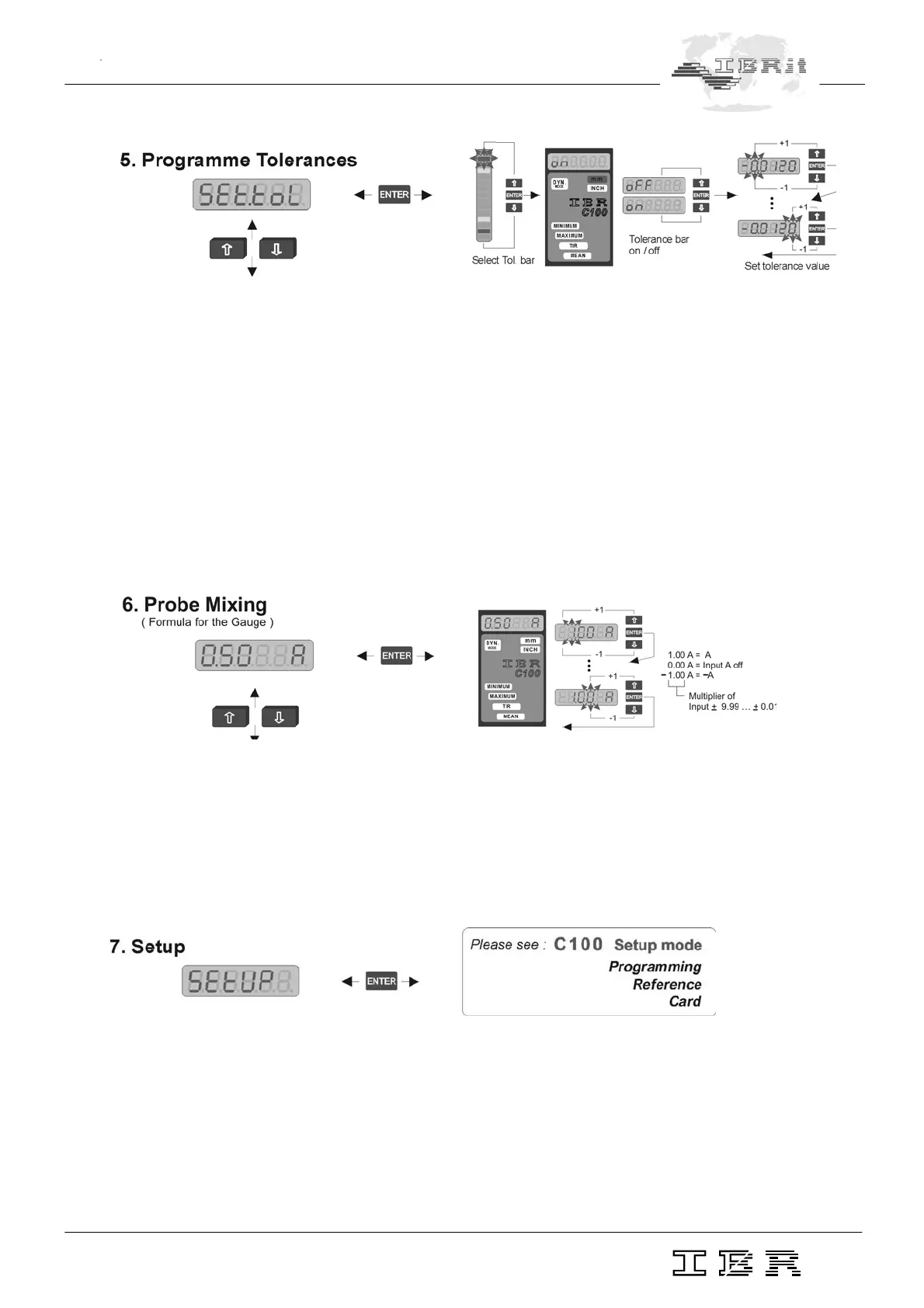
In this menu you can set a maximum of 4 tolerance points representing relative deviation from the
nominal value.
Programming starts by selecting one of the four tolerance marks on the column display :
+ red upper tolerance ( red )
+ yellow upper tolerance ( yellow )
– yellow lower tolerance ( yellow )
– red lower tolerance ( red )
The chosen tolerance point flashes. Go to the next point using the Ï and Ð keys and confirm with ENTER
key. After this you can switch the tolerance point on or off by selecting on/oFF on the numeric display. You
can set the relative deviation from the nominal value ( max. ± 1.5 mm ), if the tolerance point is switched
on.
In this menu you can assign a fixture coefficient ( multiplier ranging 0,01 to 9,99 ) to the input A ( pneumatic
measurement converter ).
Notice : When the input is disabled ( 0.00 A ) measurement is no longer possible and the error
message 'Err. 1' appears on the numeric display.
This menu allows all basic settings of the column gauge.
Please, refer to chapter 3.5


 To Next Page