16
Instruction Manual C100-AE
3.5 Basic settings / Setup menu
The Setup menu ( „SEtUP“ ) contains all basic settings which are usually introduced only at the first start-
up.
The basic factory settings are marked by * throughout the menus.
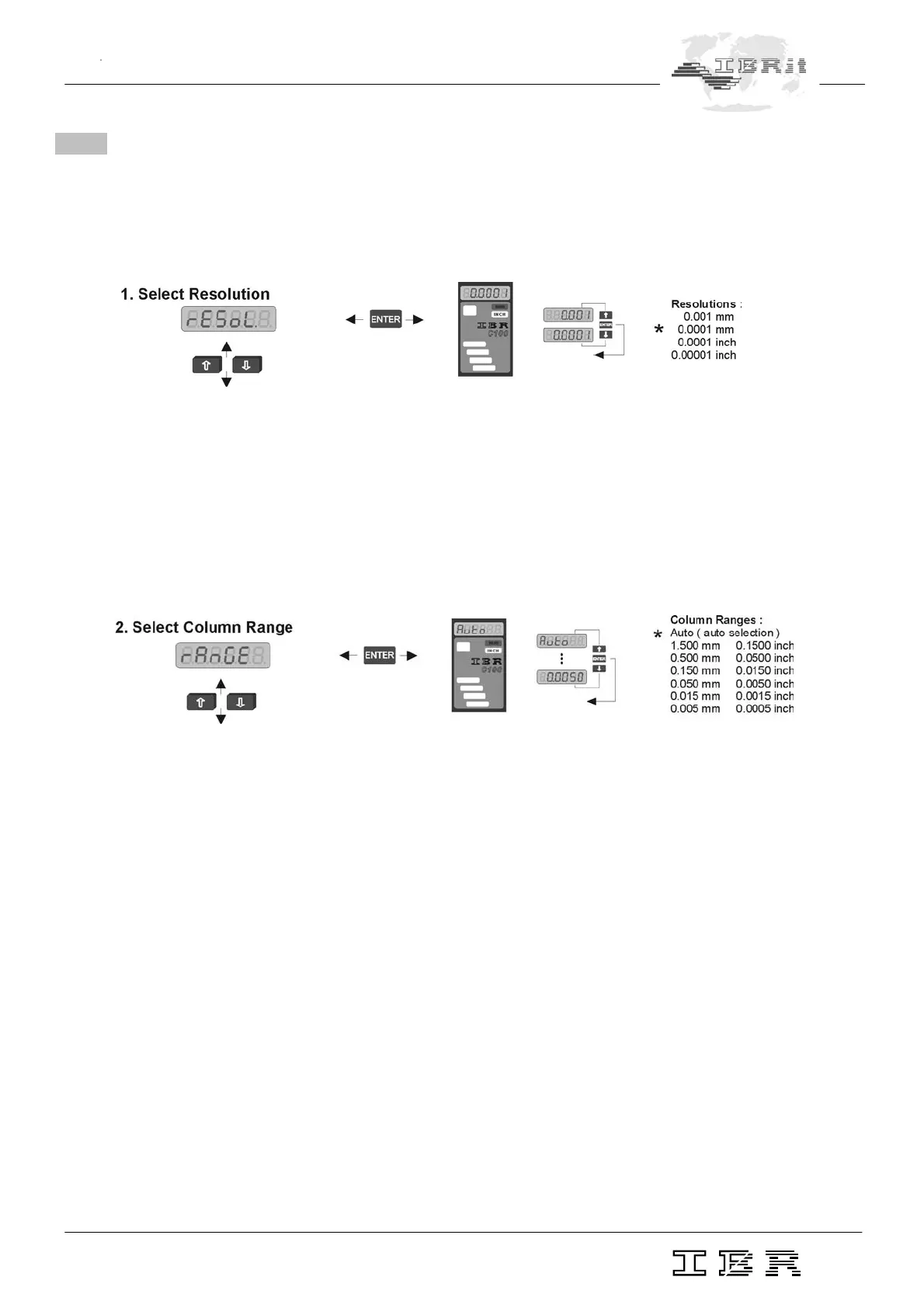
rESoL. In this menu you can select the resolution of the numeric display for the Measuring mode.
0.001 mm or. 0.0001 INCH ( low resolution )
0.0001 mm or 0.00001 INCH ( high resolution )
Notice : When a new resolution is set, only the decimal point of programmed values
is shifted.
The programmed numeric values, e.g. master values, nominal size and tolerances
must be corrected in some cases.
rAnGE In this menu you can set the column display range. You can select fixed ranges ±1.5 mm to ±50
µm or ± 0.15 INCH to ± 0,0005 INCH or the Auto option for automatic range selection.
In automatic mode the column gauge selects automatically the optimal column display range for
the selected tolerance.
Auto - Automatic selection of column display range
1.5000 - Fixed column display range ±1.5 mm
. . .
0.0050 - Fixed column display range ± 50µm


 To Next Page