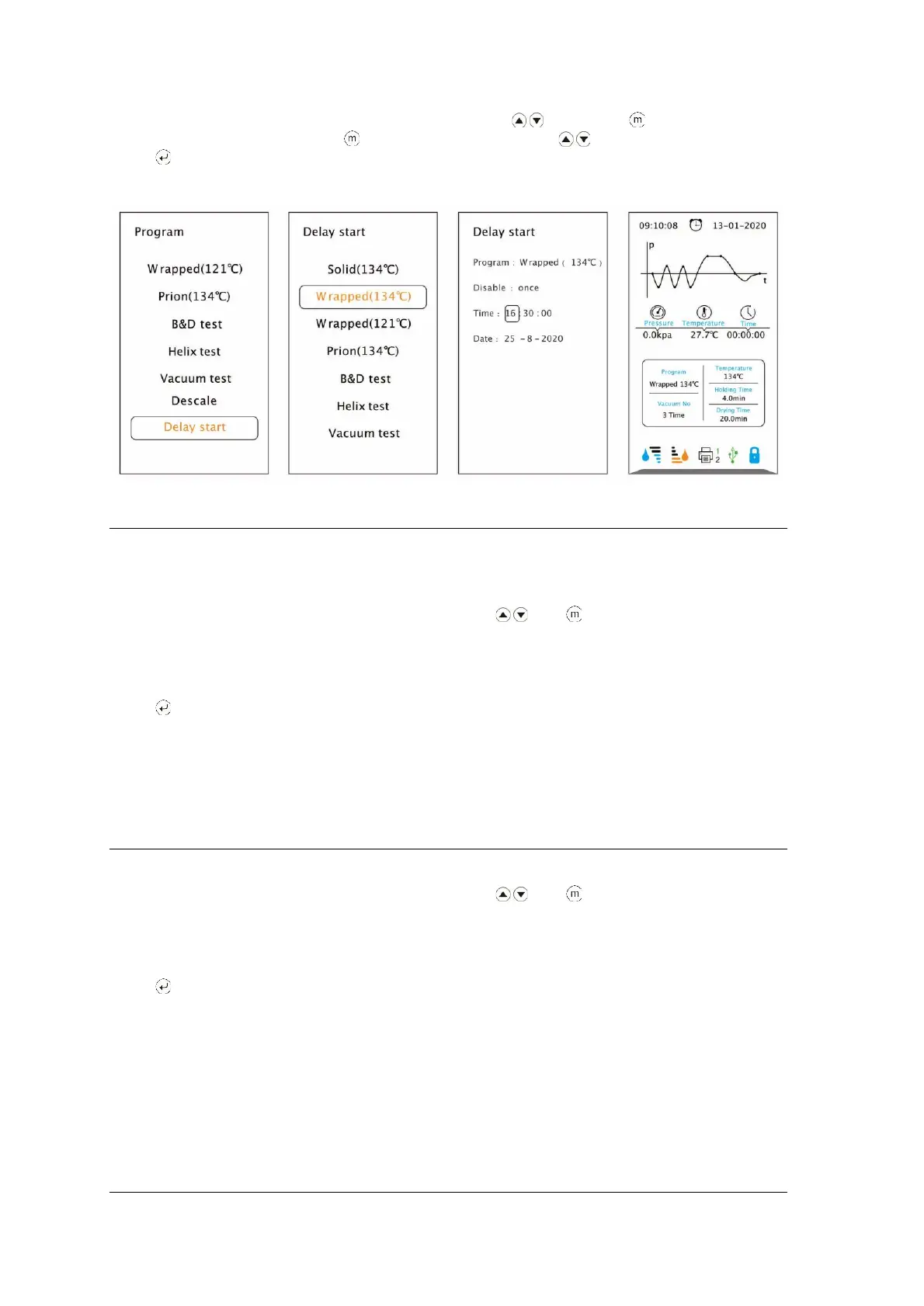
Select “Delay start”. Select the program by pressing then press to confirm.
Select the parameter by pressing button. Adjust it by pressing .
Press button to save and back.
Test Programs
Helix Test
Put the Helix test device into the chamber, then close the door.
Select “Program” from the main menu by pressing then to enter in the menu,
select “Helix test”; in the screen will appear the information as temperature and
sterilization time (holding time), also the date, time, current pressure and current
temperature.
Press to start the cycle. The stage, conditions and the status of the cycle will appear on the
display. The sterilizers will perform the program automatically. (see appendix 2).
After finishing the cycle, you may check the indicator and evaluate the result according with the
instructions of the test manufacturer.
B&D test
Put the B&D test package into the chamber, then close the door.
Select “Program” from the main menu by pressing then to enter in the menu,
select B&D test, in the screen will appear the information as the temperature and
sterilization time (holding time), also the date, time, current pressure and current
temperature.
Press to start the cycle. The stage, conditions and the status of the cycle will appear on the
display. The sterilizers will perform the program automatically. (see appendix 2).
After finishing the cycle, you may check the indicator and evaluate the result according with the
instructions of the test manufacturer.
Vacuum Test


 To Next Page