EasyManua.ls Logo

ICANCLAVE STE-18-D Pro - Symbols and Control Panel

ICANCLAVE STE-18-D Pro
25 pages
Print Icon
To Next Page IconTo Next Page
To Previous Page IconTo Previous Page
Loading...
6
Symbols
For safe operation, please pay close attention to the alert symbols below which can be
found on the sterilizer and throughout this manual.
Important information (Caution) Hot surface Ground
connection
2 Description of the sterilizer
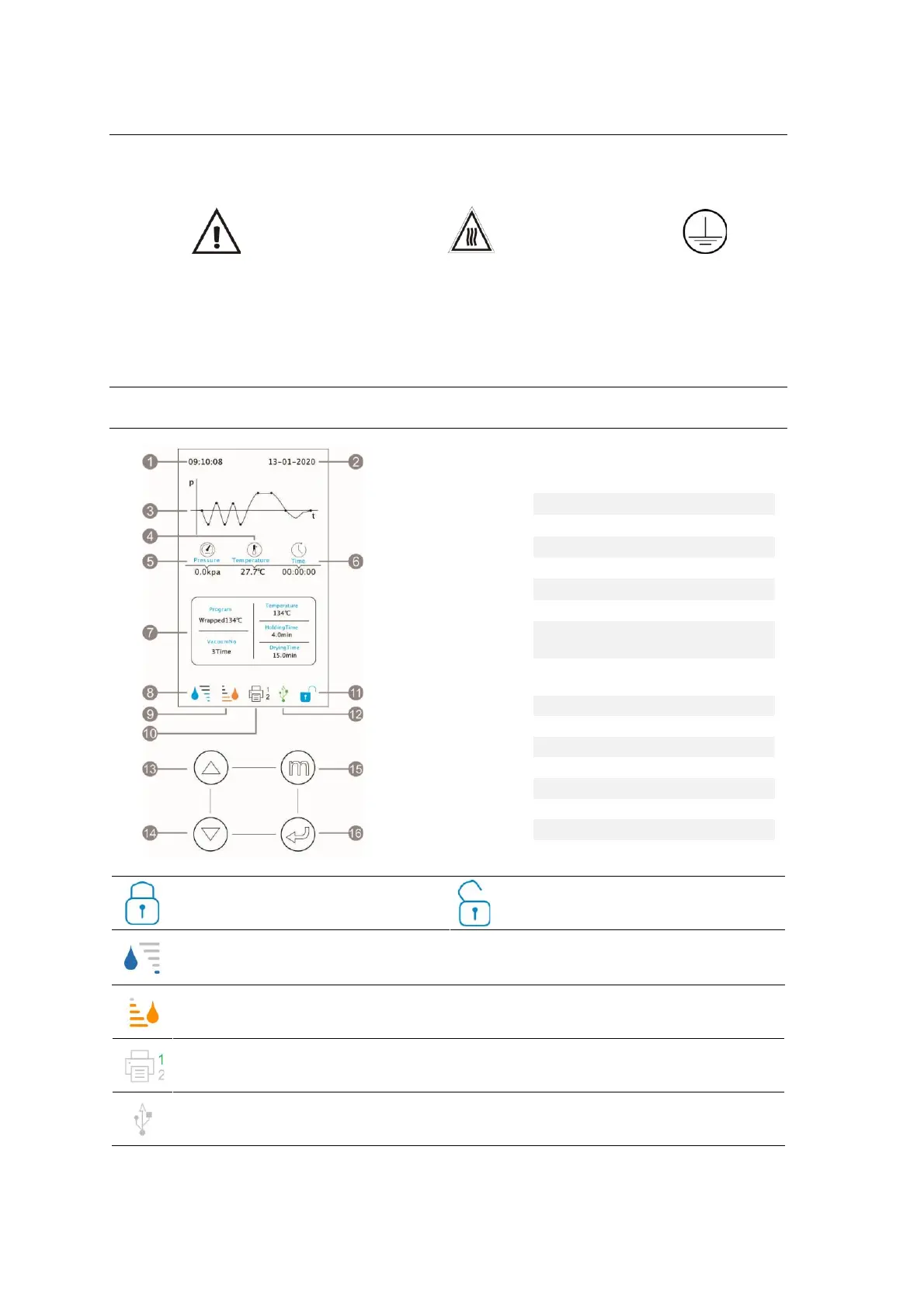
Screen and Control panel
Door closed / Tap to open the
door
Fill the tank if it is flashing
Min level of freshwater tank 0.5Liters
Drain the tank if it is flashing
The capacity is 1.5 liters
1 Report printer
Grey = No connected / no paper
Green =Ready
USB memory
Grey = No connected
Green =Ready
1
Time
2
Date
3
Process curve
4
Internal temperature
5
Internal pressure
6
Cycle time
7
Program information
8
Clean water tank
level
9
Used water tank
level
10
Printers
11
Door status
12
USB memory
13
Up button
14
Down button
15
Select button
16
Start button

Related product manuals