Basic Set
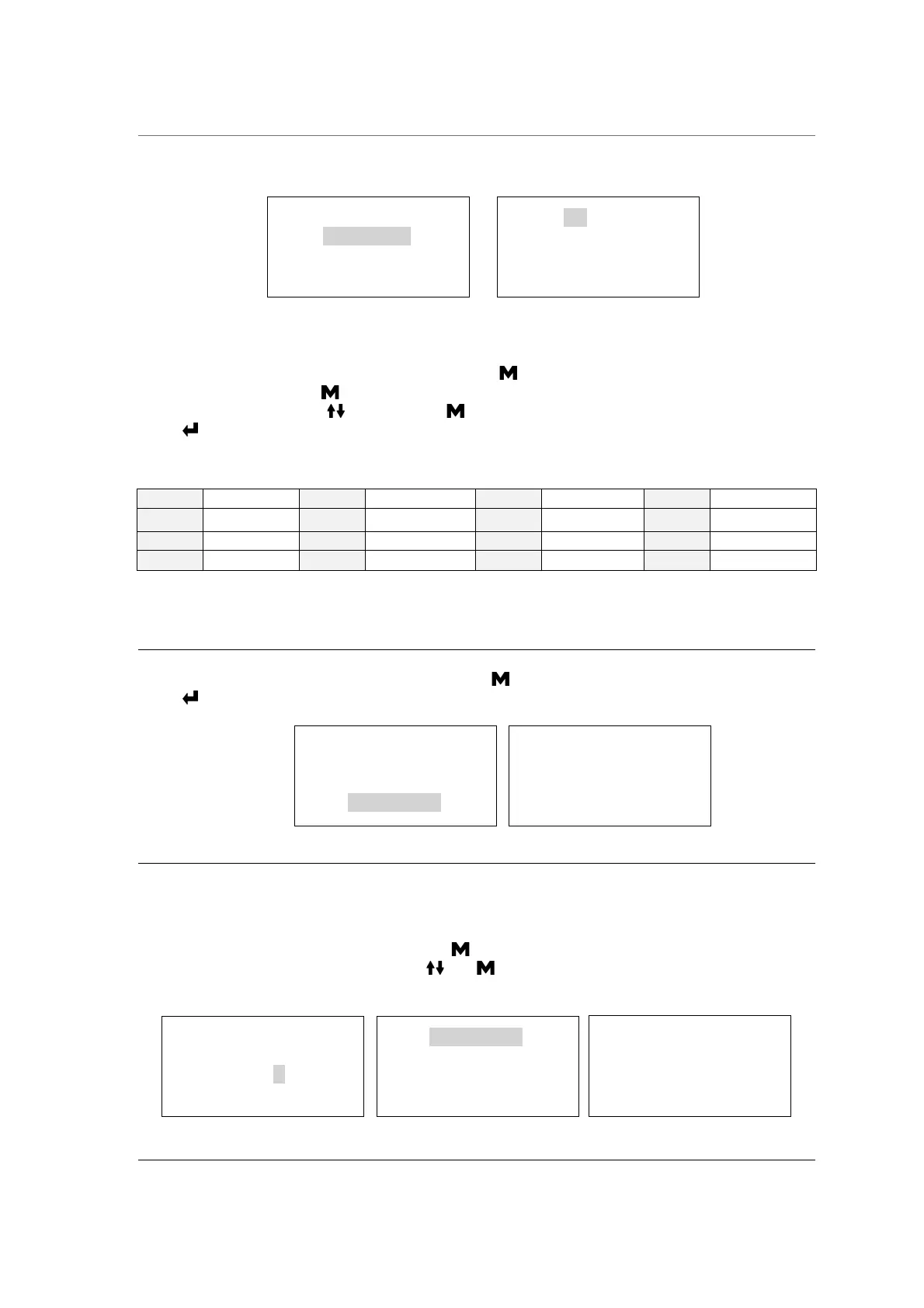
From the main menu,, select "Basic Set”.
The “Basic Set” menu permits to set the following options:
*Date *Time *Language
Select the “Basic Set” from the main menu by pressing button.
Select the item by pressing button. The unit you selected will be lighted.
Adjust the value by pressing buttons. Press button to select the next item.
Press button to save and back.
Abbreviation of language options
Note: The Counter (cycle No) cannot be set by the operator.
About device
Select “About device” from the main menu then press button.
Press button to back.
Advance Set
The “Setup” menu permits to set the following options:
*Parameter *Unit *Preheat *Expire date (labels) *Water quality (sensor)
and see the information of: *Last error
Select “Setup” from the main menu by pressing button.
Input the password digit to digit by pressing and button to go next.
Password: 1111
Parameter
Program
Basic Set
Report
Label
Date: 11-07-2019
Time: 12:05:35
Language: ENG
Counter: 00000
Parameter
Unit
Preheat
Expiry date
Water quality
Last error
About device
Device Info.
3BB12B 11111110
V2.9.0.1—00
SN: A09999B12
Basic Set
Report
Label
My device


 To Next Page