14
Marquee Cover Removal
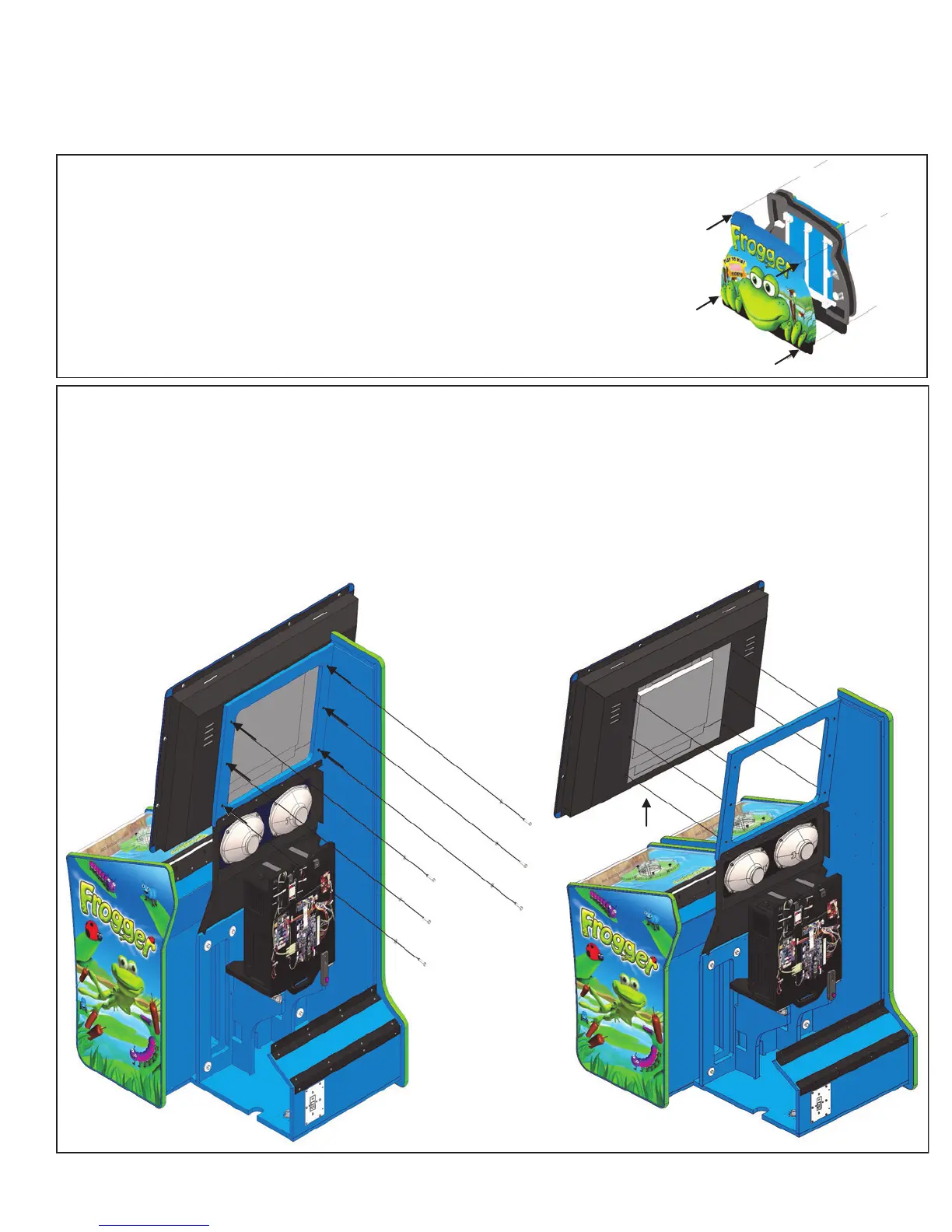
In order to replace the either the Firefly lights or the PLL bulbs used in the
marquee of the game, it is necessary to remove the front marquee graphic.
The marquee is held attached to the cabinet by 4 bolts with nuts. Once
removed, the marquee cover lifts up and out. You can now access both
items. See picture to the right.
Monitor Removal
It is recommended that three people, one on each side of the monitor and one person to remove the
mounting hardware in order to safely remove the assembly from the cabinet. Start by removing the
lower back door of the main cabinet and set it aside. Disconnect both the VGA cable and both the Red
and Black wires going to the monitor’s power supply. They are attached to the power supply with Phil-
lips screws. The Red wire is +24 volts and the Black wire is DC ground. Now remove the six 1/4 hex
mounting bolts shown below. The monitor assembly can now be removed from the cabinet.
Game Maintenance


 To Next Page