EasyManua.ls Logo

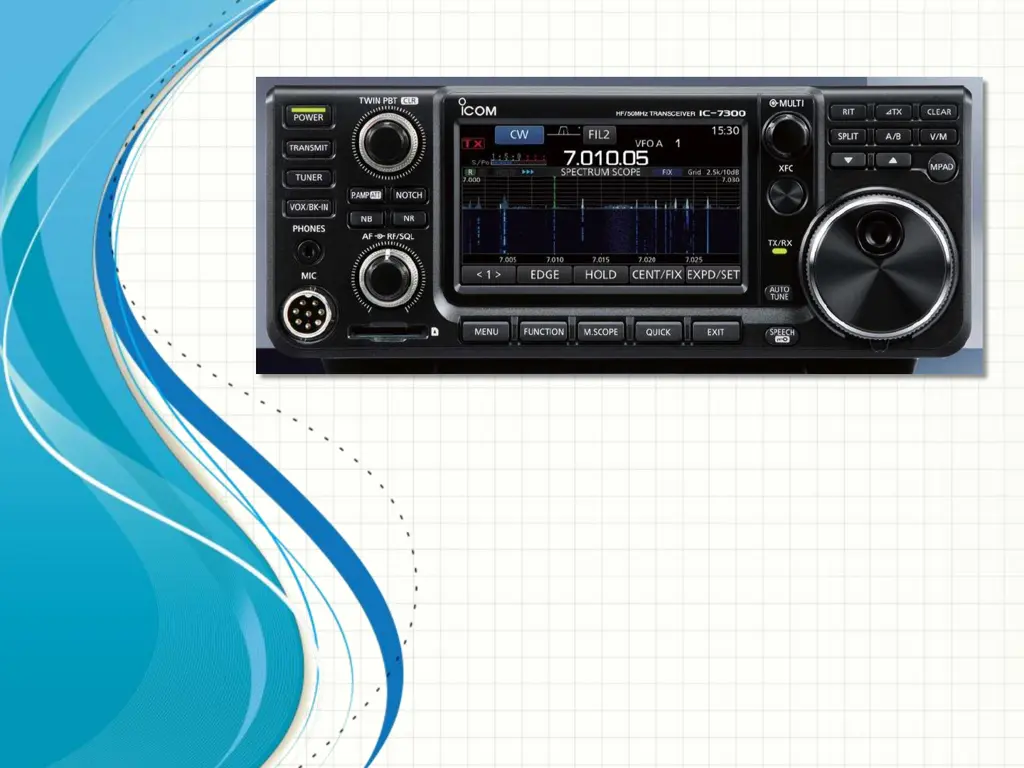
Icom IC-7300 - User Manual

Icom IC-7300
43 pages
Print Icon
To Next Page IconTo Next Page
Loading...
GETTING THE MOST FROM YOUR HF
TRANSCEIVER
FRED KEMMERER, AB1OC
JANUARY 10
TH
, 2017

Other manuals for Icom IC-7300

Questions and Answers

  • J
    James GoldenSep 23, 2025
    Why can't I hear the speech after pushing SPEECH on my Icom Transceiver?
    • L
      Larry PrestonSep 23, 2025
      If you cannot hear the speech after pushing SPEECH on your Icom Transceiver, the speech level may be too low. Adjust the speech level in the Speech setting.
  • A
    Amy BrooksAug 25, 2025
    How to save changes to a memory channel on Icom IC-7300 Transceiver?
    • M
      michaelmartinezAug 25, 2025
      If the contents of a selected memory channel are not changed on your Icom Transceiver, touch [MW] for 1 second to write them into the memory channel in the VFO/MEMORY screen when you want to save the changed settings.
  • J
    Jasmine MillerAug 25, 2025
    What to do if MAIN DIAL is not changing frequency on my Icom Transceiver?
    • K
      Kayla Best DDSAug 26, 2025
      If the displayed frequency on your Icom Transceiver does not change properly when rotating the MAIN DIAL, the Dial Lock function may be activated. Hold down the SPEECH button to turn the Dial Lock function OFF.
  • M
    Maureen ColemanAug 27, 2025
    How to fix no sound from the speaker on my Icom IC-7300 Transceiver?
    • L
      Larry RhodesAug 27, 2025
      If you're not hearing any sound from the speaker of your Icom Transceiver, here's what to check: * Rotate AF RF/SQL (inner) clockwise to increase the audio level. * Rotate AF RF/SQL (outer) to the 12 o’clock position to open the squelch. * Turn OFF the Tone squelch if it's ON in the FM mode. * Disconnect any headphones or external speakers connected to the [PHONES] jack. * Inspect the external speaker cable for cuts and repair if necessary.
  • C
    Charles OlsonSep 23, 2025
    How do I fix an Icom Transceiver touch screen that isn't working correctly?
    • R
      Richard Francis Jr.Sep 23, 2025
      If the touch screen on your Icom Transceiver is not working correctly, the touched point and the detected point may be different. Calibrate the touch screen.
  • R
    Richard TrujilloSep 13, 2025
    Why is the received audio unclear in SSB mode on my Icom Transceiver?
    • H
      Henry WilkinsSep 13, 2025
      If the received audio in SSB mode is unclear or distorted on your Icom Transceiver, the incorrect sideband may be selected. Try toggling between USB and LSB. It's also possible that the PBT function is activated; hold down TWIN PBT CLR to clear the settings.
  • C
    christinariveraSep 12, 2025
    Why can't I contact another station with my Icom Transceiver?
    • T
      Todd WoodsSep 12, 2025
      If you cannot contact another station with your Icom Transceiver, even though receiving and transmitting appear successful, the Split function may be activated, causing transmit and receive frequencies to differ. Push the SPLIT button to turn OFF this function. Alternatively, the RIT function or the ?TX function might be ON, also setting different receive or transmit frequencies; push RIT or TX to turn OFF these functions.
  • K
    katherine38Sep 12, 2025
    What causes a high antenna SWR on an Icom Transceiver?
    • T
      Tracy OconnellSep 12, 2025
      If the antenna SWR is too high on your Icom Transceiver, it could be that the antenna is not properly tuned. Adjust the antenna SWR to be less than 3. Also, ensure you are using a coaxial cable with a characteristic impedance of 50 Ω.
  • B
    Brian JacobsSep 4, 2025
    What to do if my Icom Transceiver displays “OVF”?
    • S
      Steven FranklinSep 4, 2025
      If your Icom Transceiver displays “OVF,” it means an excessively strong signal is being received. Try rotating the AF RF/SQL (outer) dial counter-clockwise. If this doesn't help, turn ON the attenuator.
  • K
    Karen GraySep 2, 2025
    Why is the received audio unclear on my Icom IC-7300 Transceiver in SSB mode?
    • B
      Bobby CollierSep 2, 2025
      If the received audio in SSB mode is unclear or distorted on your Icom Transceiver: * Toggle between USB and LSB to select the correct sideband. * Hold down TWIN PBT CLR to clear the settings if the PBT function is activated.

Summary

Its Mostly About The Receiver

Controls to Optimize Weak Signals

Identifies specific controls for improving reception of weak signals.

Using Your Filters

Guide on adjusting filters (Passband Tuning, IF Shift) for noise and interference reduction.

Dynamic Range - Its About Optimal Gain Control

Explains how gain control, preamplifiers, and attenuators affect dynamic range.

Pulling in and Cleaning Up a Weak Signal

Steps for improving reception of weak or noisy signals using various controls.

Transmitter Tips and Tricks

Adjusting Microphone Gain, Compression, Tx Bandwidth

Guidance on optimizing audio quality and transmission bandwidth for SSB.

Using an Amplifier

Guidelines for connecting and safely using external linear amplifiers.

Common Operating Scenarios

Split Operation

Explains split operation and strategies for working DX stations.

Working Split

Step-by-step guide to setting up and performing split operations on the transceiver.

Icom IC-7300 Specifications

General IconGeneral
Product typePortable CB radio
Product colorBlack
Housing materialSteel
Input voltage13.8 V
Microphone includedYes
Output power100 W
Frequency range0.5 - 70 MHz
Channels quantity101 channels
Compatible productsAH-2B; AH-4; AH-5NV; AH-710; AH-740; CT-17; HM-219; MB-118; MB-123; OPC-2321; OPC-420; OPC-599; PS-126; RC-28; SM-30; SM-50; SP-23; SP-33; SP-34; SP-35; SP-35L; SP-38; SP-41;
Display typeLCD
Weight and Dimensions IconWeight and Dimensions
Depth238 mm
Width240 mm
Height94 mm

Related product manuals