EasyManua.ls Logo

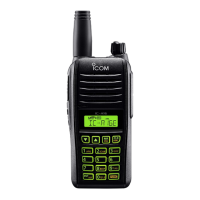
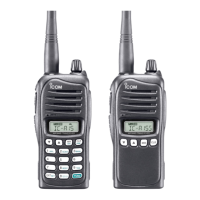
Icom IC-A14 - Service Manual

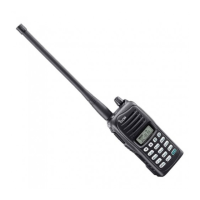
Icom IC-A14
28 pages
Print Icon
To Next Page IconTo Next Page
Loading...
S-14417XZ-C1
Jan. 2008
VHF AIR BAND TRANSCEIVER

Other manuals for Icom IC-A14

Questions and Answers

  • J
    Joy BuckAug 18, 2025
    How to unlock Icom Transceiver frequency?
    • D
      Danny LynchAug 18, 2025
      If you cannot change the operating frequency or memory channel on your Icom Transceiver, the lock function might be activated. Hold down [ ] for 2 seconds to turn the lock function OFF.
  • P
    perezanthonyAug 20, 2025
    How to unlock frequency change on Icom IC-A14?
    • R
      Robin ConwayAug 20, 2025
      If the operating frequency or memory channel on your Icom Transceiver can't be changed, the lock function may be activated. Hold down [ ] for 2 seconds to turn the Lock function OFF.
  • E
    Eric JenningsAug 23, 2025
    Why Icom Transceiver won't turn on?
    • D
      Donna LittleAug 23, 2025
      Your Icom Transceiver might not be turning on because the battery is exhausted. In that case, recharge the battery pack. Alternatively, there may be a bad connection for the battery pack. Check the connection to the transceiver to ensure it is properly connected.
  • S
    Samantha HurleyAug 26, 2025
    What to do if Icom IC-A14 Transceiver has no sound?
    • R
      Robin RodriguezAug 26, 2025
      If there is no sound coming from the speaker of your Icom Transceiver, it could be due to a squelch level that is too deep. Try setting the squelch to the threshold point. Also, check if the volume level is too low and set the [VOL] to a suitable level.
  • T
    Thomas SmithAug 28, 2025
    Why Icom IC-A14 scan does not start?
    • B
      Brittney GonzalesAug 28, 2025
      The scan function on your Icom Transceiver might not start for several reasons: - All memory channels in the selected bank are not programmed as “TAG” channels. Set the “TAG” settings of desired channels. - The squelch is open. Adjust the squelch level to tighten it. - There are not more than 2 memorized channels. Program 2 or more memory channels.
  • A
    Aaron JohnsonAug 30, 2025
    How to fix Icom IC-A14 transmitting impossible issue?
    • E
      Erin FieldsAug 30, 2025
      If you are unable to transmit with your Icom Transceiver, it may be because WX channels or the NAVI band is selected. Set the COM band in frequency mode. Also, ensure that the battery is not exhausted by recharging the battery pack.
  • B
    ballsabrinaSep 1, 2025
    How to turn on beep sound on Icom IC-A14 Transceiver?
    • G
      Gina BellSep 1, 2025
      If there are no beep sounds on your Icom Transceiver, it is possible that the beep tones are turned OFF. To turn them ON: - For IC-A14: Push [FUNC], then push [BEEP](8). - For IC-A14S: Turn the beep tone ON in set mode.
  • A
    Alexander PowellSep 4, 2025
    Why is my Icom Transceiver not transmitting?
    • C
      Chelsea HornSep 4, 2025
      If your Icom Transceiver isn't transmitting, it might be because a WX channel or the NAVI band is selected. Switch to COM band in frequency mode. Also, check if the battery is exhausted and recharge it if necessary.
  • T
    Tiffany SchwartzSep 6, 2025
    How to fix no sound from the Icom IC-A14 speaker?
    • C
      Christopher WestSep 6, 2025
      If you're not getting any sound from your Icom Transceiver's speaker, the squelch level might be set too deep. Try adjusting the squelch to the threshold point. Also, make sure the volume isn't too low by adjusting the [VOL] to a suitable level.
  • R
    Robert HernandezSep 9, 2025
    What to do if my Icom Transceiver won't turn on?
    • Z
      Zachary StantonSep 9, 2025
      If your Icom Transceiver won't power on, the battery may be exhausted; try recharging it. Also, ensure the battery pack has a good connection by reattaching it to the transceiver.

Summary

Specifications

Inside Views

PA Unit Views

Shows the top and bottom views of the Power Amplifier unit components.

Main Unit Views

Displays the top and bottom views of the Main Unit components.

Disassembly Instructions

Front Panel Removal

Step-by-step guide for safely removing the front panel assembly.

Main Unit Removal

Instructions for detaching the main circuit board unit from the chassis.

PA Unit Removal

Procedure for safely disassembling the Power Amplifier unit.

Circuit Description

Receiver Circuitry

Details the signal path and components for receiving radio signals.

Transmitter Circuitry

Explains the circuitry responsible for transmitting radio signals.

Frequency Synthesizer Circuits

Describes the VCO and PLL circuits for frequency generation.

Port Allocations

Lists and explains the function of each CPU port.

Voltage Block Diagram

Illustrates the power distribution and voltage regulation.

Parts List

Mechanical Parts

Chassis Mechanical Parts

Lists mechanical components associated with the transceiver's chassis.

PA Unit Mechanical Parts

Lists mechanical components specific to the Power Amplifier unit.

ANT Unit Mechanical Parts

Lists mechanical components for the Antenna unit.

DC Unit Mechanical Parts

Lists mechanical components for the DC power unit.

Accessories List

Lists optional accessories and included items for the transceiver.

Main Unit Mechanical Parts

Lists mechanical components specific to the Main Unit.

Board Layouts

Main Unit Top View Layout

Diagram showing component placement on the top of the main board.

PA Unit Top View Layout

Diagram showing component placement on the top of the PA unit board.

ANT Unit Top View Layout

Diagram showing component placement on the top of the antenna unit board.

DC Unit Top View Layout

Diagram showing component placement on the top of the DC unit board.

Block Diagram

Voltage Diagram

Main Unit Voltage Diagram (Left Side)

Detailed voltage schematic for the left section of the main unit.

Main Unit Voltage Diagram (Center)

Detailed voltage schematic for the center section of the main unit.

Main Unit Voltage Diagram (Right Side)

Detailed voltage schematic for the right section of the main unit.

Icom IC-A14 Specifications

General IconGeneral
Power Supply Requirement7.2 V DC
ModeSimplex
TypeAviation Transceiver
Frequency Range118.000 - 136.975 MHz
Channel Capacity200 Channels
Power Output5 W
Battery LifeApprox. 8 hours (with standard battery)
Channel Spacing25 kHz
Current Drain (at 7.2 V DC)1.5 A (max)
Modulation SystemAM
Spurious EmissionsLess than –60dBc
Audio Output Power500 mW (at 10% distortion)
Adjacent Channel Selectivity70 dB
Spurious Response Rejection70 dB

Related product manuals