EasyManua.ls Logo

Icom IC-A15S - User Manual

Icom IC-A15S
40 pages
Print Icon
To Next Page IconTo Next Page
Loading...
INSTRUCTION MANUAL
iA15
iA15S
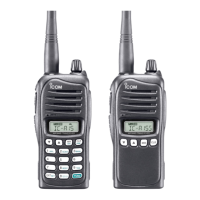
VHF AIR BAND TRANSCEIVER
YIC-A15 YIC-A15S

Questions and Answers

  • J
    Jacqueline VargasJul 31, 2025
    How to unlock the frequency on my Icom Transceiver?
    • M
      Michelle HarrisJul 31, 2025
      If you are unable to change the operating frequency or memory channel on your Icom Transceiver, the lock function may be activated. Push and hold [ ] for 2 seconds to turn the lock function OFF.
  • D
    Dr. Stephanie Rivera DDSAug 5, 2025
    How to fix an Icom IC-A15S Transceiver that has no power?
    • R
      robinsonmatthewAug 6, 2025
      If your Icom Transceiver won't turn on, the battery may be exhausted. Try recharging the battery pack. Alternatively, there might be a bad connection. Ensure the battery pack is properly connected to the transceiver.
  • C
    Cynthia KennedyAug 12, 2025
    Why is there no sound coming from my Icom IC-A15S speaker?
    • T
      Tina HaydenAug 12, 2025
      If you can't hear any sound from the Icom Transceiver speaker, it might be due to the squelch level being too deep. Try setting the squelch to the threshold point. Also, the volume level might be too low. Adjust the [VOL] to a suitable level.
  • J
    Jason FranklinAug 18, 2025
    Why doesn't the scan start on my Icom IC-A15S Transceiver?
    • L
      lisa84Aug 18, 2025
      If the scan function on your Icom Transceiver does not start, it could be due to several reasons: * All memory channels in the selected bank are not programmed as “TAG” channels. Set the “TAG” settings of desired channels. * The squelch is open. Set the squelch level to tighten. * There are not more than 2 memorized channels. Program 2 or more memory channels.
  • A
    Adam NguyenAug 23, 2025
    How to turn on beep sounds on Icom IC-A15S Transceiver?
    • K
      Kelly WashingtonAug 23, 2025
      If there are no beep sounds on your Icom Transceiver, the beep tones may be turned OFF. To turn them ON: * For IC-A15: Push [FUNC], then push [BEEP](8). * For IC-A15S: Turn the beep tone ON in set mode.

Summary

Declaration of Conformity

List of Country Codes

Lists country codes for compliance with regulations.

Introduction and Important Information

Key Operational Guidance

Contains critical instructions, definitions, and foreword.

Included Accessories

Lists all items supplied with the transceiver.

Safety Precautions

Device Layout and Display

Physical Panel Description

Details the physical buttons, connectors, speaker, and microphone.

Function Display Indicators

Explains the meaning of various indicators shown on the LCD.

Accessory Installation

Antenna and Belt Clip Mounting

Instructions for attaching the antenna and belt clip.

Battery Pack Attachment

Steps for connecting and disconnecting the battery pack.

Core Device Operations

Frequency Setting and Tuning

How to set and adjust the operating frequency using keys or keypad.

Squelch, Lock, and Receiving

Adjusting squelch, activating key lock, and receiving signals.

Transmitting and Audio Features

How to transmit, side tone function, LCD backlight, and low battery indicator.

Memory Channel Management

Navigating Memory Channels and Banks

Selecting and organizing memory channels into banks.

Programming Memory and Names

Storing frequencies and assigning custom names to memory channels.

Memory Content Operations

Copying memory contents and clearing unwanted channels.

Scanning Procedures

Scan Type Overview

Explains frequency scan and memory scan types.

Frequency and Memory Scan Execution

Steps to start and stop frequency and memory scans.

TAG Channel Skip Configuration

How to set channels to be skipped during scan operations.

Additional Device Functions

Home Function and Emergency Access

Returning to default settings and accessing the 121.5 MHz emergency frequency.

Audio and Noise Limiter Settings

Configuring key touch beep, ANL function, and microphone gain.

System Settings and Usage

Adjusting set mode items, internal mic usage, and time-out timer.

Battery Pack Information

Battery Safety and Charging Warnings

Critical safety information regarding battery handling and charging.

Battery Charging Methods

Details on regular charging using BC-179 and associated accessories.

Rapid Charging Systems

Information on rapid charging with BC-119N and BC-121N adapters.

Data Transfer and Cloning

Transceiver-to-Transceiver Cloning

Procedures for transferring data between transceivers.

PC Cloning and Error Handling

Cloning data to/from a PC and managing cloning errors.

Troubleshooting Guide

Technical Specifications

Optional Accessories

Headset Interface

Icom IC-A15S Specifications

General IconGeneral
Channel Spacing8.33 kHz/25 kHz
Power Supply Requirement7.2 V DC
ModeAM
TypeHandheld transceiver
Frequency Range118.000–136.991 MHz
Channels200
Power Output5 W
WeightApprox. 300 g
Modulation SystemAM
Audio Output Power500 mW

Related product manuals