16
4
MEMORY OPERATION
NOTE: When programming a memory name to the pro-
grammed memory channel, operate as follow.
q Select the desired memory channel that requires a name.
(see p. 12).
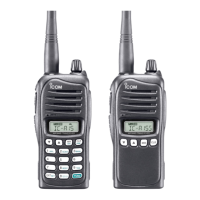
For IC-A15
w Push [FUNC] then push [MW](MR).
• The selected memory contents copied into frequency mode
and frequency mode is selected automatically.
e Push [FUNC] then push [MW](MR) again.
r
Push [MR] momentarily to select memory name pro-
gramming mode.
t Perform the steps t and y described at left page in “For
IC-A15” to program the desired memory name.
For IC-A15S
w Push and hold [MR] for 1 sec.
• The selected memory contents copied into frequency mode
and frequency mode is selected automatically.
e Push and hold [MR] for 1 sec. again.
r
Push [MR] momentarily to select memory name pro-
gramming mode.
t Perform the steps t and y described at left page in “For
IC-A15S” to program the desired memory name.
n Copying memory contents
This function copies a memory channel’s contents into the
frequency mode. This is useful when searching for signals
around a memory channel’s frequency.
q Push [MR] to select memory mode.
w Select the desired memory channel to be copied using
[Y]/[Z] (or keypad and [ENT]; for IC-A15 only).
• Select the desired bank if desired.
For IC-A15
e Push [FUNC], then push [MW](MR) to copy the memory
channel’s contents into the frequency mode.
• Frequency mode is automatically selected.
For IC-A15S
e Push and hold [MR] for 1 sec. to copy the memory chan-
nel’s contents into the frequency mode.
• Frequency mode is automatically selected.
1
2
3
4
5
6
7
8
9
10
11
12
13
14
15
16
17
18
19



 To Next Page