22
6
OTHER FUNCTIONS
1
2
3
4
5
6
7
8
9
10
11
12
13
14
15
16
17
18
19
n Set mode setting
Set mode is used for programming infrequently changed val-
ues or conditions of functions.
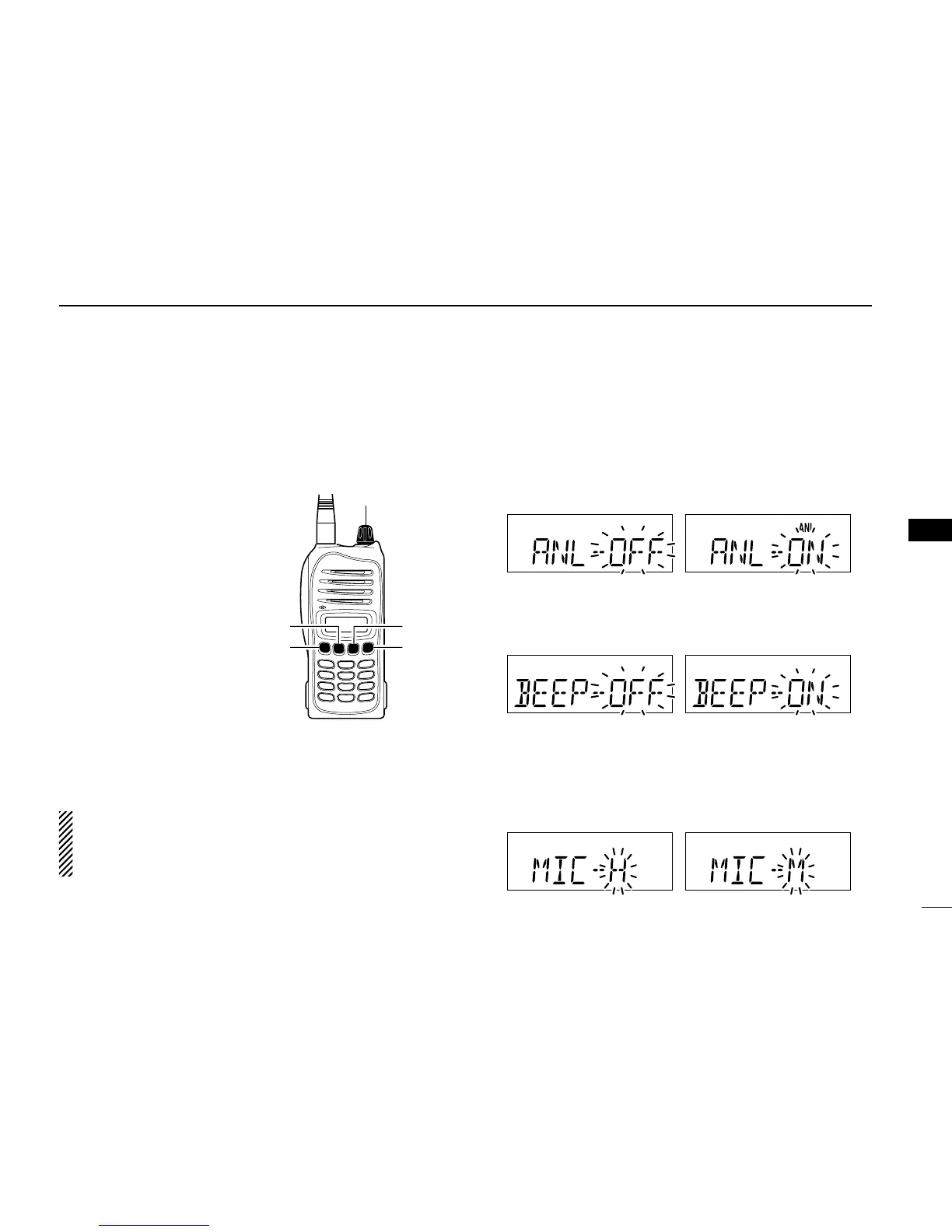
D Entering set mode
q Rotate [VOL] to turn the
transceiver power OFF.
w While pushing and holding
[Y] and [Z], turn [VOL] to
enter set mode.
e Push [MR] several times
to select the desired set
mode item.
r Push [Y]/ [Z] to select the
desired condition or value
for the item.
t Push [CLR] to return to
frequency mode.
For IC-A15 only
Push [FUNC] then push and hold [SET](ENT) for 1 sec. to
also enters into set mode.
For your information:
The default value of the set mode items can be changed
with the optional cloning software, CS-A14. And the de-
fault settings are re-called by the home function.
D Set mode items
• ANL— ANL function (available with IC-A15S only)
Sets the ANL (Automatic Noise Limiter) function that reduces
noise components such as that caused by engine ignition
systems while receiving.
• BEEP— Key touch beep (available with IC-A15S only)
The beep tone which sounds at the push of a switch can be
set, if desired.
• MIC— Microphone gain
The internal microphone gain can be selected to suits your
communicating style.
“H” (High gain), “M” (Middle gain) and “L” (Low gain) selections
are available.



 To Next Page