EasyManua.ls Logo

Icom IC-A22 - Parts List; IC-A22;E RF Unit Components

Icom IC-A22
63 pages
Print Icon
To Next Page IconTo Next Page
To Previous Page IconTo Previous Page
Loading...
ms
3
BASIC
OPERATION
lM
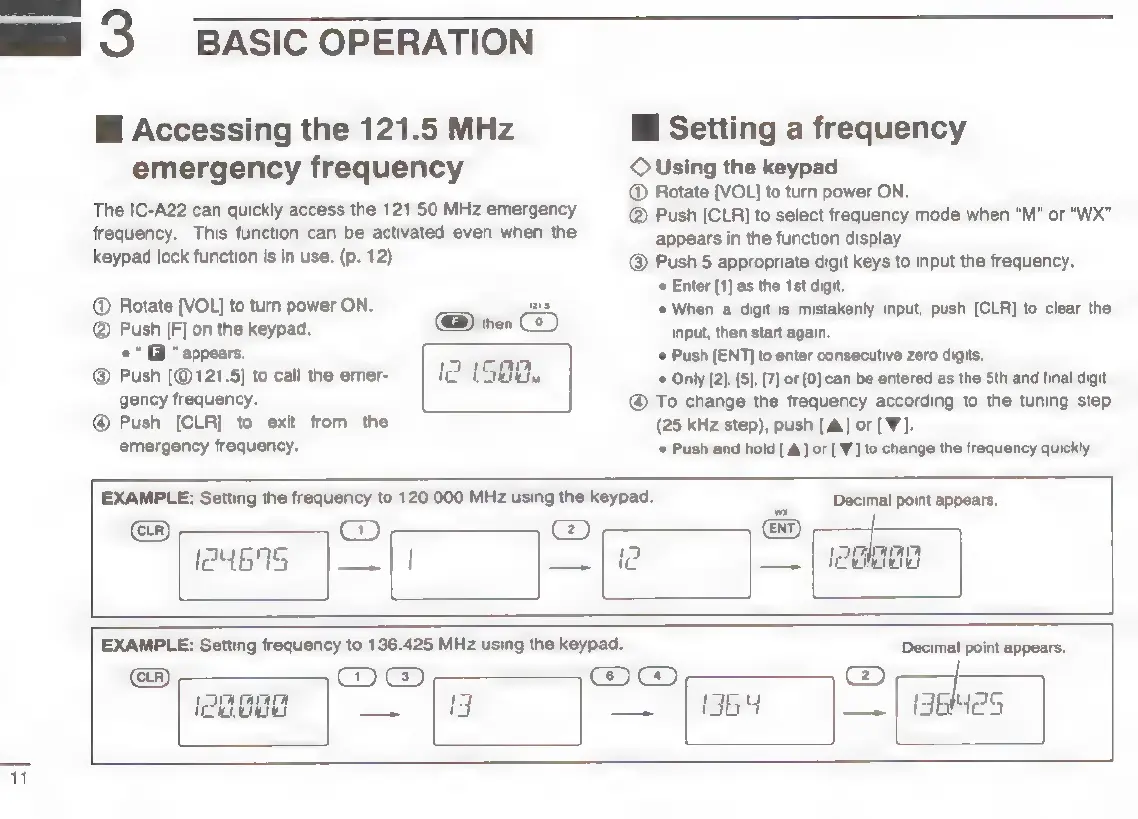
Accessing
the
121.5
MHz
emergency
frequency
The
IC-A22
can
quickly
access
the
121.50
MHz
emergency
frequency.
This
function
can
be
activated
even
when
the
keypad
lock
function
is in
use.
(p.
12)
@
Rotate
[VOL]
to
turn
power
ON.
Push
[F]
on
the
keypad.
@
“appears.
Push
121.5]
to
call
the
emer-
gency
frequency.
@
Push
[CLR]
to
exit
from
the
emergency
frequency.
EXAMPLE:
Setting
the
frequency
to
120.000
MHz
using
the
keypad.
i
Setting
a
frequency
©
Using
the
keypad
@
Rotate
[VOL]
to
turn
power
ON,
@
Push
[CLR]
to
select
frequency
mode
when
“M"
or
“WX”
appears
in
the
function
display.
@
Push
5
appropriate
digit
keys
to
input
the
frequency.
*
Enter
[1]
as
the
1st
digit.
*
When
a
digit
is
mistakenly
input,
push
[CLR]
to
clear
the
input,
then
start
again.
«
Push
[ENT]
to
enter
consecutive
zero
digits.
*
Only
[2}, [5],
(7]
or
[0]
can
be
entered
as
the
Sth
and
final
digit.
@
To
change
the
frequency
according
to
the
tuning
step
(25
kHz
step),
push
[A]
or
[W].
Push
and
hold
[A]
or
['W]
to
change
the
frequency
quickly,
Decimal
point
appears.
[ew
4575
|_.
;
EXAMPLE:
Setting
frequency
to
136.425
MHz
using
the
keypad.
Oe
@@
(Phang
as
|
8
ager
||
TET
Decimal
point
appears.
@
|
36He25

Other manuals for Icom IC-A22

Related product manuals