EasyManua.ls Logo

Icom IC-A22 - Scan Operation; Scan Types; COM Band Scan; Memory Scan

Icom IC-A22
63 pages
Print Icon
To Next Page IconTo Next Page
To Previous Page IconTo Previous Page
Loading...
me
5
SCAN
OPERATION
i
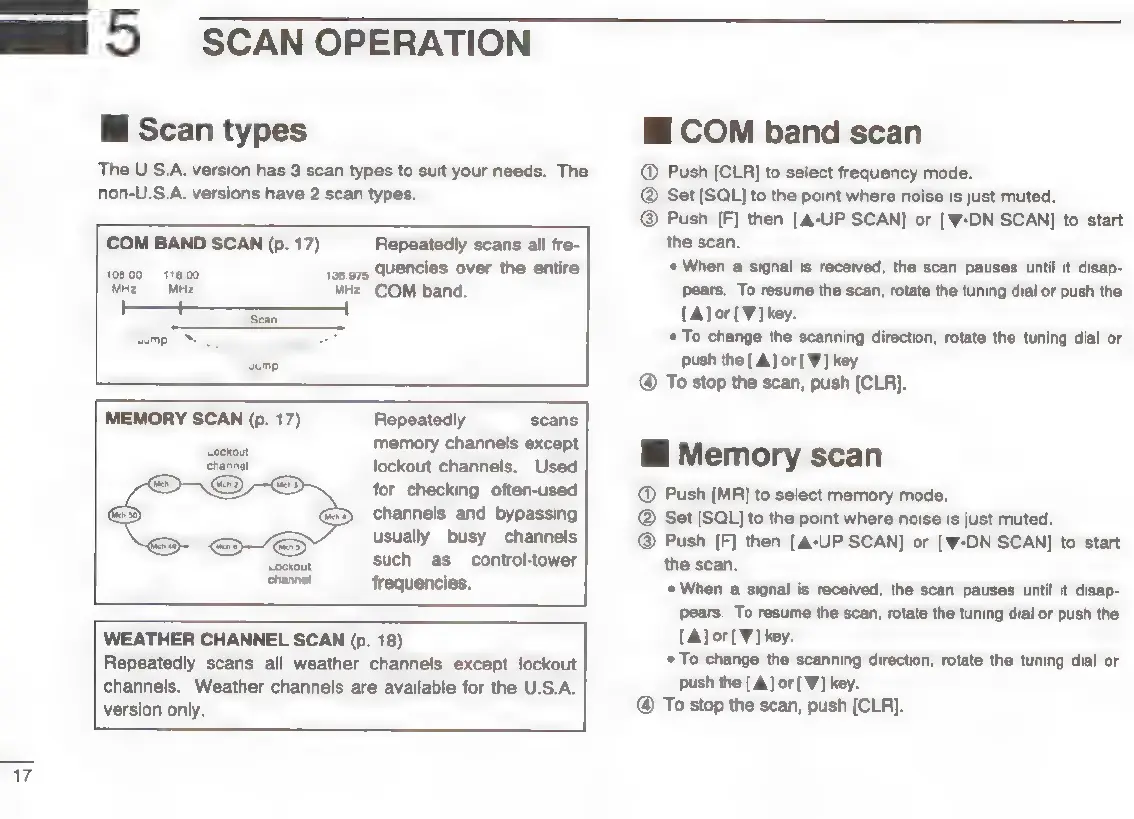
Scan
types
The
U.S.A.
version
has
3
scan
types
to
suit
your
needs.
The
non-U.S.A.
versions
have
2
scan
types.
COM
BAND
SCAN
(p.
17)
108.00
118,00
MHz
=
MHz
Repeatedly
scans
all
fre-
198.975
quencies
over
the
entire
Hz
COM
band.
MEMORY
SCAN
(p.
17)
Repeatedly
scans
memory
channels
except
lockout
channels.
Used
for
checking
often-used
channels
and
bypassing
usually
busy
channels
such
as
control-tower
ehanne!
frequencies.
WEATHER
CHANNEL
SCAN
(p.
18)
Repeatedly
scans
all
weather
channels
except
lockout
channels.
Weather
channels
are
available
for
the
U.S.A.
version
only.
EE
|
HI
COM
band
scan
@
Push
[CLR]
to
select
frequency
mode.
Set
[SQLJ
to
the
point
where
noise
is
just
muted.
@
Push
[F]
then
[A-UP
SCAN]
or
[W-DN
SCAN]
to
start
the
scan.
When
a
signal
is
received,
the
scan
pauses
until
it
disap-
pears.
To
resume
the
scan,
rotate
the
tuning
dial
or
push
the
[A]
or[¥]
key.
*
To
change
the
scanning
direction,
rotate
the
tuning
dial
or
push
the
[A]
or
[W]
key.
@
To
stop
the
scan,
push
[CLR].
Hi
Memory
scan
@
Push
[MR]
to
select
memory
mode.
Set
[SQL]
to
the
point
where
noise
is
just
muted.
@
Push
[F]
then
[A-UP
SCAN]
or
[W-DN SCAN]
to
start
the
scan,
«
When
a
signal
is
received,
the
scan
pauses
until
it
disap-
pears.
To
resume
the
scan,
rotate
the
tuning
dial
or
push
the
[A]
or
[¥]
key.
*
To
change
the
scanning
direction,
rotate
the
tuning
dial
or
push
the
[A]
or['W]
key.
@
To
stop
the
scan,
push
[CLR].

Other manuals for Icom IC-A22

Related product manuals