10
3
BASIC OPERATION
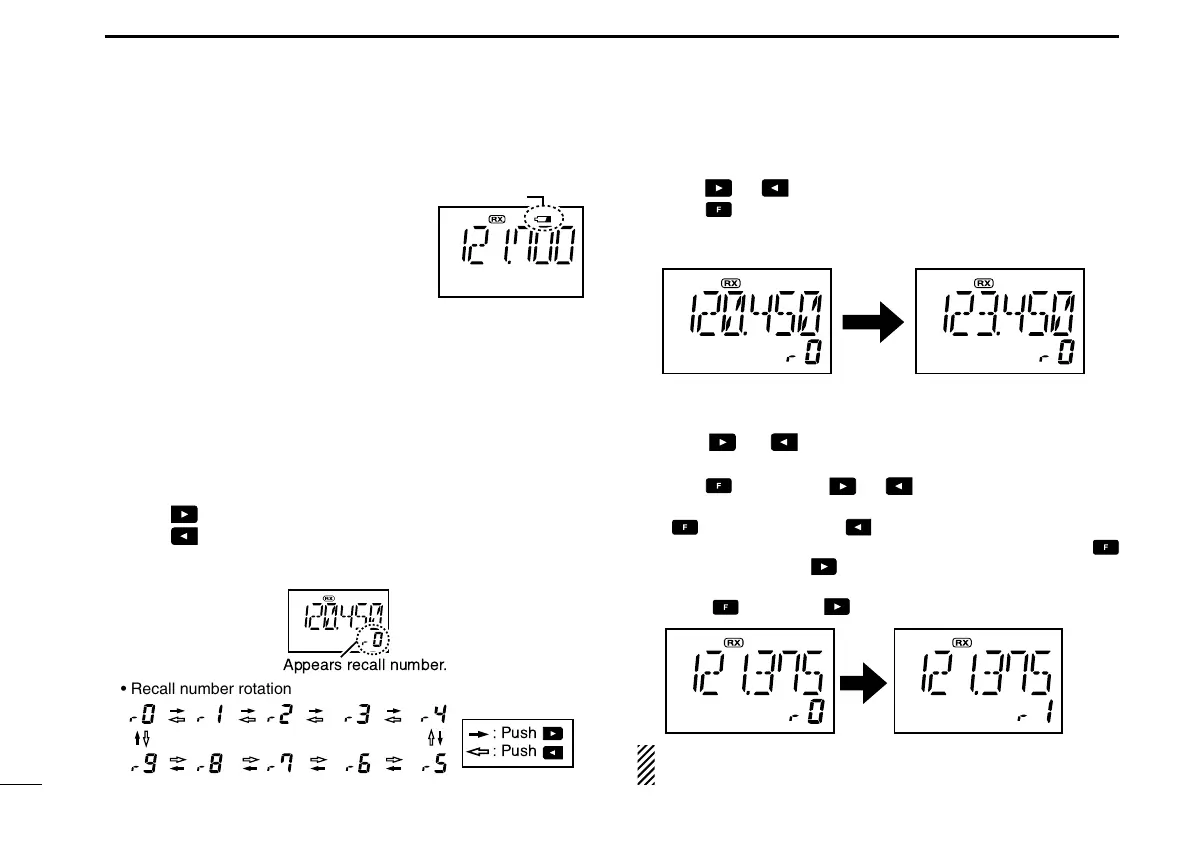
■ Low battery indicator
Low battery indicator appears
when the battery power has de-
creased to a specified level. The
attached battery pack requires
recharging.
■ Recall function
The recall function stores the last 10 frequencies used.
The function stores frequencies when the frequency is pro-
grammed and transmitted on (except memory and emer-
gency channels).
D Calling the stored frequencies
➥ Push to call the 1st stored frequency.
➥ Push to call the 10th stored frequency.
➥ Push [CLR•
DEL] to exit the recall function.
D Deletes the stored recall channel
q Push or to select the deleting recall channel.
w Push , then push [CLR•
DEL] for 2 sec. to delete it.
• (e.g.) Deletes “r0” recall channel which is stored 120.450 MHz,
and “r1” recall channel stores 123.450 MHz.
D Replaces the stored recall channel
q Push or to select the recall channel to be re-
placed.
w Push , then push or to replace it.
• Replaces the selected channel into the previous channel when
is pushed and then is pushed.
• Replaces the selected channel into the next channel when
is pushed and then is pushed.
• (e.g.) To replace “r0” which is stored as 121.375 MHz into “r1”,
push , then push .
NOTE: Deletes in order of old
recall
channel automatically
when stored frequencies exceeds 10 channels.


 To Next Page