11
Bluetooth
®
OPERATION
11-5
Step 4: Connect to the device (Transceiver)
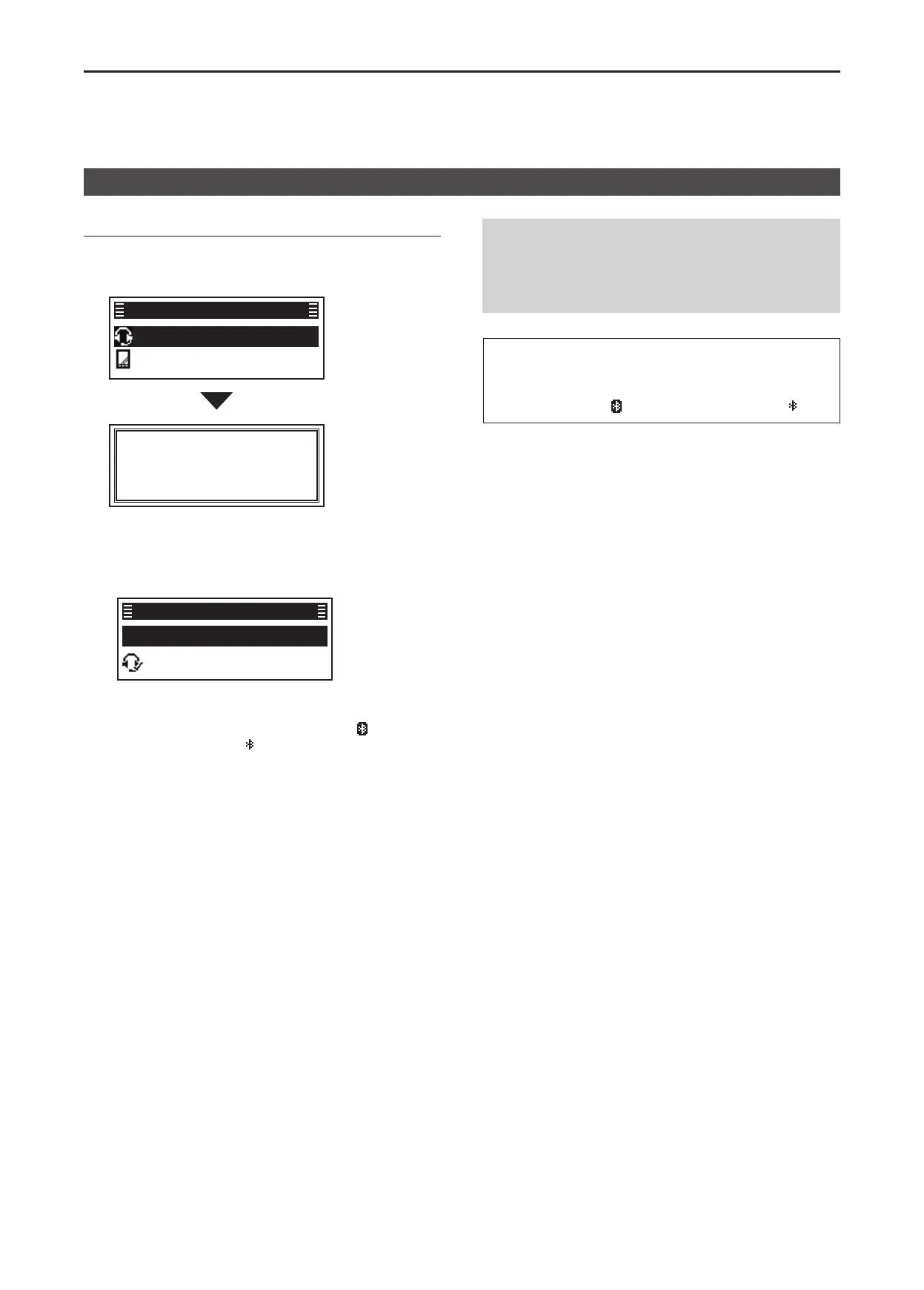
1� Push [P2 (Up)] or [P1 (Down)] to select the
headset to connect, then push [OK]�
• Connects to the headset�
ICOM BT-002
PC1
Find Device Result
Connecting
L If the Serial Port Access Authorization screen is
displayed when using a PC, accept it� See the
deviceʼs instruction manual for details.
• After the transceiver and the device connection has
succeeded, “✔” is displayed beside the deviceʼs icon.
Find Device
ICOM BT-002 ►
Device List
2� Hold down [Back] for 1 second to return to the
standby screen�
• While connected to a Bluetooth device, “ ” is
displayed instead of “
�”
TIP: When Auto Connect is set to “ON,” the
transceiver automatically connects to the last paired
device after you turn ON the transceiver�
After connecting, “ ” is displayed instead of “ �”
Pairing with a headset or a data device
NOTE: The transceiver connects to the last
connected device, if the connecting operation is
performed on the device side, even if Auto Connect
is set to “OFF�”
(Menu > Bluetooth > Auto Connect)


 To Next Page