11
Bluetooth
®
OPERATION
11-9
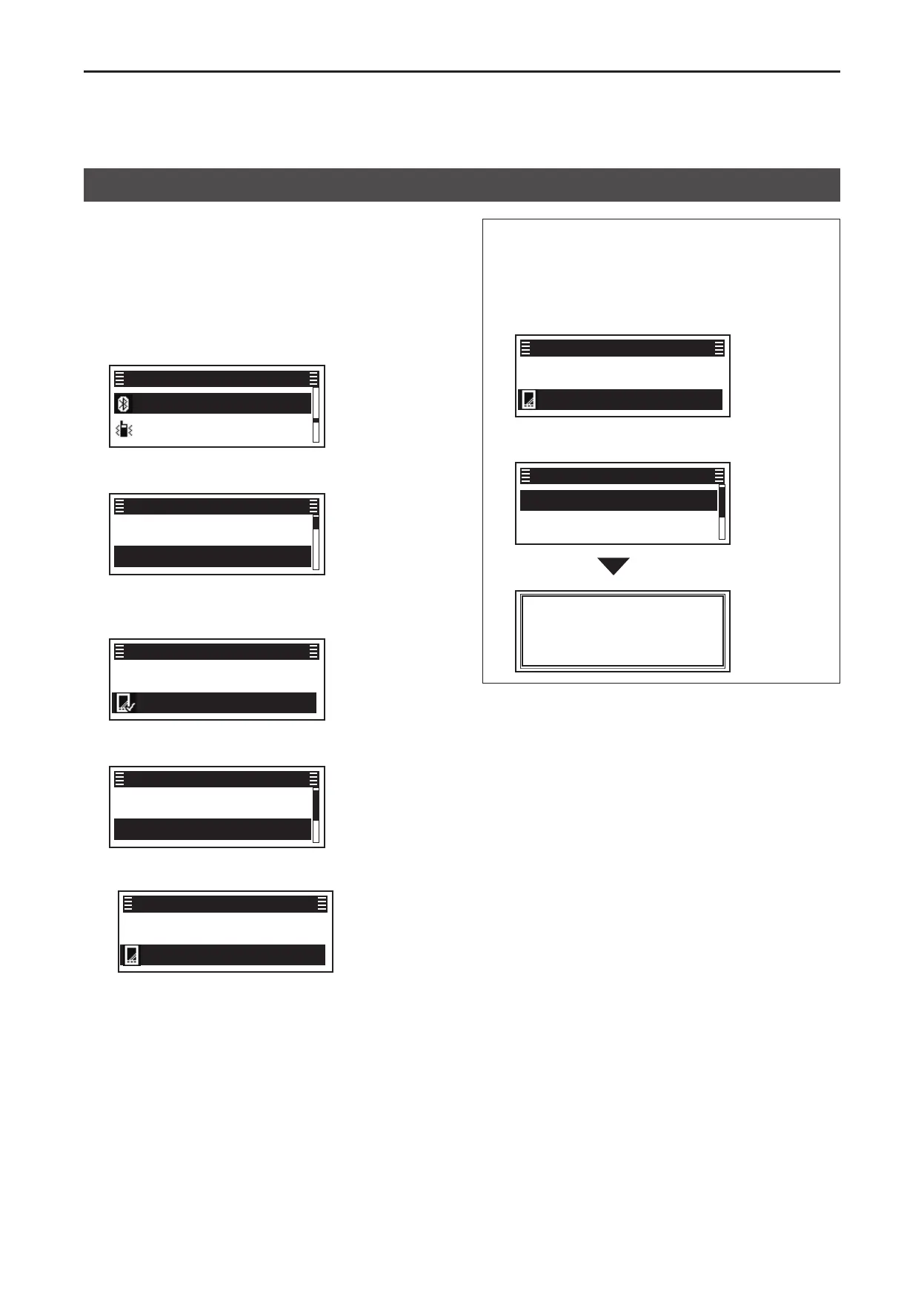
You can disconnect from a Bluetooth device without
cancelling the pairing�
(Menu > Bluetooth > Device List)
1� Push [Menu] to display the “Menu” screen�
2� Push [P2 (Up)] or [P1 (Down)] to select
“Bluetooth,” then push [OK]�
Bluetooth ►
Vibration ►
Menu
3� Push [P2 (Up)] or [P1 (Down)] to select “Device
List,” then push [OK]�
Bluetooth info ►
Device List ►
Bluetooth
4� Push [P2 (Up)] or [P1 (Down)] to select the
Bluetooth device that is currently connected, then
push [OK]�
Find Device
PC1 ►
Device List
5� Push [P2 (Up)] or [P1 (Down)] to select
“Disconnect,” then push [OK]�
Connect
Disconnect
PC1
• The transceiver disconnects from the Bluetooth
device, and “✔” disappears beside the device’s icon�
Find Device
PC1 ►
Device List
L The transceiver is still paired with the Bluetooth
device�
6� Hold down [Back] for 1 second to return to the
standby screen�
TIP: You can reconnect to the Bluetooth device
displayed on the screen again by doing the following
steps�
1� Push [P2 (Up)] or [P1 (Down)] to select the
Bluetooth device to connect, then push [OK]�
Find Device
PC1 ►
Device List
2� Push [P2 (Up)] or [P1 (Down)] to select
“Connect,” then push [OK]�
Connect
Disconnect
PC1
Connecting
Disconnecting from a Bluetooth
®
device


 To Next Page