11
5
SET MODE
4
5
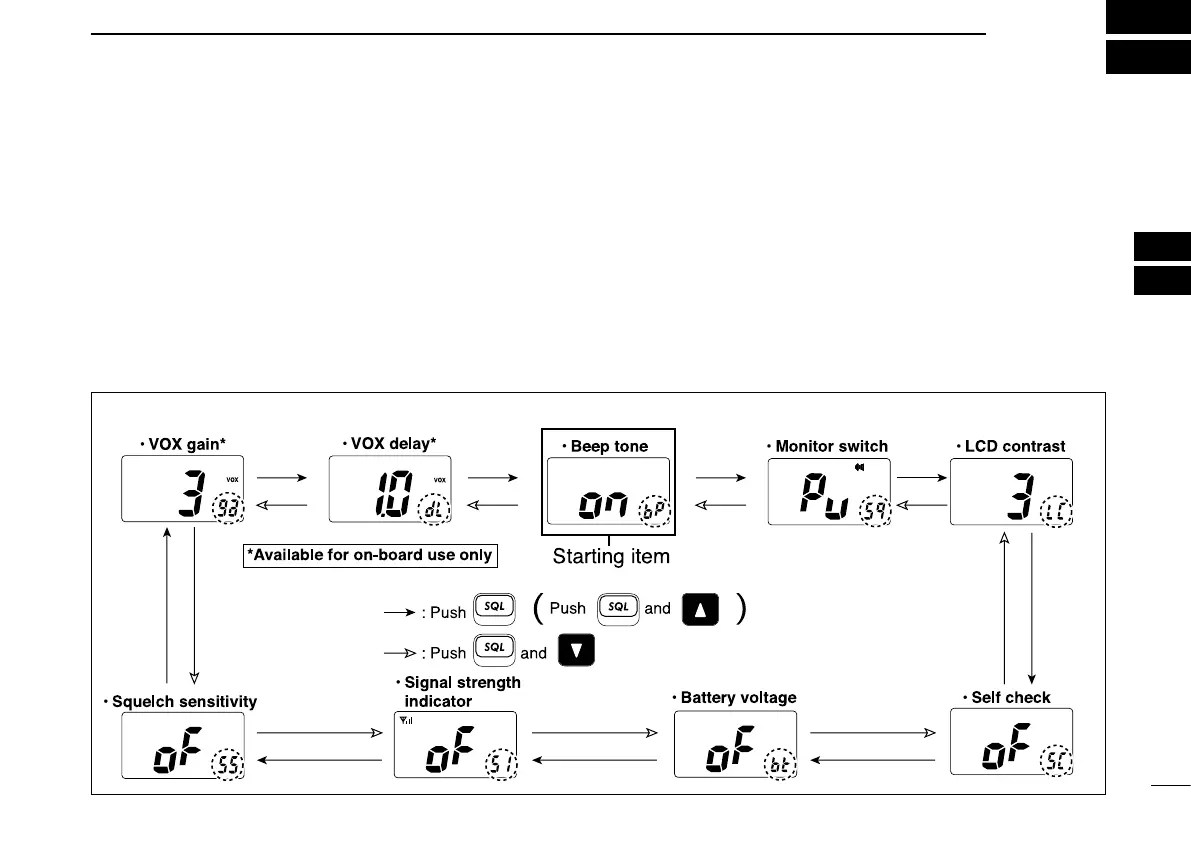
■ SET mode programming
SET mode is used to change the condition of 9 transceiver
functions: Beep tone function, Monitor switch action, LCD
contrast selection, Self check function, Battery voltage indi-
cator, Signal strength indicator, Squelch sensitivity function,
VOX gain and VOX delay.
D
SET mode operation
q
Turn power OFF
.
w While pushing [SQL•MONI], turn power ON to enter the
SET mode.
• “bp” (Beep tone function setting) appears.
e Push [SQL•MONI] or [SQL•MONI] and [Y]/[Z] to select the
desired item, if necessary.
r Push [Y]/[Z] to select the desired condition of the item.
t Push [16] to exit the SET mode.
D SET MODE ITEMS
The displays show the default settings, and the selected item is displayed in the dotted circle.



 To Next Page