6
2
PANEL DESCRIPTION
■ Function display (Continued)
!8
!4
!6
!7
!5
qw ietr!0you
!1
!2
!3
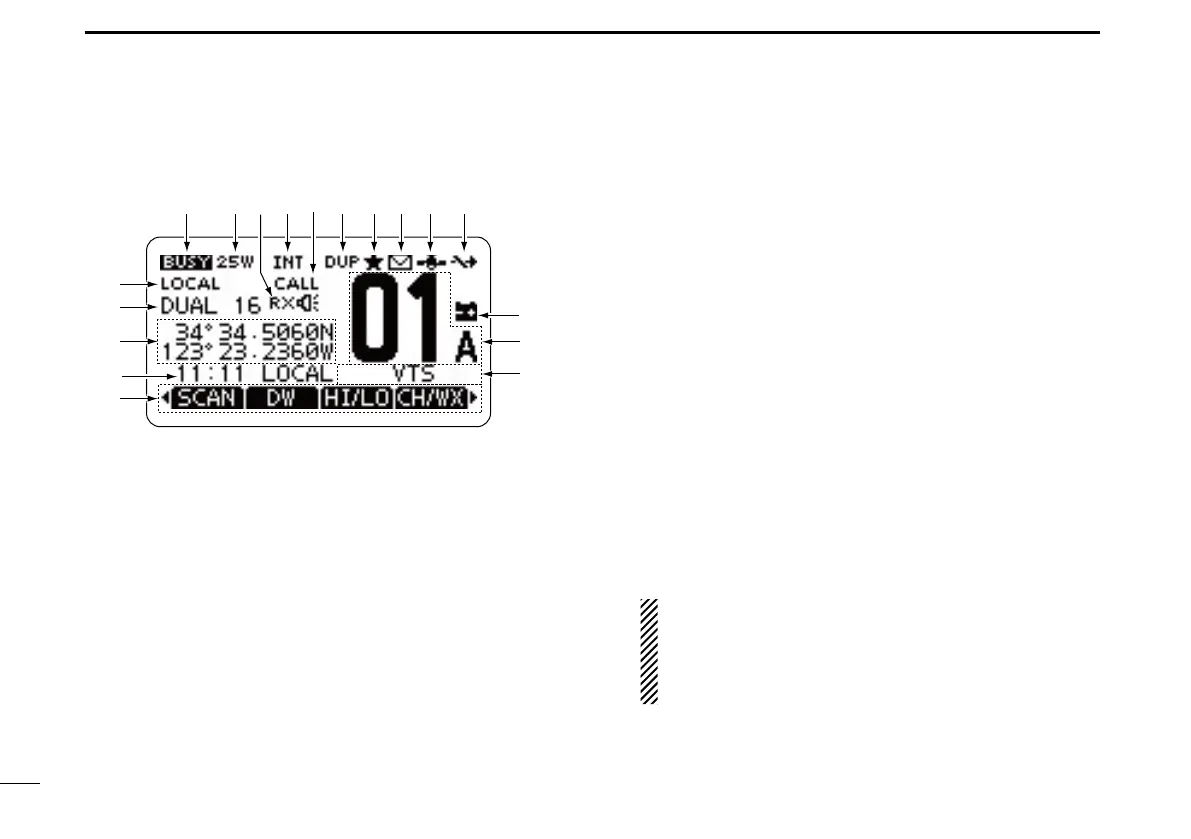
!1 LOW BATTERY ICON
Blinks when the battery voltage drops to approximately
10 V DC or less.
!2 CHANNEL NUMBER READOUT
Shows the selected operating channel number.
•Whenasimplexchannelisselected,“A”isdisplayed.
!3 CHANNEL NAME FIELD
The channel name is displayed, if entered. (p. 16)
!4 KEY ICON (p. 7)
Shows the preset function of the softkeys on the front pan-
el.
!5 TIME ZONE INDICATOR
Shows the current time when GPS data is received, or ➥
the time is manually entered.
•When theGPS current time isinvalid,“??” will blinkevery
2 seconds instead of the current time. After 23.5 hours has
passed, “NO TIME” is displayed.
•“??”
will
blink every 2 seconds instead of the current time,
after 4 hours have passed from when the time was manu-
ally entered. The manually entered time is held for only 23.5
hours, and after that, “NO TIME” is displayed.
“LOCAL” ➥
is displayed
when the offset time is set.
“MNL” ➥
is displayed
when
the time is manually entered
.
“UTC” ➥
is displayed
when
the GGA, GLL or GNS GPS
sentence format is included in the GPS signal.
The date information ➥
is displayed
when
the RMC GPS
sentence format is included in the GPS signal.
“NO TIME” ➥
is displayed
when no GPS receiver is con-
nected, and no time is manually entered.
NOTE for the IC-M423 and IC-M424:
These models do not come with a built-in GPS receiver.
Therefore an external GPS receiver needs to be con-
nected, or the time needs to be manually entered for
the time zone indicator to be displayed.



 To Next Page