12
3
BASIC OPERATION
3
BASIC MANUAL
7
4
10
15
18
8
13
5
11
16
9
14
6
12
17
2
1
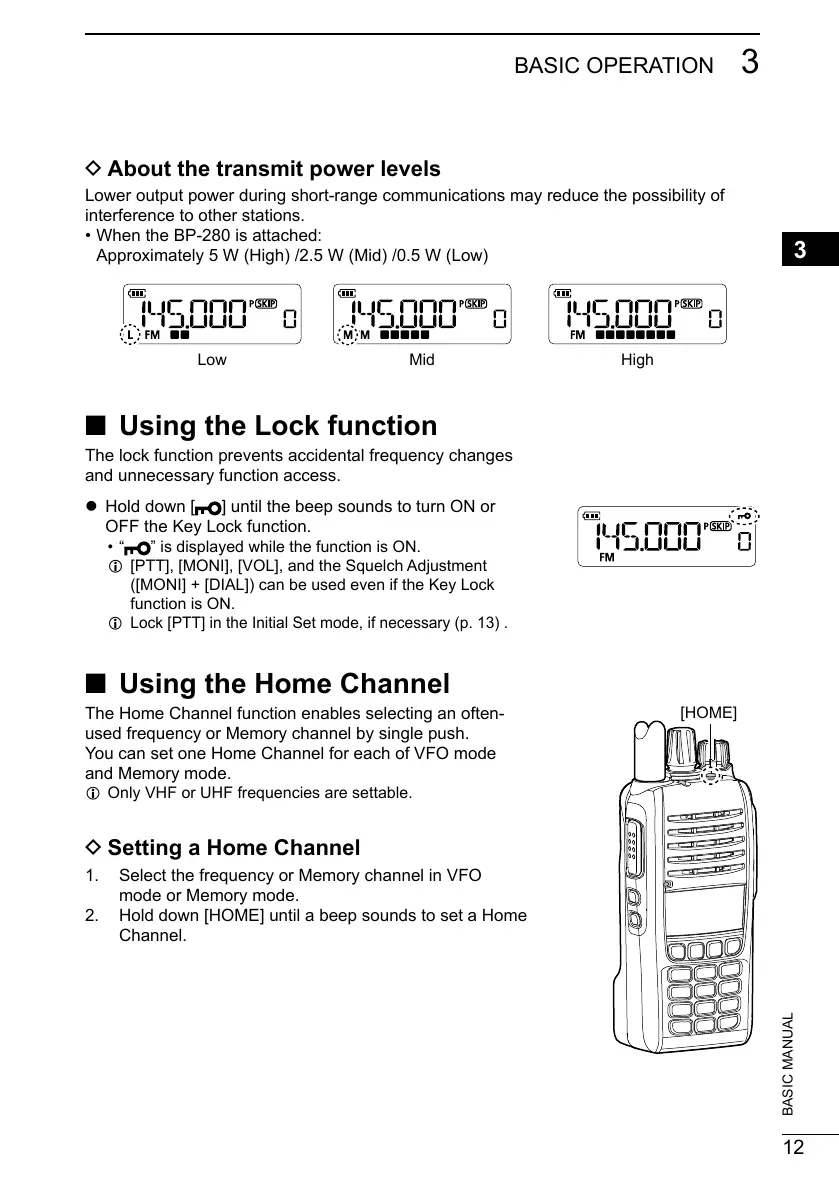
D About the transmit power levels
Lower output power during short-range communications may reduce the possibility of
interference to other stations.
• When the BP-280 is attached:
Approximately 5 W (High) /2.5 W (Mid) /0.5 W (Low)
Low Mid High
■ Using the Lock function
The lock function prevents accidental frequency changes
and unnecessary function access.
z Hold down [
] until the beep sounds to turn ON or
OFF the Key Lock function.
• “
” is displayed while the function is ON.
L [PTT], [MONI], [VOL], and the Squelch Adjustment
([MONI] + [DIAL]) can be used even if the Key Lock
function is ON.
L Lock [PTT] in the Initial Set mode, if necessary (p. 13) .
■ Using the Home Channel
The Home Channel function enables selecting an often-
used frequency or Memory channel by single push.
You can set one Home Channel for each of VFO mode
and Memory mode.
L Only VHF or UHF frequencies are settable.
D Setting a Home Channel
1. Select the frequency or Memory channel in VFO
mode or Memory mode.
2. Hold down [HOME] until a beep sounds to set a Home
Channel.
[HOME]



 To Next Page