38
5
MEMORY/CALL CHANNELS
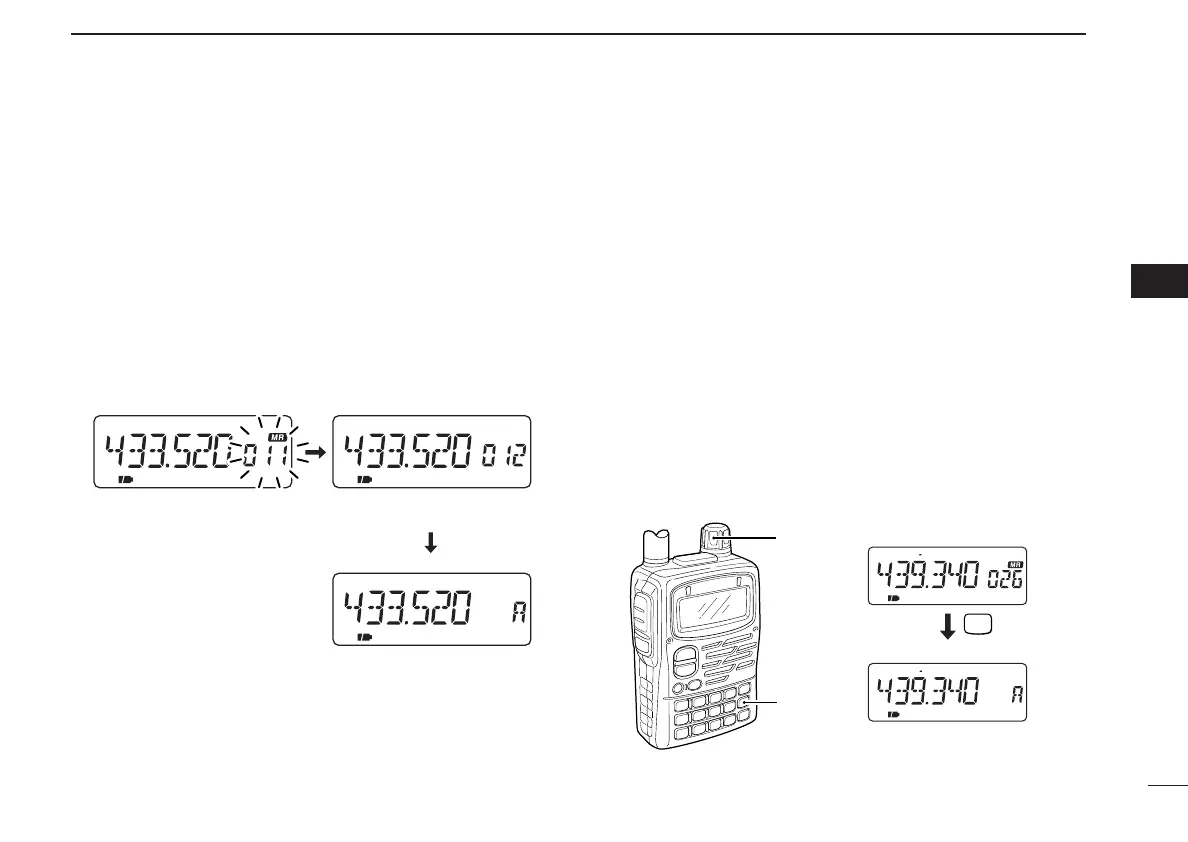
D Auto memory channel increment
While programming a memory channel, the next memory
channel can be selected automatically. This is convenient
when programming memory channels one after another.
➥ Keep pushing [MR S.MW] for 2 sec. or more, at step t of
the left section, to select the next memory channel auto-
matically.
■ Transferring memory
contents to VFO
This is convenient when operating around a memory or call
channel.
q Push [VFO] several times to select VFO A or B to be trans-
ferred.
w Push [MR] to select memory mode.
e Set the desired memory channel with [DIAL].
• Call or scan edge channel contents can be transferred in the
same manner. Select a call channel in this case.
r Push [MR S.MW] for 2 sec. to transfer.
[EXAMPLE]: Transferring memory channel 26 to VFO A.
MR
S.MW
FM DUP SKIPT
FM DUP T
P
[DIAL]
[MR]
Select the desired Mch.
for 2 sec.
Transfer to VFO.
FM SKIPP
FM SKIPP
FM
Keep pushing [MR S.MW].Push [MR S.MW] for 1 sec.
VFO is selected.
Next memory channel is
automatically selected.
tt
MEMORY/CALL CHANNELS
IC-T90A_IM.qxd 02.6.6 08:44 AM Page 41 (1,1)



 To Next Page