39
5
MEMORY/CALL CHANNELS
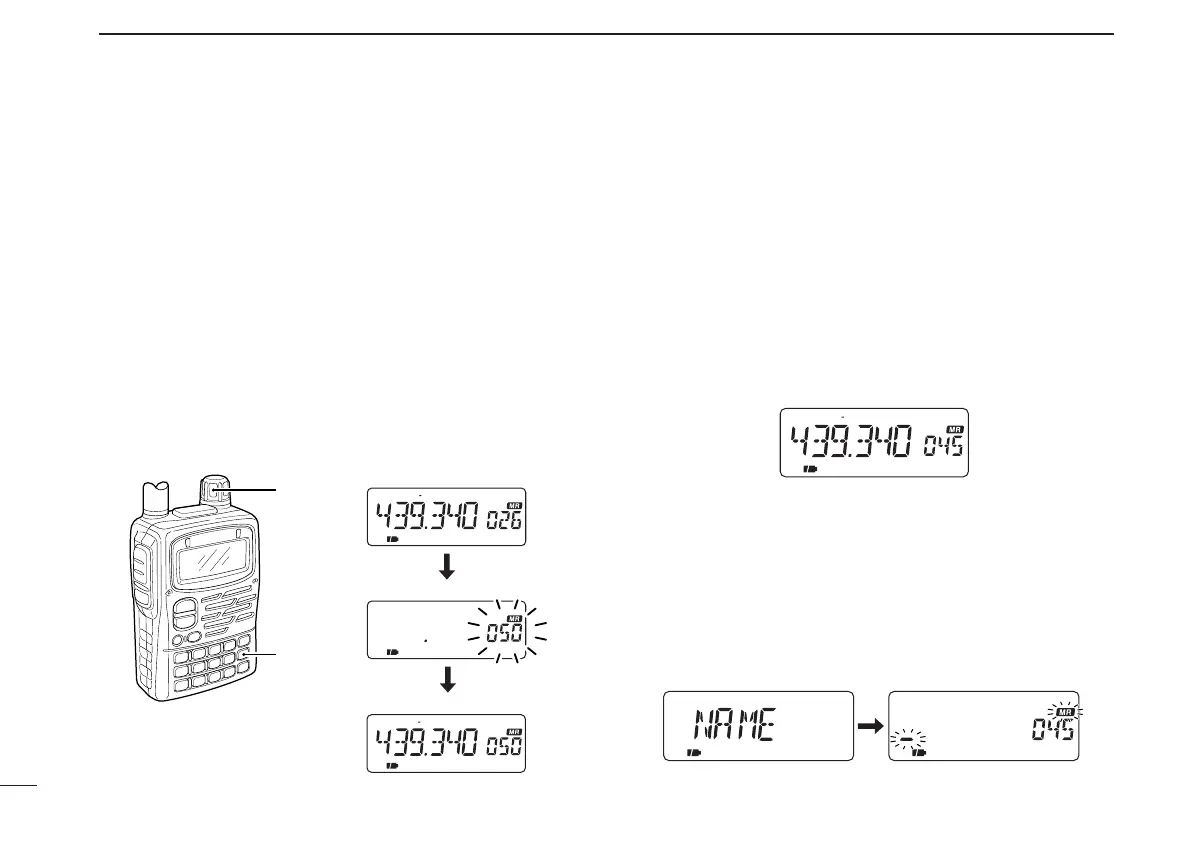
■ Copying memory contents
This is convenient when programming memory contents into
a scan edge channel or call channel.
• Call or scan edge channel contents can be copied in the same
manner.
q
Push [MR S.MW]
to select memory mode.
w Select the memory channel to be copied with [DIAL].
e
Push [MR S.MW] for 1 sec.
• Memory channel indicator and number blinks.
• Do not hold [MR S.MW] for more than 2 sec., otherwise the pre-
viously selected VFO will be overwritten.
r Rotate [DIAL] to select the target memory channel.
t Push [MR S.MW] for 2 sec. to copy.
■ Memory names
Each memory, scan edge and call channels can be pro-
grammed with an alphanumeric name such as a repeater
name, club name, etc., for easy recognition. Names can be
a maximum of 6 characters—see the table at right for avail-
able characters.
DMemory name input
q Push [MR] to select memory mode.
w Set the desired memory channel with [DIAL].
e
Push [MR S.MW] for 1 sec. to indicate the memory channel.
• Memory channel indicator blinks.
• Do not hold [MR S.MW] for more than 2 sec., otherwise the pre-
viously selected VFO will be overwritten.
r Push [CALL/TV] several times to select “NAME.”
• Memory name screen appears. The 1st character of the name
and “X” blinks.
• Previously programmed name appears, if programmed.
FM DUP T
FM DUP T
[DIAL]
[MR]
Select a channel to copy.
Select desired channel.
Write into the channel.
IC-T90A_IM.qxd 02.6.6 08:44 AM Page 42 (1,1)



 To Next Page