FM
FM
FM
FM
FM
q
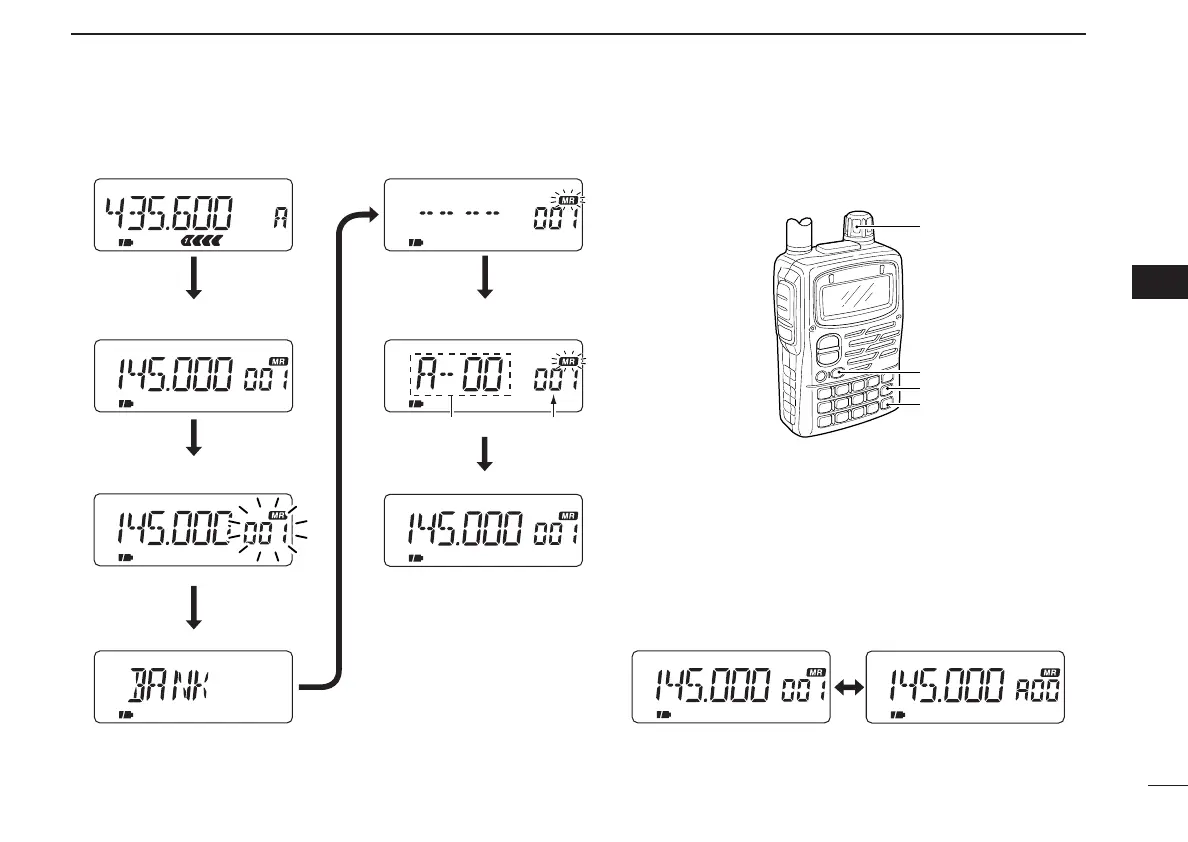
Push [MR] to select memory mode.
w Select Mch with [DIAL].
e Push [MR S.MW] for 1 sec. to
indicate Mch.
VFO mode
Memory channel indicator flashes.
Release [CALL/TV].
u
Push
[VFO].
Memory bank is programmed and
memory mode is selected.
Memory bank indication
Memory channel indication
t
Push
[BAND]
to select memory bank.
y Rotate [DIAL] to select
memory bank channel
.
r Push [CALL/TV].
Each push selects BANK, NAME,
SKIP, CLEAR and S.MW in sequence.
Memory bank and
channel.
FM SKIPP
Selected memory channel.
and memory bank indication.



 To Next Page