40
6
OPTIONS
1
2
3
4
5
6
7
8
9
10
11
12
13
14
15
16
17
18
19
20
D Setting the VOX gain
The VOX sensitivity level can be adjusted from 1 (minimum) to 10
(maximum).
q
Connect the optional headset
(HS-94, HS-95 or HS-97)
and
OPC-2004. (p. 38)
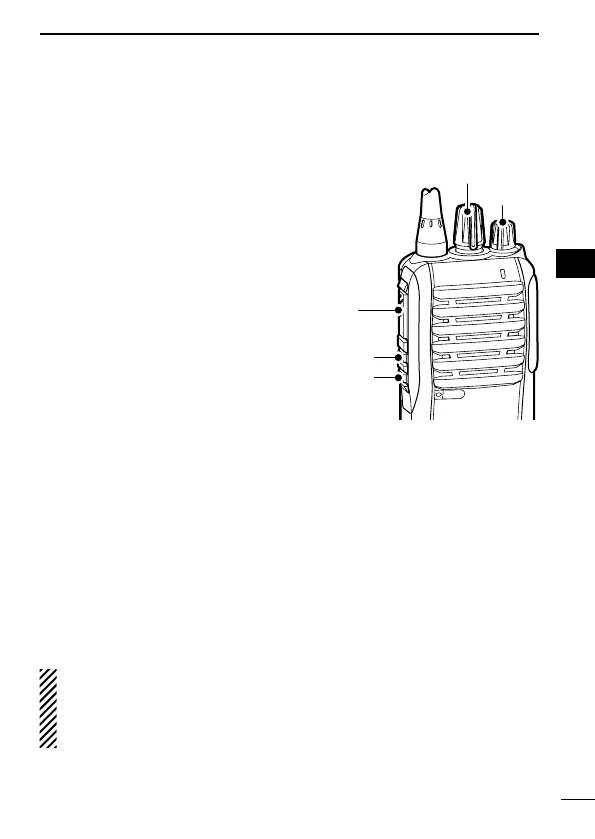
w Rotate [VOL] to turn the trans-
ceiver power OFF.
e Set [ROTARY SELECTOR] to
Channel 16.
r While pushing and holding
[PTT] and [Upper], rotate [VOL]
to turn the power ON and
enter the VOX gain adjustment
mode.
t Push [Upper] to increase, or
push [Lower] to decrease the
VOX gain while speaking into
the optional headset.
• The adjustable range is 1 (minimum) to 10 (maximum).
• A beep sounds after pushing [Upper] or [Lower].
If the level is set on 1 or 10, an error beep sounds after pushing.
Therefore, you can determine the current level setting by the type
of beep that sounds.
y Rotate [VOL] to turn the power OFF, then ON to exit the VOX
gain adjustment mode.
NOTE:
• This operation may not be available, depending on the preset-
ting. Ask your dealer for details.
• Set the microphone gain before setting the VOX gain. (p. 18)
[VOL]
wer]



 To Next Page