(17.H\ZKLOHSUHVVLQJWKH3RZHU 2Q2IIEXWWRQ,IWKLVGRHVQRWHQDEOHWKH
NH\SDGWKHQPDNHDUUDQJHPHQWVWRWDNHVKLS\RXU03URWRDQ$XWKRUL]HG
,FRPGHDOHUOLNH'RFN6LGH5DGLRZKRKDVWKHVRIWZDUHKDUGZDUHQHHGHGWR
UHSURJUDPWKHUDGLRDQGDFWLYDWHWKHNH\SDG1RWH'HDOHUVPD\FKDUJHIRUWKLV
VHUYLFHVRDVNEHIRUHHQJDJLQJWKHP
03UR3URJUDPPLQJWKHROGHUSUH0RGHO
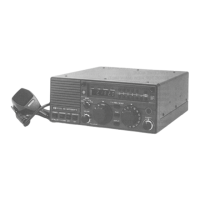
There are at least two earlier versions of the M700Pro that program
differently, or cannot be programmed unless "opened up" by an
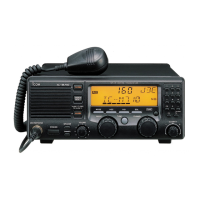
Authorized Icom Dealer. To program the more recent version of the
older versions:
1.
Turn the Radio OFF.
2. With the radio off, simultaneously hold down the MODE and
SQUELCH (SQL) buttons while turning the radio on. This
activates the 10-key keypad and puts the radio into the
H[WHQGHGIUHTXHQF\PRGH, permitting it to transmit on
both amateur radio and ham frequencies.
3. Select the "A", "B", or "C" Memory Mode/User Group with the
Group Channel Selector Knob.
4. Press the CH/Freq keypad button to put the radio into the
Channel Mode. Select the radio memory location/radio channel
to be programmed.
5. Press the CH/Freq keypad button to get into the Frequency
mode.
6. Enter the new frequency using the keypad.
7. Check to see that the correct MODE is showing.
8. Press and hold the ENT key until you hear two beeps from the
radio's speaker (Hint: keep the volume turned up so you'll be
sure to hear the beeps).
9. The LCD display on the radio will display the newly
programmed frequency and show SIMP (simplex) on the
screen. ,WLVQRWQHFHVVDU\WRSURJUDPWKHUHFHLYHDQG
WUDQVPLWIUHTXHQFLHVVHSDUDWHO\ZKHQSURJUDPPLQJ
WKH03URXQOHVV\RXZLVKWRHQWHUDGXSOH[
IUHTXHQF\VHW7KH03URDVVXPHVWKDW\RXUH
RSHUDWLQJVLPSOH[DQGWKDWWKHGHVLUHGWUDQVPLW
IUHTXHQF\LVWKHVDPHDVWKHUHFHLYHIUHTXHQF\
Note:
The M-700Pro must be manually set to the Extended
Frequency mode each time it is turned on.
The Group Channel Selector knob tunes the radio in
1-KHz steps, and the Channel Selector now tunes the
radio in 100 cycle increments when the Extended
Frequency mode is enabled.
7KHRULJLQDO03URVVROGGXULQJWKHVZHUHVKLSSHGZLWKWKH
NH\SDGGHDFWLYDWHG,I\RXKDYHRQHRIWKHVHYLQWDJH03URVPDNH
DUUDQJHPHQWVWRWDNHVKLS\RXU03URWRDQ$XWKRUL]HG,FRPGHDOHU
OLNH'RFN6LGH5DGLRZKRKDVWKHVRIWZDUHKDUGZDUHQHHGHGWR
UHSURJUDPWKHUDGLRDQGDFWLYDWHWKHNH\SDG
Note: There are no obvious identifying marks, labels, or model designations to assist
in determining one version of M700Pro from another. 'HDOHUVPD\FKDUJHIRU
WKLVVHUYLFHVRDVNEHIRUHHQJDJLQJWKHP
6DOHVRIWKH03URZHUHGLVFRQWLQXHGLQWKH86RQ
© 2021 DockSide Radio


 To Previous Page
 Loading...