8
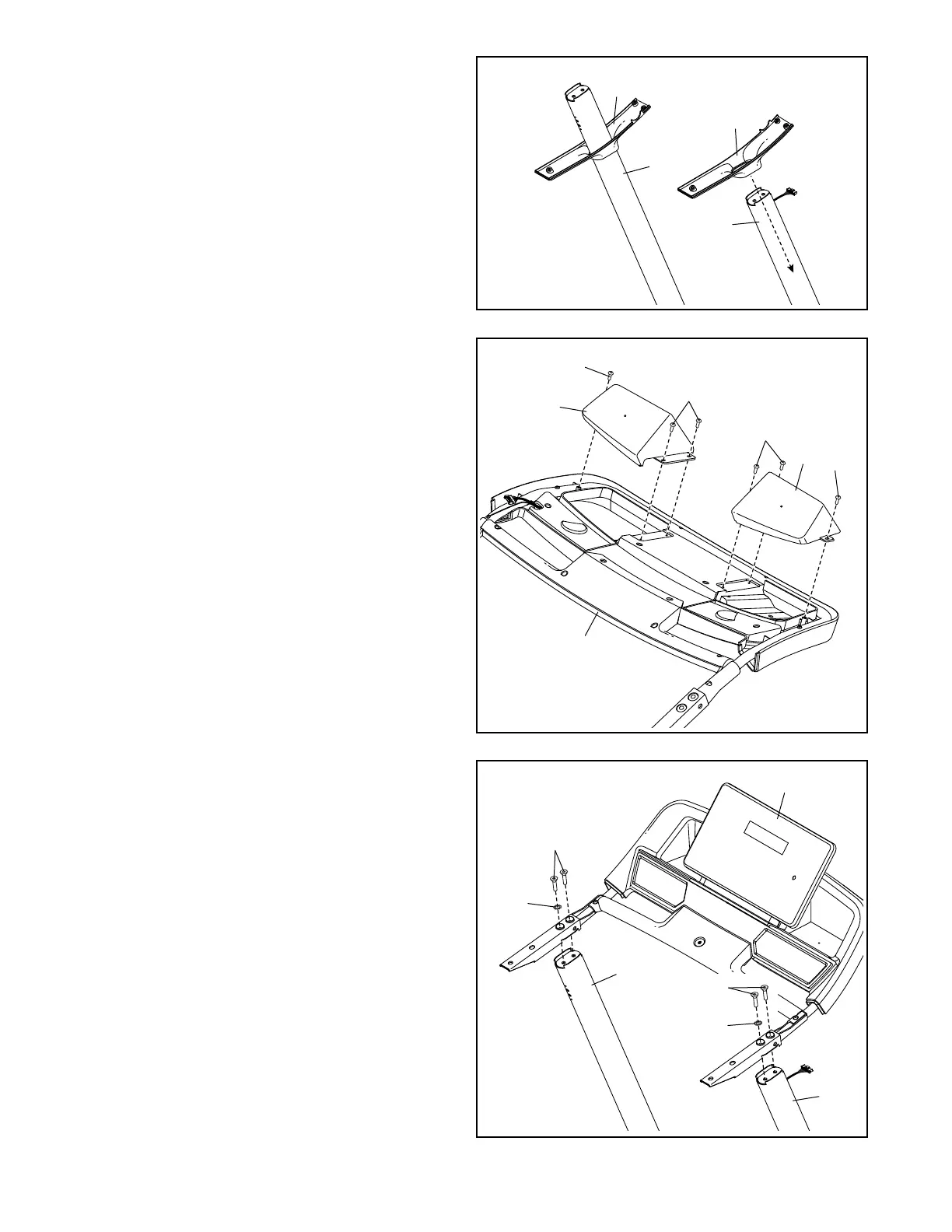
3. Identify the Left and Right Handrail Bottoms
(73, 74), and slide them onto the Uprights
(80, 81) as shown.
3
80
73
81
74
5. With the help of a second person, set the
console assembly (A) on the Uprights (80, 81).
Attach the console assembly with four 5/16" x 2"
Screws (2) and two 5/16" Star Washers (7); start
all four Screws, and then tighten them.
5
80
A
2
7
7
2
81
4. Set the console assembly (A) face down on
a soft surface to avoid scratching the console
assembly.
Attach the Right and Left Trays (4, 94) with six
#8 x 3/4" Screws (29); start all six Screws, and
then tighten them. Do not overtighten the
Screws.
4
29
29
4
94
A
29
29



 To Next Page